In MLB The Show 26, quickselling (QS) is an essential mechanic for managing your inventory and maximizing your stubs. By understanding the quicksell values and applying smart strategies, you can stay ahead of the game, streamline your collection, and even make some quick profit on the side. Here's everything you need to know about quickselling in MLB The Show 26, including how to efficiently manage your stubs and make the most out of your cards.
Quicksell Values for MLB The Show 26 Cards
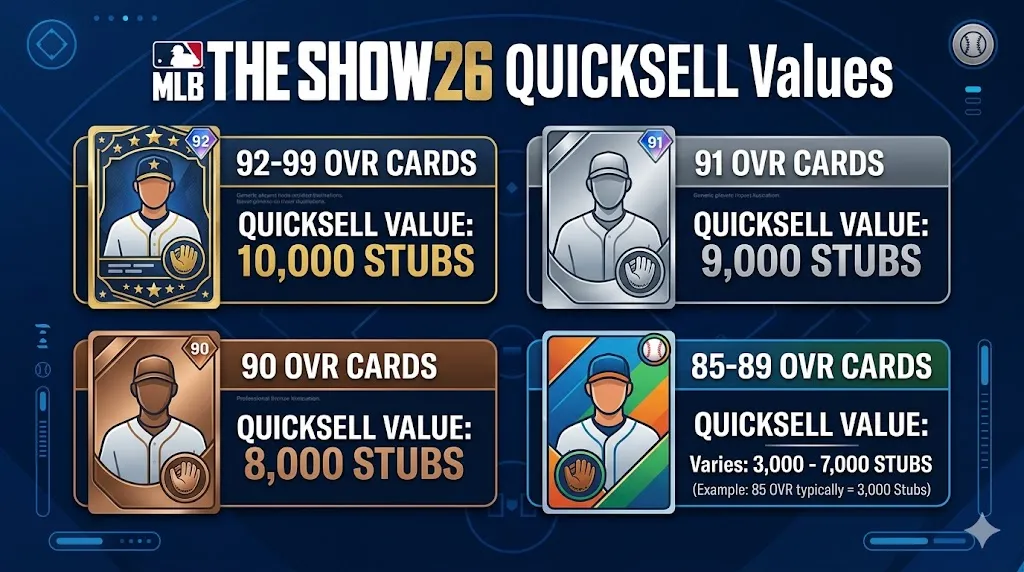
The quicksell values for cards in MLB The Show 26 depend on the card's rarity and overall rating (OVR). This means that higher-rated and rarer cards will provide more stubs when quicksold. Let's break down the quicksell values:
| Rarity | Overall Rating (OVR) | Quicksell Value (Stubs) |
|---|---|---|
| Common | All Ratings | 5 |
| Bronze | All Ratings | 25 |
| Silver | 75 OVR | 50 |
| Silver | 76 OVR | 75 |
| Silver | 77 OVR | 100 |
| Silver | 78 OVR | 125 |
| Silver | 79 OVR | 150 |
| Gold | 80 OVR | 400 |
| Gold | 81 OVR | 600 |
| Gold | 82 OVR | 900 |
| Gold | 83 OVR | 1,200 |
| Gold | 84 OVR | 1,500 |
| Diamond | 85 OVR | 3,000 |
| Diamond | 86 OVR | 3,750 |
| Diamond | 87 OVR | 4,500 |
| Diamond | 88 OVR | 5,500 |
| Diamond | 89 OVR | 7,000 |
| Diamond | 90 OVR | 8,000 |
| Diamond | 91 OVR | 9,000 |
| Diamond | 92+ OVR | 10,000 |
| Diamond | (Some Live Series cards like Aaron Judge may have a 8,500 Stub QS value) |
Tips for Maximizing Your Quicksell Stubs
While quickselling is a quick way to earn stubs, there are better methods to ensure you are getting the most out of your cards:
1. Marketplace vs. Quicksell
Sometimes, you can make more stubs by selling your cards on the Marketplace than by quickselling them. Cards can often be sold for more than their quicksell value, especially when you create a "Sell Order" and wait for someone to purchase it. Before you quicksell, take a look at the Market to see if you can get a better deal.
2. Companion App for Bulk Quickselling
The official Companion App makes it faster to quicksell duplicate cards in bulk. It's a great tool if you want to clear out your inventory without going through each individual card on your console.
3. Cards Locked for Collections
If you've already collected a card as part of a set, it will be locked and cannot be sold on the Marketplace. However, you can still quicksell these cards for a fixed amount of stubs, so they won't go to waste.
4. Tax Rule for Marketplace Selling
Before you sell a card on the Marketplace, remember that it comes with a 10% tax. This means you need to calculate whether the Sell Now price is at least 11% higher than its quicksell value to make it worth your time. If it's not, you might be better off quickselling it and saving the tax-free stubs.
5. Free Agents Are Instant QS
Cards labeled as Free Agents (FA) are instant quicksell candidates. These cards are usually not needed for major collections and can be quicksold immediately to boost your stub count. Don't hesitate to get rid of these duplicates quickly!
6. Consolidating Low-Value Cards
Instead of quickselling Silver or Bronze cards for low stubs, consider putting them into Gold Exchanges. This method consolidates hundreds of low-value cards into a few Gold cards, which could have a higher resale or quicksell value. Reddit guides recommend this method as an efficient way to maximize your inventory's worth.
Efficiently Managing Your Quicksell Process
Managing duplicates and quickselling large quantities of cards can be a tedious process. But there are a few efficiency tips that can speed up your workflow:
Using the Companion App for Duplicates
The Companion App lets you manage duplicates quickly and sort them by their quicksell values. This makes it faster to list them for sale or quicksell them all at once. You can even filter out the duplicates and batch-sell them in a matter of seconds.
In-Game Bulk Management
The Quick Sell All Duplicates feature in the game is another fast way to clear out your inventory. It's available under the My Inventory section, so you can get rid of multiple cards in one go. This is ideal if you want to clean up your inventory after grinding through several modes.
Rosters and Upgrades
Cards that are in hot streaks or have had their ratings upgraded (due to roster updates) are often prime candidates for resale or quick sell profits. For example, if a Gold player is upgraded to Diamond, their quicksell value could triple, which is a great way to make stubs with zero risk.
Where to Find the Quicksell Option
To quicksell a card in MLB The Show 26, follow these steps:
- Go to your Profile (top left corner).
- Navigate to My Collection, then go to My Inventory.
- Select the player or item you want to quicksell and choose the Quick Sell option.
Remember that you can't quicksell directly from the Marketplace menu—you must access the My Inventory screen.