While MLB The Show 26 is a major title in the baseball gaming world, its compatibility with virtual reality (VR) is somewhat limited due to the platform restrictions and lack of official support. Specifically, the game is not released on PC, and as a result, it cannot directly support VR functionality with tools like vorpX. However, players seeking an immersive experience may still have a few options through creative workarounds.
Platform Restrictions: Why MLB The Show 26 Isn't on PC
MLB The Show 26 is available on PlayStation, Xbox, and Nintendo Switch, but it has yet to be released on PC. This is a significant factor when it comes to using vorpX, which is a VR driver designed specifically to inject VR functionality into PC games. As vorpX requires a native PC version of a game to function, MLB The Show 26 simply cannot be used with this tool in its current form.
Without a PC release, there is no official way to play MLB The Show 26 in virtual reality. However, for those determined to bring VR into their experience, some creative alternatives exist.
What is vorpX and How Does It Work?
VorpX is a software driver that allows players to play traditional PC games in VR by converting the 3D rendering into a virtual reality experience. It essentially allows games that don't have native VR support to be experienced in a VR environment. However, for vorpX to function, the game must be available on PC, and MLB The Show 26 does not meet this criterion.
Alternative Immersive Play with Cloud Gaming
For players looking to experience MLB The Show 26 in VR, there is a workaround through Xbox Cloud Gaming or remote play apps. While these services allow you to stream the console version of the game to a PC, you can use vorpX to inject a VR environment into the experience. It's important to note that this method isn't perfect, and the experience may not be as smooth as playing a native VR game, but it can still offer a more immersive feel compared to playing on a flat screen.
To use vorpX in this manner, you would likely need to run the game through a service like Xbox Cloud Gaming, stream it to your PC, and then use vorpX to convert it into a VR environment. Since MLB The Show 26 is not natively supported on PC, you will be using a "Generic" or "User-Created" profile in the vorpX software to map the game to the VR setup.
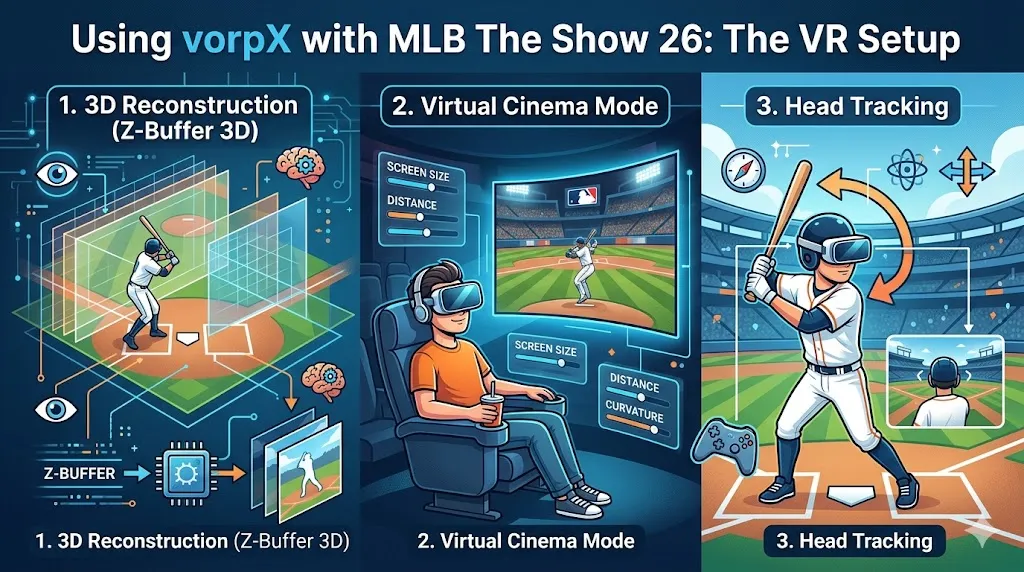
Using vorpX with MLB The Show 26: The VR Setup
While MLB The Show 26 was not designed for VR, players can still attempt to simulate the VR experience by using vorpX. The software provides two main methods to enhance immersion:
1. 3D Reconstruction (Z-Buffer 3D)
Since the game is not built for VR, vorpX uses a Z-Buffer 3D method to create the illusion of depth. This technique allows the game's visuals to appear more three-dimensional, even though the game wasn't designed to provide full geometry-based 3D. While it won't create a perfect VR experience, it does add a sense of depth to the game, making the visuals feel more lifelike.
2. Virtual Cinema Mode
For players who want to avoid the discomfort of forced first-person VR, vorpX offers a "Cinema Mode." In this mode, the player is placed in a virtual room with a large screen, resembling watching a game on a huge movie theater-style screen. This allows you to experience the game's visuals in a more immersive environment without the motion sickness that can occur with first-person VR. The virtual ballpark setting can feel immersive, even though you're not technically viewing the game in full 3D VR.
3. Head Tracking
While not natively available, you can map head tracking to the right analog stick, allowing you to look around the stadium. This feature can be used to mimic the feeling of moving your head in a real-life ballpark, letting you observe the surroundings, like the crowd or the field, in a more dynamic way. For this, you'll need to adjust sensitivity settings within the vorpX in-game menu for the best results.
Key Features of MLB The Show 26 in VR
While using vorpX with MLB The Show 26 won't provide a full native VR experience, the following features of the game could offer a unique experience in a simulated VR environment:
1. Tokyo Dome & New Stadiums
MLB The Show 26 introduces iconic stadiums like the Tokyo Dome and Estadio Hiram Bithorn. Experiencing these virtual fields in VR offers a unique sense of scale and immersion. The vast arenas can feel even more impressive when viewed on a large virtual screen in a VR setting, giving you a better sense of how grand these stadiums really are.
2. Big Zone Hitting
The new Big Zone Hitting interface is designed to make batting more accessible for players. When viewed on a virtual screen, this interface could feel easier to manage, as it's larger and more visually engaging. The added depth from VR could make it simpler to track pitches and engage with the game's new mechanics.
3. Enhanced Animations
With over 500 new animations, including newly captured catcher movements, the game looks more realistic than ever before. These enhancements, when viewed in a VR setting, may add more immersion as you witness the finer details of player actions up close.
Performance Tips for a Smooth Experience
When attempting to play MLB The Show 26 in VR through vorpX, the following performance tips can help ensure a smoother experience:
1. Frame Rate
MLB The Show 26 targets 60 FPS on consoles, but this can fluctuate depending on your setup. For VR, it's essential to maintain a consistent frame rate to avoid stuttering, which can break the immersion. If you're using vorpX with Xbox Cloud Gaming or a remote play app, ensure your PC is capable of handling the game's streaming demands.
2. Cloud vs. Local Play
If you are using a cloud service like Xbox Cloud Gaming to stream MLB The Show 26, be aware that latency could be an issue. For a more responsive and immersive experience, it's recommended to use a local setup (such as running the game via Steam) as it offers direct driver hooking and lower latency.
While MLB The Show 26 is not directly compatible with vorpX due to its lack of a PC version, there are still ways to experience the game in a simulated VR environment. By using cloud gaming services, vorpX can transform the game into a virtual reality experience, though it won't be perfect. With Z-Buffer 3D, Virtual Cinema Mode, and head tracking, players can achieve a more immersive feel for the game. However, for the best performance, local play is recommended over cloud streaming, and a stable frame rate is crucial for smooth VR play.