Cart Empty
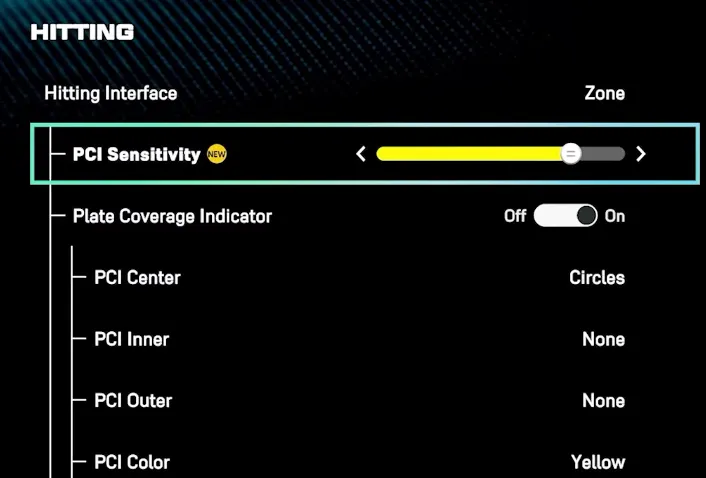
Continue ShoppingIn MLB The Show 26, the newly introduced PCI Sensitivity slider allows you to scale how fast or slow your Plate Coverage Indicator (PCI) moves when using the "Zone" hitting interface.
The slider adjusts the relationship between your analog stick movement and the PCI's speed on screen:
While the "best" setting is a matter of personal preference, current community and expert recommendations include:
In MLB The Show 26, finding the right balance with the PCI Sensitivity slider is key to refining your hitting performance. Whether you prefer a more responsive PCI for fastballs or a slower, more controlled feel for breaking pitches, adjusting this setting can give you the precision you need to excel. If you're looking to enhance your experience and get ahead in the game, you might want to buy cheap MLB 26 stubs PS5 from trusted platforms like U4N. With their competitive prices and reliable delivery, U4N offers an easy way to boost your gameplay without breaking the bank.
You can find this slider by navigating through the following menus:
Note: You must have your Hitting Interface set to Zone for this setting to be active.
The U4N Editorial Team is made up of dedicated gamers and technical experts. We're not just a trusted marketplace for game assets—we're all about empowering players with top-tier, expert-driven content. Our team produces in-depth guides, strategies, and technical fixes for some of the biggest games out there, like MLB The Show 26, Aion 2, Forza Horizon 6, Arc Raiders, and Path of Exile.
Whether it's mastering market flipping in Diamond Dynasty or optimizing your endgame builds, all of our strategies are tested and proven by in-house experts. At U4N, we don't just follow the meta—we help you stay ahead of it.