Cart Empty
Continue Shopping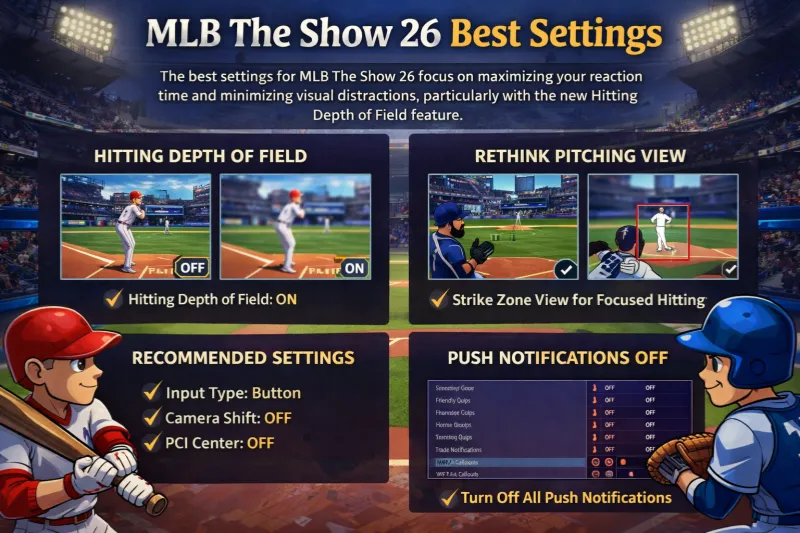
The most effective camera settings in MLB The Show 26 prioritize a clear view of the pitch path and minimize environmental distractions. A major addition this year is the Hitting Depth of Field toggle, which blurs the background to help you focus exclusively on the ball.
| Camera Category | Recommended Setting | Why It Works |
|---|---|---|
| Hitting View | Strike Zone | Provides the closest, most consistent look at pitch movement and path. |
| Alt. Hitting View | Strike Zone High | Excellent for facing pitchers with high velocity or high release points. |
| Hitting Depth of Field | On | New Feature: Blurs the crowd and background to reduce visual noise and "batter's eye" glares. |
| Pitching View | Outfield or Strike Zone | Using Strike Zone for both hitting and pitching helps you see twice as many pitches from the same angle. |
| Fielding Camera | High | Offers a wider overhead perspective, making it easier to track fly balls and line drives. |
| In-Play View | Dynamic | Automatically adjusts the camera based on where the ball is hit for the best situational view. |
In MLB The Show 26, the best hitting and PCI (Plate Coverage Indicator) settings emphasize manual control and minimal visual distractions to help you react faster to high-velocity pitches. The standout addition this year is the PCI Sensitivity slider, which allows you to customize how quickly your cursor moves across the strike zone.
For competitive play, Zone Hitting remains the gold standard, providing the highest ceiling for performance once mastered.
| Setting | Recommended Value | Why It Works |
|---|---|---|
| Hitting Interface | Zone | Offers full control over PCI placement to match the ball's location. |
| PCI Sensitivity | 75% to Max | New Feature: Higher sensitivity allows for instant reactions to inside fastballs. |
| Swing Input | Buttons | Most consistent for timing; using the right stick (Analog) can lead to unintentional "flicking". |
| Guess Pitch | Off | Prevents the game from punishing your PCI size if you guess the wrong location. |
| PCI Anchor | Off | Keeps the PCI fluid; turning it on can sometimes make the cursor feel "stuck". |
The goal for PCI visuals is to have a precise target without cluttering your view of the ball.
The PCI Sensitivity slider is a major gameplay shift in MLB The Show 26.
In MLB The Show 26, the best pitching settings focus on maximizing accuracy through the Pinpoint Interface and utilizing the new Bear Down Pitching mechanic for high-leverage situations. For a faster experience, the new Pitcher Delivery setting allows you to pitch exclusively from the stretch.
These settings provide the highest level of manual control for competitive play.
| Setting | Recommended Value | Why It Works |
|---|---|---|
| Pitching Interface | Pinpoint | Offers the most precise control over pitch accuracy and the smallest PAR (Perfect Accuracy Region). |
| Pitching View | Outfield or Strike Zone | Outfield provides a broadcast-style view, while Strike Zone mirrors your hitting view to improve overall pitch recognition. |
| Pitcher Delivery | Stretch Only | New Feature: Forces all pitchers to use their faster "stretch" animation, speeding up games significantly in offline modes like Conquest or Mini Seasons. |
| Pitch Marker | Pitch Trail | Shows the exact path and break of the ball as it travels toward the plate. |
| API (Catcher) | Off | Disables suggested locations to reduce visual clutter, though beginners may prefer it On for guidance. |
Mastering these manual settings is the best way to stay competitive, but building a top-tier Diamond Dynasty squad to back up your skills can take a lot of time. If you’re looking to skip the grind and pick up your favorite players sooner, you can buy MLB 26 stubs cheap at U4N. It’s a reliable way to round out your rotation without spending all your free time on the market.
The best defense settings in MLB The Show 26 emphasize manual control over throws and a wide-angle perspective for better tracking of batted balls. A critical recommendation for competitive play is disabling automatic shifts to prevent the CPU from creating easily exploitable gaps in your defense.
These settings provide the highest level of reliability, specifically the Button Accuracy interface, which removes "random" throwing errors if you time the meter correctly.
| Setting | Recommended Value | Why It Works |
|---|---|---|
| Throwing Interface | Button Accuracy | Replaces RNG with a skill-based meter for perfect throws. |
| Throw Canceling | On | Allows you to stop a throw mid-animation if a runner stops or changes direction. |
| Auto Defensive Shift | Off | Prevents the CPU from shifting players into positions where "bloop" hits can easily land. |
| Fielding Camera | High | Provides a wider overhead view, making it much easier to track fly balls and line drives. |
| In-Play View | Dynamic | Automatically adjusts the camera angle based on where the ball is hit. |
The best gameplay settings for MLB The Show 26 emphasize manual control and minimal visual clutter to maximize competitive performance. For the most consistent results, the community standard remains Zone Hitting and Pinpoint Pitching, coupled with the newly added PCI Sensitivity slider to match your reaction speed.
These settings are designed to speed up the game and ensure that critical moments are decided by skill rather than random animations.
Customizing your PCI (Plate Coverage Indicator) is essential for high-level play.
The U4N Editorial Team is made up of dedicated gamers and technical experts. We're not just a trusted marketplace for game assets—we're all about empowering players with top-tier, expert-driven content. Our team produces in-depth guides, strategies, and technical fixes for some of the biggest games out there, like MLB The Show 26, Aion 2, Forza Horizon 6, Arc Raiders, and Path of Exile.
Whether it's mastering market flipping in Diamond Dynasty or optimizing your endgame builds, all of our strategies are tested and proven by in-house experts. At U4N, we don't just follow the meta—we help you stay ahead of it.