Freeze offs in MLB The Show 26 are one of those frustrating online issues that have plagued the series for years. They happen when the game desynchronizes during online play, leaving both players stuck on a frozen screen. Understanding what they are, why they happen, and how to handle them can save you a lot of stress.
1. What Is a Freeze Off?
A freeze-off occurs when the peer-to-peer system can't properly sync both players' games. This often happens after a high-action moment like a home run or big play. The result is a frozen screen where the game can't decide a winner. It's important to know that the game isn't broken permanently—it's just struggling to reconcile the two players' states.
2. Causes of Freeze Offs
- Peer-to-Peer Matchmaking: MLB The Show 26 relies on peer-to-peer connections instead of dedicated servers. If the two systems disagree, the game can freeze.
- Connection Quality: Slow or unstable internet, especially during peak times, increases the risk.
- In-Game Bugs: Certain animations, like home run celebrations or complex button sequences, can trigger freezes.
- Co-op Modes: Freeze offs happen more often in co-op play than in standard 1v1 matches, according to player reports.
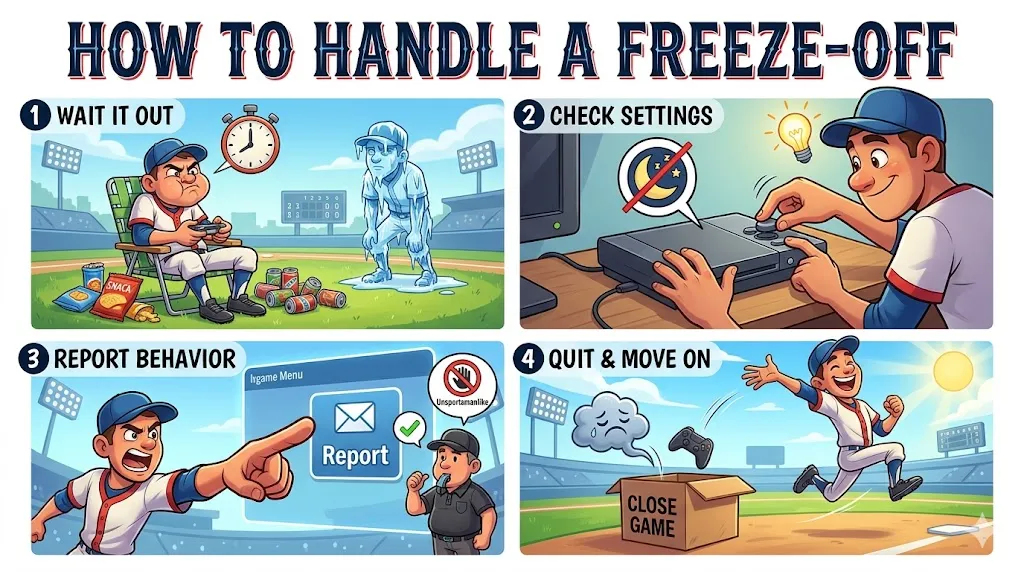
3. How to Handle a Freeze Off
- Wait It Out: The community often recommends staying in the game. Many players have reported receiving wins simply by waiting for the opponent to quit.
- Check Your Settings: Make sure your console won't enter auto-rest mode or sleep, which can accidentally end the session.
- Report Unsportsmanlike Behavior: If you suspect your opponent is intentionally freezing the game, use the in-game reporting tool. This helps protect the community.
- Quit and Move On: If waiting isn't an option, you can close the game or disconnect. You'll take a loss, but it lets you start fresh.
For players frustrated by freeze offs in MLB The Show 26, having extra resources can make the grind less stressful—whether it’s rebuilding your team after a loss or powering through online challenges. Sites like U4N let you buy MLB 26 stubs coins online, giving you a fast and safe way to stay competitive without waiting through endless freezes or frustrating disconnects.
4. Prevention Tips
- Use Wired Internet: A wired connection is far more stable than Wi-Fi and significantly reduces the chance of connection-based freezes.
- Be Mindful in Co-op: Since freeze offs are more common in co-op modes, expect occasional issues and plan accordingly.
- Report Problem Players: If you encounter someone abusing the freeze, report them through the in-game system.
- Community Wisdom: Many agree that the player currently losing when the freeze occurs should be the one to quit to avoid unfair advantages.
About the Author
Authored by elite gamers and industry insiders, the U4N Editorial Team delivers authoritative game updates, patch notes breakdowns, and expert strategies for trending titles including World of Warcraft, Path of Exile 2, MapleStory, Aion 2, and Arc Raiders.
From deep-dive guides to the latest meta shifts, our in-house veterans test every tactic firsthand to keep you ahead of the game.