In MLB The Show 26, Diamond Dynasty Co-op mode is one of the most popular features, allowing players to team up and take on opponents together. However, several issues have emerged since the game's release, particularly in March and April 2026. These issues have affected the gameplay experience, causing frustration for players trying to enjoy this feature.
1. Major Co-op Issues & Bugs
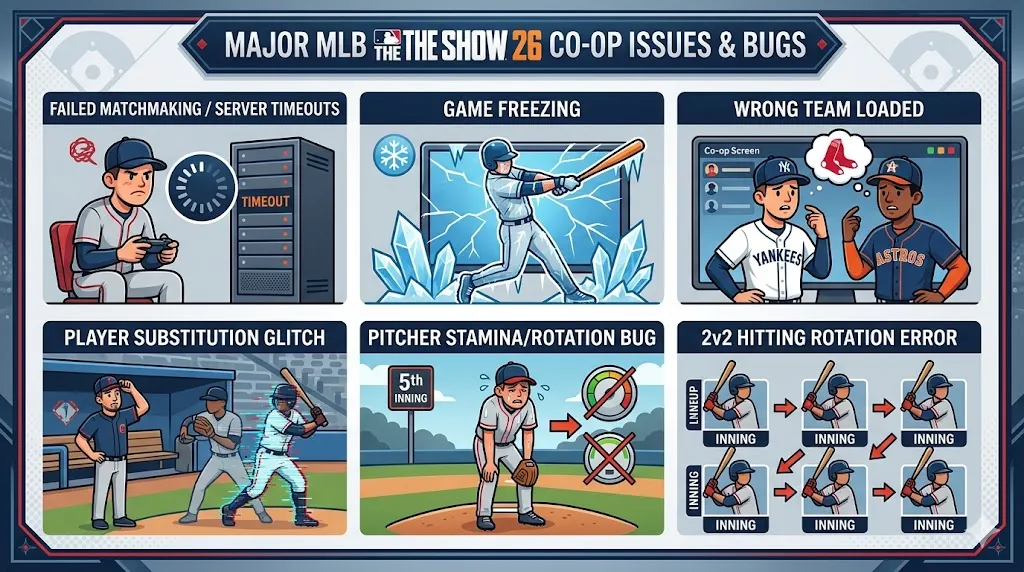
Failed Matchmaking/Server Timeouts
One of the most frequently reported issues in MLB The Show 26's Co-op mode is failed matchmaking and server timeouts. Players often find themselves stuck at 100% loading when trying to start a game, with the server failing to connect or timing out completely. This problem has been widespread across different platforms and can prevent players from enjoying Co-op games with friends.
Game Freezing
Another major problem is game freezing. Several players have reported that their games either freeze at various points during matchmaking or refuse to start altogether. This bug is typically linked to issues with matchmaking and server synchronization, making it hard to get into a game without facing interruptions.
Wrong Team Loaded
A frustrating bug in the Co-op mode has caused teams to load into games with the wrong MLB team. This issue has affected players who specifically chose a team for their Co-op session, only to find that the game automatically loads them into a completely different team. This can completely throw off the strategy and team dynamics, especially in competitive Co-op matches.
Player Substitution Glitch
Another annoying bug in MLB The Show 26's Co-op mode involves player substitutions. Some players have reported rare instances where the wrong player appears during a substitution. This often leads to confusion and can disrupt the flow of the game, especially in the middle of critical moments when a key player is supposed to be substituted in.
Pitcher Stamina/Rotation Bug
There has been an issue with pitcher stamina and rotations in MLB The Show 26. Specifically, players have complained about being able to bring in a new starting pitcher in the 5th inning, allowing them to throw too many pitches. This leads to unrealistic gameplay mechanics, where pitchers can go beyond their normal limits, making it harder to strategize and maintain fairness in matches.
2v2 Hitting Rotation Error
A new feature introduced in MLB The Show 26 is the 2v2 hitting rotation setting, which allows players to change batters after every out. However, a glitch has caused issues with this feature, where the same batter starts the next inning if the previous batter made the final out of the previous inning. This error disrupts the rotation and can lead to unfair advantages during gameplay, affecting the overall experience of Co-op matches.
As MLB The Show 26 continues to work on fixing the various Co-op issues, players can still enjoy the game while waiting for patches to be released. If you're looking to enhance your Diamond Dynasty experience or need to build your team while the Co-op mode gets smoother, the U4N MLB 26 Stubs shop is a great place to go. Whether you're looking to buy MLB 26 Stubs to make your team stronger or grab those coveted player cards, U4N offers a reliable, secure marketplace for all your Diamond Dynasty needs. Keep grinding, and check out U4N for the best deals on MLB 26 Stubs!
2. Updates and Fixes (as of April 2026)
Game Update 4 (Late March 2026)
In late March 2026, MLB The Show 26's developers released Game Update 4, which addressed several bugs. One key fix was resolving the issue where the center fielder would flicker during gameplay, making it difficult to focus on fielding. The update also improved camera performance, resulting in better framerates during Co-op matches. Additionally, the bug that caused the wrong team to load into games was fixed, giving players a more stable and enjoyable Co-op experience.
Game Update 2 (Mid March 2026)
Released in mid-March 2026, Game Update 2 focused on fixing several Co-op bugs that were causing major disruptions. One of the key fixes addressed the bug where roles were not properly rotating between users, which was particularly problematic in 2v2 matches. Another major fix from this update was the resolution of freezing issues that occurred before matchmaking, allowing players to get into games more smoothly without experiencing freezes or delays.
3. Troubleshooting Tips
If you're encountering Co-op issues in MLB The Show 26, here are some troubleshooting tips to help you get back into the game:
1. Verify Crossplay Settings
If you're experiencing performance issues or trouble connecting with friends, check whether crossplay is enabled. Some players have reported better performance with crossplay turned on, while others have found that turning it off improves their experience. It's worth experimenting with these settings to see which one works best for your specific situation.
2. Avoid the "Change After Out" Setting in 2v2
Until the developers release a fix for the 2v2 hitting rotation error, it's recommended to avoid using the "change after every out" setting in 2v2 games. This will prevent the glitch where the same batter starts the next inning, ensuring smoother gameplay until the issue is fully addressed in future updates.
3. Xbox Multiplayer Error Troubleshooting
If you're on Xbox and encountering a "multiplayer not supported" error, this may be related to a temporary platform communication issue. If you see this message, try restarting your game or console to see if the issue resolves itself. If the problem persists, check the Xbox Live status for any ongoing outages or disruptions that might be affecting multiplayer functionality.
MLB The Show 26's Co-op mode offers an exciting way to enjoy the game with friends, but it has faced a range of issues since its release. Whether it's failed matchmaking, game freezes, or pitching bugs, these problems have impacted the overall experience. Fortunately, updates have already addressed some of these bugs, and developers are actively working on fixes for the remaining issues. In the meantime, players can use the troubleshooting tips provided to improve their gameplay experience and get back on the field without major disruptions. Stay tuned for more updates from the developers, as they continue to enhance MLB The Show 26's Co-op mode.