In MLB The Show 26, perfecting your batting setup can be the difference between a successful season and a frustrating one. Whether you're aiming for competitive play or just improving your casual game, the settings you choose can have a huge impact on how you hit. Here's a breakdown of the best settings to help you get the most out of your batting in MLB The Show 26.
Core Hitting Controls
To start, the key to improving your batting is maximizing control over the Plate Coverage Indicator (PCI) and ensuring the clearest view of the pitch. Here's how to fine-tune your hitting settings:
| Setting | Recommended Value | Why It Matters |
|---|---|---|
| Hitting Interface | Zone | Offers full control over PCI; preferred by competitive players |
| Input Type | Buttons | Most consistent for timing, compared to analog flicking |
| PCI Sensitivity | 75%-Max | Allows for faster reaction to pitches (start at 60-70% if new) |
| PCI Anchor | On | Helps track pitches by presetting PCI in a quadrant |
| Guess Pitch | Off | Avoids shrinking your PCI if you guess wrong |
Recommended Setup:
- Hitting Interface: Zone (most recommended for full PCI control)
- Input Type: Buttons (ensures precise timing)
- PCI Sensitivity: 75% to Max (adjust based on your comfort level)
- PCI Anchor: On (helps track pitches better)
- Guess Pitch: Off (don't develop bad habits)
Visual & Camera Settings
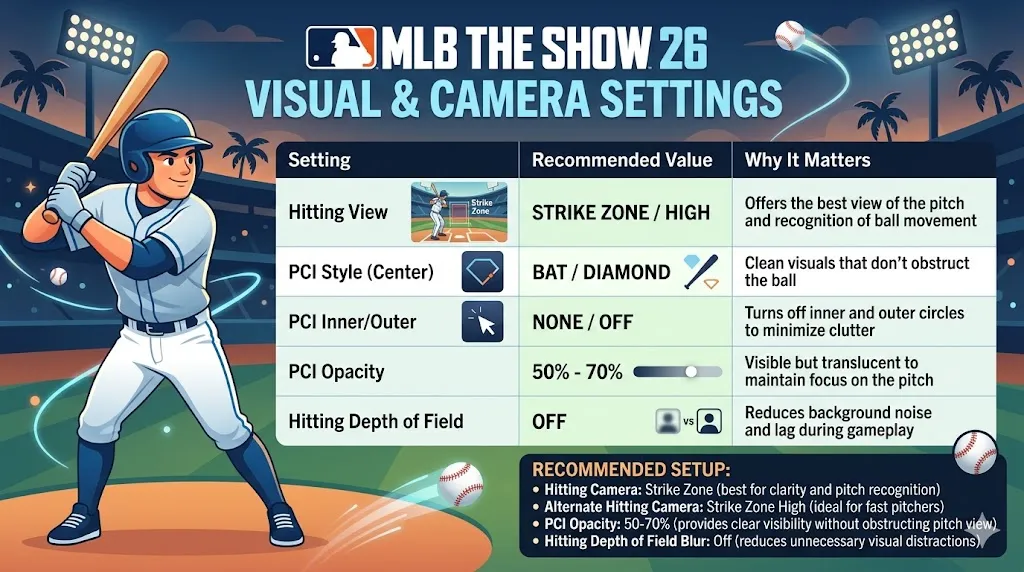
Visual clarity is crucial to recognizing pitches early, so the right camera and PCI style are essential.
| Setting | Recommended Value | Why It Matters |
|---|---|---|
| Hitting View | Strike Zone/High | Offers the best view of the pitch and recognition of ball movement |
| PCI Style (Center) | Bat/Diamond | Clean visuals that don't obstruct the ball |
| PCI Inner/Outer | None/Off | Turns off inner and outer circles to minimize clutter |
| PCI Opacity | 50%-70% | Visible but translucent to maintain focus on the pitch |
| Hitting Depth of Field | Off | Reduces background noise and lag during gameplay |
Recommended Setup:
- Hitting Camera: Strike Zone (best for clarity and pitch recognition)
- Alternate Hitting Camera: Strike Zone High (ideal for fast pitchers)
- PCI Opacity: 50-70% (provides clear visibility without obstructing pitch view)
- Hitting Depth of Field Blur: Off (reduces unnecessary visual distractions)
Best Batting Settings
Here's a more detailed look at the settings that will help you master batting in MLB The Show 26:
| Setting | Best For | Why It Works |
|---|---|---|
| Hitting Interface | Zone Hitting | Full control over PCI; optimal for competitive play |
| PCI Sensitivity | High/Max | Fast reaction times for high-velocity pitches |
| PCI Style | Bat | Minimal distraction, directly tied to where the bat is |
| Guess Pitch | Off | Forces you to read the pitch, which builds better habits |
| Camera Setup | Strike Zone | Best for pitch recognition, focus on the release point |
To maximize your batting performance in MLB The Show 26, it's essential to have the right settings that help you control the Plate Coverage Indicator (PCI) and react quickly to pitches. By using the Zone Hitting interface, setting your PCI Sensitivity to High/Max, and keeping your Guess Pitch option off, you'll have more control and can read pitches more effectively. Additionally, using the Strike Zone camera view helps with pitch recognition, giving you a better chance to react and hit with precision.
If you're looking to enhance your Diamond Dynasty experience with the best players, U4N offers the cheapest MLB The Show 26 stubs for sale, allowing you to unlock top-tier players and improve your team without breaking the bank. Don't miss out on the opportunity to get the best deals and take your gameplay to the next level!
Pro Tips to Improve Your Batting
Alongside your settings, implementing good batting habits will improve your results on the field.
- Pre-pitch PCI Placement: Place your PCI in the area where you expect the pitch. This is similar to setting up a crosshair in shooting games.
- Track Early: Focus on the pitcher's release point and the shape of the ball to anticipate what pitch is coming.
- Don't Always Guess: Avoid using Guess Pitch too often, as it can lead to bad habits and lower your batting consistency.
- Count-based Swings: Use Contact Swings on 0-2 or 1-2 counts to stay alive, and Power Swings on 3-0 counts for a higher chance of hitting a home run.
Quick Recap – Best Batting Setup
For the most optimal batting experience in MLB The Show 26, here's a quick recap:
Hitting Settings:
- Hitting Interface: Zone
- PCI Sensitivity: High/Max
- PCI Style: Bat
- PCI Anchor: Off
- Guess Pitch: Off
Camera Settings:
- Hitting Camera: Strike Zone (Strike Zone High for fast pitchers)
- Depth of Field Blur: Off
Quick Tips for Improvement
- Sit on the Fastball: It's easier to adjust for a changeup than it is to catch up to a high-speed fastball. Focus on fastballs and adjust timing accordingly.
- Watch the Release: Train your eyes to focus on the pitcher's hand at the release point. This gives you valuable extra milliseconds to react.