In MLB The Show 26, players have the chance to customize their ballplayers using a wide array of equipment across 16 different slots. These pieces of gear not only enhance your player's appearance but also provide boosts to key attributes, particularly in modes like Road to the Show (RTTS). Whether you're looking for the best bats or stylish cleats, there's a lot of gear available, though some brands like Nike have been notably absent in recent updates.
Equipment Categories & Notable Items
Equipment in MLB The Show 26 is categorized by the type of slot it fills on your player's gear setup. Below are some of the most popular and notable items players can find in the Community Market or through specialized packs.
| Equipment Type | Notable Items |
|---|---|
| Bats | Victus® ALT13-TPD, Marucci® LINDY12T, 1920-1940 Turkey Stearnes G69 (Louisville Slugger®) |
| Bat Skins | Soda Pop Series (Lime, Grape, Cola, Cherry, Berry), Lightning Bat Skin (Lightning Bundle) |
| Bat Grips | Lizard Skins® ("Pink Slime," "Hero," "Frosted Cookies," "Ocean Vibes") |
| Cleats | Adidas® Adizero Impact 2.0 Candy, New Balance® 3000v7 Molded Lab Work, FuelCell Ohtani 1 |
| Batting Gloves | Franklin® CFX Pro ("Cotton Candy," "Coral Reef," "Watermelon"), Under Armour® "King of the Diamond" |
| Fielding Gloves | 44 Pro® PRX |
| Socks | STANCE® "All Rise!", Team-Specific Stance Socks |
| Protective Gear | Bruce Bolt Original Series Leg Guard, Pro-SRZ™ Batter's Double Elbow Guard, Pro-SRZ™ Protective Wrist Guard |
| Accessories | Ice Cream Sliding Mitt, Active DNA Compression Sleeves, Graduated Compression Premium Sleeves |
How to Obtain Equipment
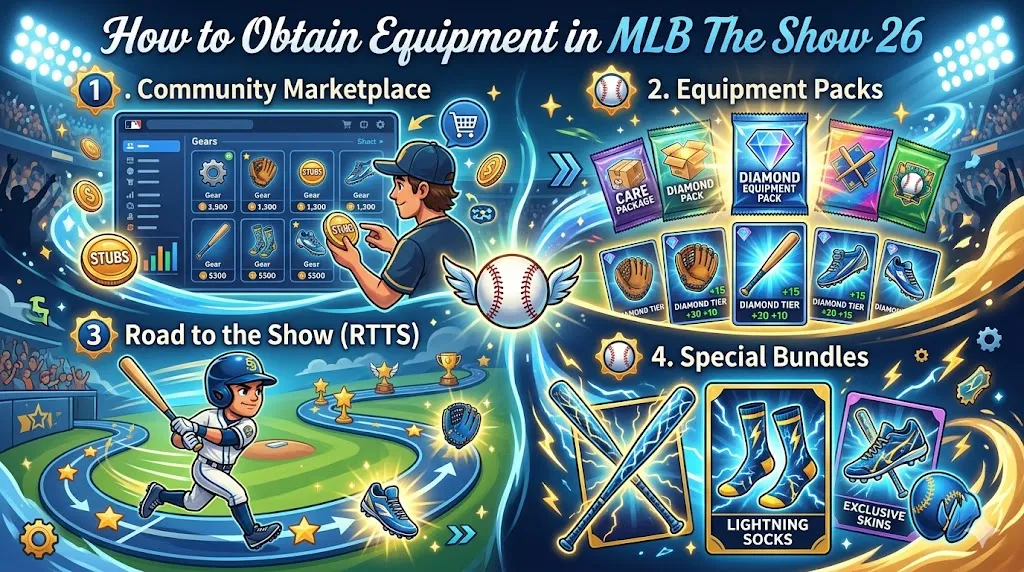
There are several ways to get the equipment you need in MLB The Show 26:
1. Community Marketplace
The most direct way to obtain specific gear is through the Community Marketplace. Here, you can filter by slot type and buy gear using Stubs. This is ideal if you want to pick up rare or specific equipment without relying on random packs.
2. Equipment Packs
Specialized packs like the “Care Package” or “Diamond Equipment Pack” (which costs 15,000 Stubs) guarantee specific tiers of equipment. These packs often contain rare and high-quality items, making them a good investment for players looking to upgrade their gear.
3. Road to the Show (RTTS)
In RTTS, equipment is earned naturally through career progression. As you level up and complete objectives, you'll unlock gear that can help improve your player's stats and abilities.
4. Special Bundles
Occasionally, MLB The Show 26 offers exclusive bundles, such as the Lightning Bundle. These bundles include special items like the Lightning Bat Skin and Lightning Socks, adding a cool, limited-edition twist to your gear collection.
In MLB The Show 26, equipment plays a crucial role in boosting your player's stats and performance. But what's considered the “best” equipment? The answer largely depends on the Diamond tier rarity, as these items provide the highest percentage-based boosts to your player's attributes. Unlike previous years, most equipment brands within the same tier offer identical performance boosts, so your choice often comes down to personal visual preferences or perk synergies.
To maximize your performance in MLB The Show 26, obtaining the best equipment is key, and there are multiple ways to do so. Whether you choose to purchase gear through the Community Marketplace, unlock exclusive items in Equipment Packs, or earn rewards through Road to the Show (RTTS), you'll need Stubs to get your hands on top-tier equipment. For those looking to save time and guarantee quality gear, visiting a Trusted MLB 26 Stubs store like U4N is an excellent option. With their reliable and fast service, you can easily purchase MLB 26 Stubs to buy the best equipment, ensuring your player’s performance is always at its peak.
Best Equipment in MLB The Show 26: Diamond Tier Performance Boosts
Diamond equipment provides the most significant boosts in MLB The Show 26. Here's how it works:
- Diamond equipment typically gives a 6% boost to the respective attribute category.
- Gold equipment boosts attributes by 4%.
- Silver equipment offers a 2% boost.
This means that Diamond gear should be your go-to for maximizing your player's attributes. Let's break down which equipment is best in each category:
1. Bats & Batting Gloves
When it comes to hitting, bats and batting gloves are essential for improving attributes like Contact and Power. The Diamond-tier bats and gloves offer a 6% boost, which can make a huge difference in your hitting stats.
Best Choices:
- Batting Gloves: The Under Armour® "King of the Diamond" and the Coral Reef CFX Pro are highly favored in the Diamond tier for their consistent performance and aesthetics.
- Bats: The Diamond Torpedo Bat is one of the most sought-after items, designed specifically to increase Exit Velocity and Home Run frequency, making it perfect for power hitters.
2. Cleats & Socks
Speed and stealing bases are critical aspects of the game, and cleats and socks can help you boost your Speed and Stealing attributes by 6%. If you're focusing on creating a fast and agile player, these items are essential.
Best Choices:
- Cleats: The New Balance® 3000v7 Molded Lab Work is a top-tier choice for speed-focused builds, providing both performance and style.
- Socks: Diamond-tier socks are also important, as they contribute to the overall speed boost. Specific Diamond-tier socks, such as those earned through programs, will maximize your player's speed.
3. Fielding Gloves
If you want your player to be an elite defender, you'll need to equip fielding gloves. These are especially important for infielders and outfielders in Road to the Show (RTTS), as they help you achieve Elite defensive status early on in your career. The 6% boost to Fielding makes a huge impact in your defensive stats.
Best Choices:
- 44 Pro® PRX Fielding Gloves are highly regarded for their overall balance and performance.
4. Rituals
Rituals in MLB The Show 26 offer a smaller 3% boost to all three major categories: Hitting, Pitching, and Fielding. While not as powerful as Diamond equipment in terms of specific attribute boosts, they are still valuable for players looking for a universal performance improvement.
Best Choice:
- Diamond Rituals are often priced reasonably on the Community Market, and since all Diamond Rituals offer the same 3% universal boost, it's a good idea to grab whichever is cheapest.
Highly-Rated Specific Gear
While the stats for Diamond-tier equipment are largely uniform by tier, certain items stand out due to their cost-effectiveness and utility in different builds.
Batting Gloves
- Under Armour® "King of the Diamond": This option provides a great mix of aesthetics and power boosts, making it a favorite for many players.
- Franklin® CFX Pro "Coral Reef": A popular choice for its balance of affordability and performance.
Bats
- Diamond Torpedo Bat: A top-tier option designed to maximize Exit Velocity and increase Home Run frequency.
Cleats
- New Balance® 3000v7 Molded Lab Work: These cleats are designed for speed, providing a great boost to your Speed and Stealing attributes.
Rituals
- Cheapest Diamond Rituals: Since all Diamond Rituals offer the same boost, it's often best to pick up the cheapest one available. They provide a 3% boost across Hitting, Pitching, and Fielding.
Acquisition Strategies
If you're looking to equip your player with the best gear, there are several strategies for obtaining Diamond-tier equipment.
1. Diamond Equipment Packs (15k Stubs)
The Diamond Equipment Pack costs 15,000 Stubs and guarantees one Diamond-tier item. You can purchase these packs directly from the Pack Store. It's a great way to secure a Diamond item for your player, especially if you're looking to improve your gear quickly.
Tip: Use the MLB The Show Companion App to check current Community Market prices before choosing your reward. This will ensure that you pick the most valuable option, maximizing your investment in the pack.
2. Program Rewards
Complete in-game programs to earn Diamond-tier gear for free. For example, the Jackie Robinson Program offers free Diamond-tier socks and bat grips as rewards. These can save you Stubs and still offer top-tier boosts for your player.
3. Strategic Perks
Pair your equipment with new perks to further enhance your player's performance. For example, using the "Clear for Takeoff" perk boosts Exit Velocity, which synergizes well with Diamond bats. Similarly, the "Cannon Arms" perk can amplify Throwing Strength, making your defensive gear even more effective.
How to Access and Equip Gear
1. Accessing Equipment in Road to the Show (RTTS)
To equip gear in RTTS, follow these steps:
- Go to the Main Menu: From the main screen, navigate to Road to the Show (RTTS) and select your player.
- Select "My Player": Inside RTTS, choose My Player to open your player's customization menu.
- Choose the Equipment Tab:
- In the My Player menu, you'll find a section labeled Equipment. This is where you can manage all your gear.
- Select Equipment to access your player's inventory and view the available gear slots.
- Select the Slot to Equip:
- Equipment in RTTS is divided into 16 slots, each corresponding to a different piece of gear, like Bats, Gloves, Cleats, Batting Gloves, Fielding Gloves, and more.
- Click on the slot you want to customize (e.g., Bat or Fielding Gloves).
- Choose Your Equipment:
- From your inventory, browse and select the equipment you want to equip.
- If you have multiple options, choose the one that provides the best boosts or fits your style.
- Save Your Changes: After selecting your gear, confirm your choices, and exit the menu. Your new gear will now be equipped and active for gameplay.
2. Equipping Gear in Diamond Dynasty
In Diamond Dynasty, you can equip gear to your player just like in RTTS. The process is slightly different since you'll be customizing your team:
- Enter Diamond Dynasty: From the main menu, navigate to Diamond Dynasty.
- Access Your Team:
- Once inside Diamond Dynasty, select My Squad to access your team's customization options.
- Select a Player:
- Choose the player you want to equip gear to. This could be one of your stars or any player on your roster.
- Go to the Equipment Tab:
- After selecting your player, look for the Equipment option.
- You'll see the gear slots available for customization, just like in RTTS.
- Equip Your Gear:
- Browse through your available equipment and choose the best options for your player.
- After selecting gear for each slot, confirm your choices and save them.
- Manage Your Entire Roster:
- In Diamond Dynasty, you can equip gear for all players on your roster. Be sure to check each player's stats and equipment to ensure you're making the most of their abilities.
3. Using the Community Marketplace
If you're looking for specific gear, you can visit the Community Marketplace to purchase items using Stubs.
- Go to the Marketplace: From the main menu, go to Community Marketplace.
- Filter by Gear Type:
- Use filters to search for specific types of gear, such as bats, cleats, or gloves. You can filter by Slot Type to find the equipment that fits your needs.
- Buy the Equipment:
- Once you find the gear you want, purchase it using Stubs.
- After purchasing, the gear will be available in your player's inventory, and you can equip it just like any other item.