Cart Empty
Continue ShoppingIn MLB The Show 26, mastering pitching is crucial for success, whether you're playing competitively or just having fun in casual games. The best pitching settings give you control, precision, and a smoother gameplay experience. If you want to improve your pitching and take your game to the next level, these settings are the way to go.
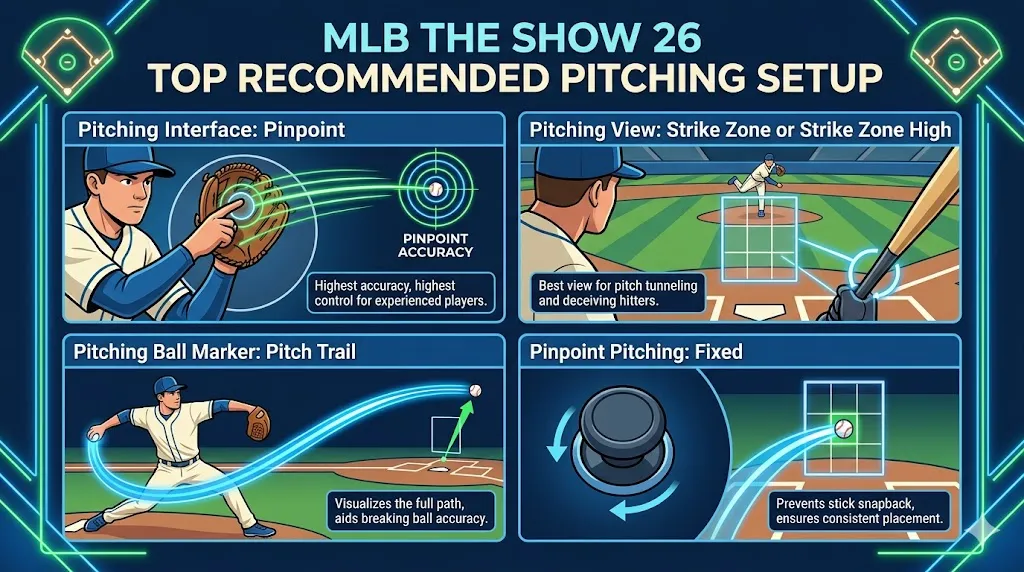
Pinpoint is widely regarded as the best choice for experienced players. It offers the highest accuracy, allowing you to hit perfect pitch locations consistently if you master the tracing gestures. Although challenging to learn, Pinpoint gives you complete control over your pitch placement.
These camera angles provide the best view of pitch movement and the batter's Plate Coverage Indicator (PCI), which is crucial for tunneling pitches and deceiving the hitter.
The Pitch Trail shows the ball's actual path, making it much easier to track the pitch as it travels. This visual aid is superior to the Classic fade-out and helps you with pitch accuracy, especially on breaking balls.
This feature prevents the left stick from snapping back to the center, keeping the pitching marker aimed directly at the location you want. This leads to more consistent pitch placement.
| Option | Skill Ceiling | Notes |
|---|---|---|
| Pinpoint Pitching | ⭐⭐⭐⭐⭐ | Best for precision and control if you can master the motions and release. Highly recommended for competitive play. |
| Pure Analog | ⭐⭐⭐☆☆ | Easier to use compared to Pinpoint but offers a less precise experience. Great for players who prefer natural joystick movement. |
| Meter Pitching | ⭐⭐☆☆☆ | An easier timing-based option with reasonable accuracy but not as precise as Pinpoint. Some veterans still use it. |
| Pulse / Classic | ⭐☆☆☆☆ | Simplified and lower skill ceiling. Classic offers minimal control, Pulse has timing but lacks precision. |
Best Overall: Pinpoint Pitching — the highest ceiling for consistent locations and effective tunneling.
These settings work well with Pinpoint or Pure Analog and help you excel in ranked play and Diamond Dynasty (DD):
| Setting | Recommendation | Notes |
|---|---|---|
| Pitching Interface | Pinpoint | Max control and precision, ideal for competitive players. |
| Pitch Marker | Pitch Trail | Helps visualize movement in flight, ensuring better pitch accuracy. |
| Camera Angle | Strike Zone/Strike Zone High | Provides the clearest view for pitch location and tunneling. |
| PCI Sensitivity | Max or High | Keeps input responsive and precise. If too twitchy, dial it down slightly. |
| Pitch Sequencing | Mixed Speeds | Use varied pitches (fastballs, off-speed) to keep batters off balance. |
| Setting | Recommendation | Notes |
|---|---|---|
| Quick CPU Pitching | On | Speeds up gameplay, especially in offline modes like DD. |
| Throw Canceling | On | Allows you to back out of a bad pitch, giving you more control. |
| Hitting Camera (for Opponents) | Strike Zone | Helps visualize the pitcher's delivery and hit locations better. |
| Hitting Interface | Zone/Directional | Depending on your skill level, Zone gives more control, while Directional is easier for beginners. |
If you're looking to enhance your gameplay in MLB The Show 26, these pitching settings will help you control the mound with precision. Whether you're aiming for competitive play or just improving your casual sessions, mastering these settings can take your pitching to new heights. Remember, whether you’re fine-tuning your Pinpoint Pitching or adjusting your camera settings, practice is key to success.
For a smoother experience, make sure to secure your MLB The Show 26 Stubs safely and efficiently. A trusted platform like U4N offers a reliable and safe way to buy MLB The Show 26 Stubs, allowing you to focus on the game and improve your team without the grind. Avoid risks and enjoy a hassle-free transaction when you choose U4N for your MLB The Show 26 Stubs needs.
For players grinding through offline modes like Diamond Dynasty or Mini Seasons, speed up the gameplay with the following settings:
| Setting | Recommendation | Notes |
|---|---|---|
| Quick CPU Pitching | On | Speeds up gameplay, especially useful for grinding. |
| Pitching Motion | Stretch Only | Eliminates long windup animation, speeding up gameplay. |
| Fast Play Presentation | On | Skips broadcast cutscenes, helping you get through games faster. |
This new feature introduced in MLB The Show 26 helps you control high-pressure pitches. It allows you to “own the mound” during crucial moments, making it easier to perform under pressure.
By following these recommendations, you'll significantly improve your pitching, whether you're trying to dominate in competitive ranked seasons or just grind through offline modes like Diamond Dynasty or Mini Seasons.
The U4N Editorial Team is made up of dedicated gamers and technical experts. We're not just a trusted marketplace for game assets—we're all about empowering players with top-tier, expert-driven content. Our team produces in-depth guides, strategies, and technical fixes for some of the biggest games out there, like MLB The Show 26, Aion 2, Forza Horizon 6, Arc Raiders, and Path of Exile.
Whether it's mastering market flipping in Diamond Dynasty or optimizing your endgame builds, all of our strategies are tested and proven by in-house experts. At U4N, we don't just follow the meta—we help you stay ahead of it.