


Table of Contents
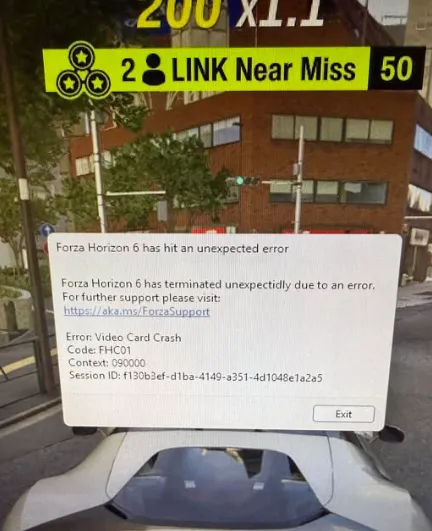
Many players of Forza Horizon 6 have reported sudden crashes to desktop, often accompanied by error codes FHC00 or FHC01. These issues are typically linked to GPU instability, driver conflicts, or demanding graphics settings like ray-tracing. If your game crashes when launching, loading zones, or switching between city and off-road areas, here's a practical, step-by-step guide to stabilizing your PC and keeping your racing experience smooth.
Critical Troubleshooting Steps
Follow these steps sequentially. Skipping steps can leave underlying problems unresolved.
1. Disable Hardware-Accelerated GPU Scheduling (HAGS)
Hardware-accelerated GPU scheduling in Windows sometimes causes instant crashes on launch or mid-game, especially with high-end ray tracing enabled.
- Open Windows Settings (Win + I).
- Go to System > Display > Graphics.
- Click Change default graphics settings.
- Toggle Hardware-accelerated GPU scheduling to Off.
- Restart your PC to apply changes.
Many users on Reddit report that this simple toggle resolves immediate desktop crashes.
2. Adjust In-Game Graphics Settings
If the game crashes during environment transitions or off-road sections, your GPU may be overloaded by ray-tracing calculations.
- Launch the game in Windowed Mode (ALT + ENTER) if it crashes before the menu.
- Go to Graphics Settings.
- Turn Environment Ray-Traced Global Illumination (GI) completely Off.
- Optionally, switch Ray-Traced GI to Screen-Space Reflections (SSR) for a balance between visuals and stability.
Lowering or disabling extreme settings can prevent GPU overload.
3. Close Conflicting Background Apps
Forza Horizon 6 is sensitive to overlay and driver hooks. Close or disable:
- MSI Afterburner & RivaTuner Statistics Server (set detection level to “None” if necessary)
- Citrix Workspace (known to trigger FHC01)
- NVIDIA High Definition Audio devices (disable in Device Manager if using NVIDIA)
These apps can interfere with drivers and cause repeated crashes.
4. Clean GPU Driver Installation
Corrupt drivers or residual files are common culprits for FHC00 errors.
- Download the latest driver from NVIDIA or AMD.
- Boot into Windows Safe Mode.
- Use Display Driver Uninstaller (DDU) to remove all old driver traces.
- Install the new driver with Clean Install or Factory Reset option.
This ensures shaders and GPU code fragments don't conflict with the game.
5. Clear Shader Cache
Corrupted shader caches can repeatedly crash your GPU during loading.
- NVIDIA: Delete DXCache and GLCache in %localappdata%\NVIDIA.
- AMD: Open AMD Software > Gaming > Graphics > Reset Shader Cache.
This removes old compiled assets that may be triggering the crash.

Understanding Forza Error Codes
| Error Code | Meaning | Primary Fix |
|---|---|---|
| FHC00 / FHC01 | Video Card Crash / Driver Instability | Disable HAGS, turn off Ray-Tracing, clean install GPU drivers |
| FHD01 | Out of Video Memory (VRAM) | Lower texture quality and resolution scaling |
| FH205 | Graphics Card Not Supported | Ensure GPU supports DirectX 12 natively |
Additional Tips
- Peripherals: Wheelbases like Moza R5 or Simucube 2 Pro can cause instant crashes. Unplug them before launching the game.
- Windowed Mode: Launching in windowed or borderless windowed mode can reduce startup crashes.
- System Resources: Close unnecessary apps, especially browsers or monitoring tools that use GPU hooks.
Fixing video card crashes in Forza Horizon 6 mostly revolves around managing GPU load, cleaning drivers, and disabling settings that push your graphics card beyond stability. For players seeking a shortcut to avoid long grinding for wheelspins or cars while troubleshooting, marketplaces like U4N provide safe, instant delivery of cheap Forza Horizon 6 credits, letting you maintain progression while optimizing your setup.





