


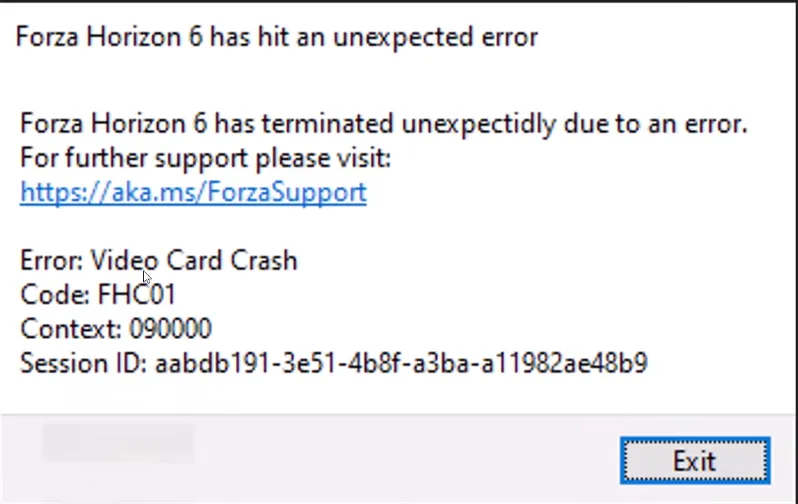
In Forza Horizon 6, error code FHC01 shows up when your game crashes due to your video card losing connection. It's a pretty common problem on PC, and it usually happens when:
- Your graphics drivers are outdated.
- Another program in the background conflicts with Forza's engine.
- In-game settings push your GPU too hard, causing it to time out.
For a smooth experience, it's important to tackle this quickly before it keeps crashing your sessions.
How to Fix Error FHC01
Here's a straightforward approach, step by step:
1. Perform a Clean GPU Driver Install
Use Display Driver Uninstaller (DDU) to completely remove your current drivers. Then download the latest drivers directly from NVIDIA or AMD for your card. Fresh drivers eliminate corruption or outdated code that might trigger FHC01.
2. Uninstall Citrix Workspace
Many PC users report immediate crashes when Citrix Workspace is installed. If you have it, go to Windows Settings → Apps, locate Citrix Workspace, and uninstall it. This removes known engine conflicts.
3. Lower In-Game Video Settings
Set graphics from "Extreme" down to High or Ultra. Turn on upscaling features like TAA or AMD FSR. Lowering stress on the GPU prevents driver timeouts and sudden crashes during gameplay.
4. Turn Off Overclocking and Overlays
Close monitoring apps like MSI Afterburner, Rivatuner Statistics Server (RTSS), or GeForce Experience overlays. If your GPU has a factory overclock, try reducing the core speed by about 100–175 MHz. This can stabilize the card under heavy loads.
5. Cap Frame Rates in Driver Software
Disable V-Sync and FPS limiters in the game itself. Instead, use the Nvidia Control Panel or AMD Adrenalin software to set a stable maximum framerate. This avoids sudden frame spikes that could crash your GPU and trigger FHC01.
Following these steps usually fixes the FHC01 error, letting you get back to racing without interruption. Staying on top of driver updates, avoiding conflicting apps, and managing your GPU load is key to preventing future crashes. With these fixes, Forza Horizon 6 should run smoother, letting you focus on your favorite tracks and challenges instead of troubleshooting.

If you want to save time and jump straight into the action without worrying about crashes or grinding for credits, U4N offers a reliable way to get cheap FH6 credits for sale, letting you stock up on cars, upgrades, and wheelspins instantly while keeping your gameplay smooth and enjoyable.





