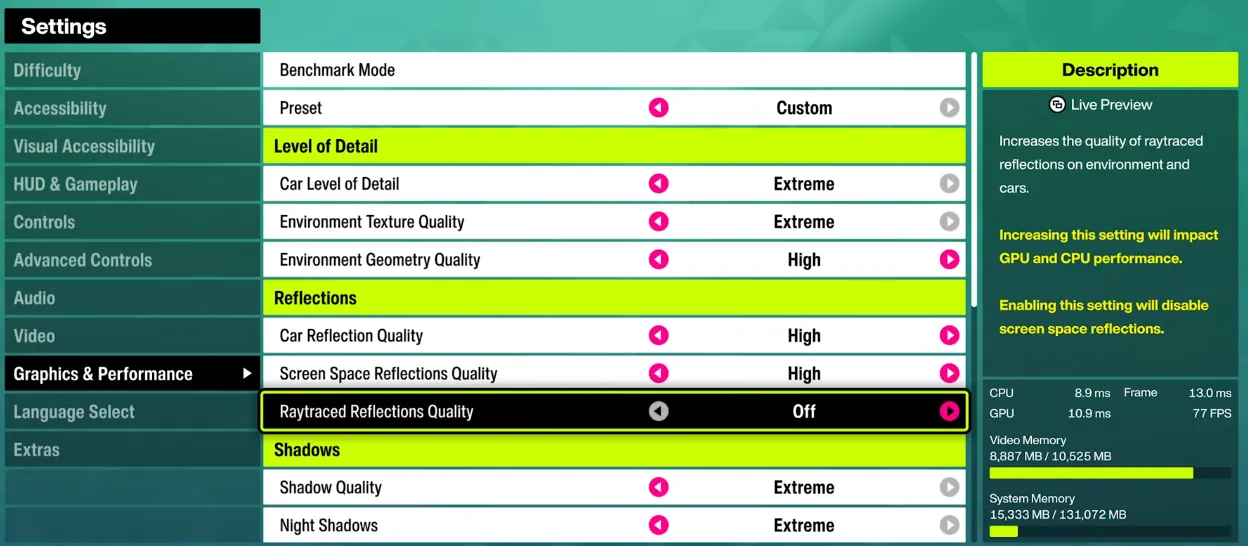
Forza Horizon 6: Best Graphics Settings for Optimal Performance and Visuals
When you jump into Forza Horizon 6, the first thing that matters is how the game looks and runs. The graphics settings give you full control over every detail, from car reflections to environmental textures, letting you tailor your experience for maximum performance or maximum beauty. This guide walks you through the optimal settings for PCs, mid-range rigs, and handheld devices alike.
U4N
Published
Updated 1,541 readsShare
Forza Horizon 6: Best Graphics Settings for Optimal Performance and Visuals
When you jump into Forza Horizon 6, the first thing that matters is how the game looks and runs. The graphics settings give you full control over every detail, from car reflections to environmental textures, letting you tailor your experience for maximum performance or maximum beauty. This guide walks you through the optimal settings for PCs, mid-range rigs, and handheld devices alike.
Video Settings
Setting
Recommendation / Explanation
Resolution
Set to your monitor's native resolution (4K for high-end PCs).
Frame Rate
Unlocked is ideal; set a cap if you want stability.
V-Sync
Turn off if you prefer unlocked FPS.
Upscaling (Nvidia)
DLSS: Balanced for 4K, Quality for 1080p, Performance for 4K upscaling.
Upscaling (AMD)
FSR 3.1.5 to boost performance without heavily compromising visuals.
Upscaling (Intel)
XeSS to improve frame rates while maintaining image quality.
Field of View (FoV)
Adjust to personal preference; doesn't significantly affect performance.
Graphics & Performance Settings
Setting
Effect
Mid-Range PC
Handheld
Car Level of Detail
Mesh/detail quality of cars; high VRAM impact
Ultra
High
Environment Texture Quality
Resolution of world textures
High
High
Environment Geometry Quality
Mesh quality for objects
High
High
Car Reflection Quality
Interior/exterior reflections
High
High
Screen Space Reflections Quality
Non-ray traced reflections
Off
Medium/Off
Ray Traced Reflections Quality
Ray traced reflections
Medium
Off
Shadow Quality
Shadow resolution & update rate
High
Low
Night Shadows
Shadows from streetlights/headlights at night
Ultra
Off
Screen Space Global Illumination (SSGI)
Ambient lighting
Off
Medium
Ray Traced Global Illumination (RTGI)
Realistic lighting with RT
Low
Off
Shader Quality
Material and lighting fidelity
Ultra
High
Deformable Terrain Quality
Dirt/mud effects
Extreme
Medium
Particle Effects
Debris and spray effects
High
Medium
Volumetric Fog Quality
Fog density and detail
Ultra
Medium
Lens Effects & Motion Blur
Purely aesthetic
Personal choice
Personal choice
Practical Tips
Tip
Recommendation / Explanation
Start with Presets
High + RT is solid for mid-range GPUs (smooth 60–70 FPS without DLSS). Ultra + RT looks better visually but can significantly drop FPS on mid-range cards.
Balance VRAM Usage
If VRAM is limited, lower environmental textures first before reducing car detail.
Only enable ray tracing on RT-capable cards; otherwise, stick to non-RT reflections.
Handheld Performance
Use a mix of medium and high presets on Xbox Ally X to achieve 50–60 FPS when plugged in; unplugged, expect around 30 FPS, still playable for casual sessions.
Use in-game benchmarks for guidance, but test in the open world to check reflections, puddles, and particle effects in real gameplay.
In Forza Horizon 6, finding the right graphics settings is all about balancing stunning visuals with smooth performance, whether you're on a high-end PC, mid-range rig, or handheld console. By carefully adjusting resolution, frame rate, upscaling, and the detailed graphics & performance options, you can enjoy realistic car reflections, immersive environments, and consistent FPS. For players looking to accelerate their progress or unlock premium upgrades, U4N is the go-to platform to buy safe Forza Horizon 6 credits, ensuring instant delivery, secure transactions, and a seamless way to enhance your Horizon experience.
U4NAbout the Author: U4N
Authored by elite gamers and industry insiders, the U4N Editorial Team delivers authoritative game updates, patch notes breakdowns, and expert strategies for trending titles including World of Warcraft, Path of Exile 2, MapleStory, Aion 2, and Arc Raiders.
From deep-dive guides to the latest meta shifts, our in-house veterans test every tactic firsthand to keep you ahead of the game.