Cart Empty
Continue ShoppingPlayers and reviewers have reported varying performance numbers, especially for the NVIDIA 5070 Ti and other mid/high-tier cards. Key observations:
| GPU | Resolution | Settings | FPS Range | Notes |
|---|---|---|---|---|
| RTX 5070 Ti | 1440p | Extreme + RTX Max | 85–95 FPS | DLSS Quality/Balanced makes little difference (~5 FPS). CPU: Ryzen 5900X. |
| RTX 4070 Ti | 1440p | Extreme + RT Reflections Low + RTGI Medium + DLSS Balanced + Frame Generation | 110–150 FPS | Smooth performance, occasional DLSS reset needed. |
| RTX 2060 | 1080p | High | 60–70 FPS | High in FH6 equates to six steps below Extreme. |
| RTX 5090 FE | 4K | Extreme + Ray Tracing | Varies | CPU bottleneck observed; scene-specific benchmarks differ. |
Notes from the community:
Modern GPUs can leverage DLSS 3 / Frame Generation (FG) to boost FPS, but results vary:
| DLSS Preset | FPS Impact | Visual Notes |
|---|---|---|
| Quality | Base | Sharp textures, good clarity |
| Balanced | +2–3 FPS | Slightly reduced clarity in wires/fences |
| Performance | +3–6 FPS | Minimal visual degradation, useful on lower-end cards |
| Frame Generation | +30–40% effective FPS boost | Ideal for high-refresh gameplay, may introduce slight artifacts |
Players report that even high-end GPUs sometimes require a DLSS toggle reset after prolonged sessions to maintain performance.
Forza Horizon 6 is one of the most visually stunning racing games, and to ensure you get the best possible experience, it includes a dedicated benchmark mode. This mode is designed to help PC players assess their system's performance and fine-tune their graphical settings. Whether you're pushing for ultra-high settings or just want to make sure your game runs smoothly, the benchmark mode has got you covered.
The benchmark mode in Forza Horizon 6 is a tool that lets you test your PC's performance by running a fixed in-game sequence. This allows you to measure key performance metrics like frame rate (FPS) and hardware utilization. The results are consistent and repeatable, giving you an accurate way to compare how well your PC handles the game at different settings.
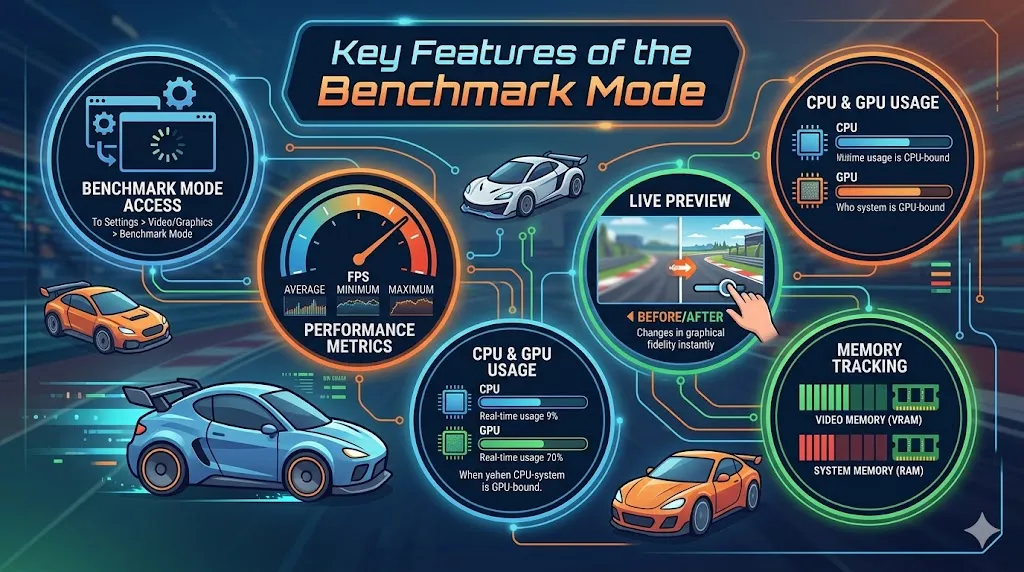
Q: Does Forza Horizon 6 on PC include a benchmark mode?
Yes, the PC version of Forza Horizon 6 includes a benchmark mode, which gives players a great and consistent way to assess the performance of the game.
Forza Horizon 6's benchmark mode isn't just about testing your system's baseline performance; it also helps you tweak your settings for the best experience.
If you're unsure which settings to use, the tool will recommend configurations based on your system's capabilities. However, while the tool offers suggestions like “Ultra” or “High” settings, some players report that it may suggest lower settings than their PC can handle. It's a good idea to manually test these settings and fine-tune them if you feel your system can handle more.
If you’re looking to take your Forza Horizon 6 experience to the next level, optimizing your settings with the benchmark mode is just the start. Once you've fine-tuned your game for smooth performance, you might want to invest in in-game currency to unlock new cars, upgrades, or other exciting content faster. If you're looking to save time and skip the grind, U4N offers Forza Horizon 6 money for sale, ensuring you can enjoy the game’s full experience without any delays. With U4N, you can make the most out of your racing adventures and focus on what matters most—racing through Japan's stunning landscapes.
For those looking to push the game's features to the limit, Forza Horizon 6 supports demanding settings like ray-traced reflections and global illumination. Here's a breakdown of target settings for different PC setups:
| Setting Tier | Target Resolution/FPS | Key Requirements |
|---|---|---|
| Minimum | 1080p @ 60 FPS (Low) | GTX 1650 / RX 6500 XT, 16GB RAM |
| Recommended | 1440p @ 60+ FPS (High) | RTX 3060 Ti / RX 6700 XT, 16GB RAM |
| Extreme RT | 4K @ 60+ FPS (Ultra) | RTX 5070 Ti / RX 9700 XT, 32GB RAM |
For the most accurate performance readings, it's a good idea to run the benchmark mode after any major graphics driver updates or when experimenting with new upscaling technologies like DLSS 4 or FSR 3/4.
The U4N Editorial Team is made up of dedicated gamers and technical experts. We're not just a trusted marketplace for game assets—we're all about empowering players with top-tier, expert-driven content. Our team produces in-depth guides, strategies, and technical fixes for some of the biggest games out there, like MLB The Show 26, Aion 2, Forza Horizon 6, Arc Raiders, and Path of Exile.
Whether it's mastering market flipping in Diamond Dynasty or optimizing your endgame builds, all of our strategies are tested and proven by in-house experts. At U4N, we don't just follow the meta—we help you stay ahead of it.