Since its release, MLB The Show 26 has faced several lineup screen glitches that have frustrated players. These glitches range from visual bugs to more serious problems, like the game freezing entirely. Here's a look at some of the most common issues and how to fix them.
Common Lineup Screen Issues
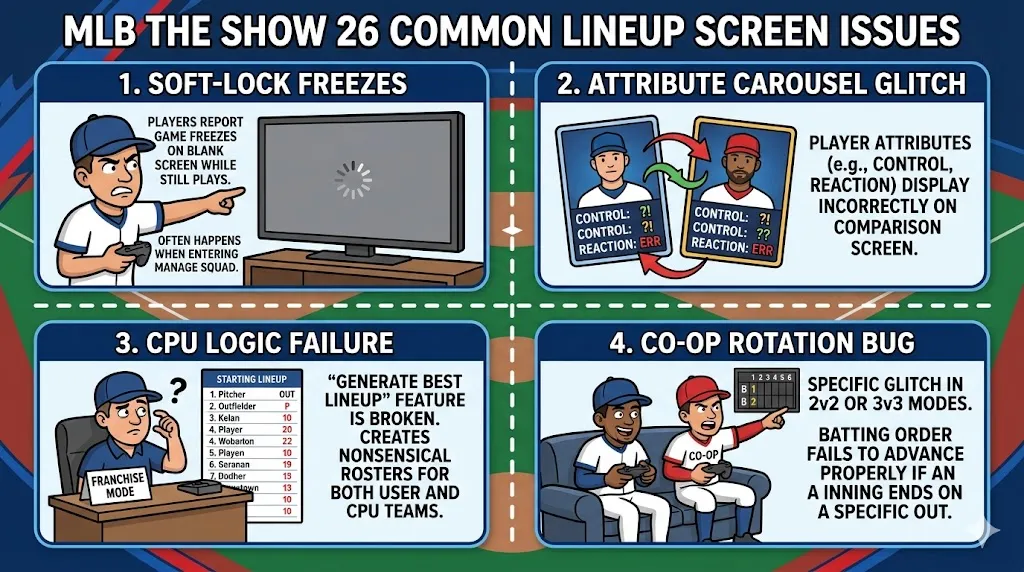
- Soft-Lock Freezes
- Problem: Players often report that entering the Manage Squad or Lineup screens causes the game to freeze. You may see a blank screen while the background music continues to play. This issue, called a "soft-lock," can be especially annoying as it prevents players from making lineup changes or managing their squad.
- What to Do: There's no universal fix, but updating the game or restarting the app may help resolve this issue temporarily.
- Attribute Carousel Glitch
- Problem: This long-standing bug causes player attributes (like Control, Reaction, and others) to display incorrectly on the comparison screen. You may see numbers that don't make sense or stats that look completely out of place.
- What to Do: This is typically fixed through patches. Make sure your game is updated to the latest version to avoid seeing these errors.
- CPU Logic Failure
- Problem: In Franchise Mode, the "Generate Best Lineup" feature doesn't always work correctly. Players have noticed that the CPU sometimes creates nonsensical lineups. For example, it might place a pitcher in the batting lineup or leave players out of the starting rotation.
- What to Do: Until an official patch arrives, manually adjust your team's lineup to avoid this issue. Try to avoid using the auto-lineup feature if possible, and double-check your roster before each game.
- Co-op Rotation Bug
- Problem: In 2v2 or 3v3 Co-op Modes, there's a glitch where the batting order fails to advance properly if an inning ends on a specific out. This can mess up your lineup and cause confusion during multiplayer matches.
- What to Do: The best workaround is to restart the game or lobby if the bug occurs. Players also recommend using custom rosters to reduce the likelihood of this happening.
Potential Fixes and Workarounds
Though many of these issues require an official patch from San Diego Studio, there are some fixes and workarounds that players have found helpful.
- Generate Best Lineup
- If you get stuck on a bugged roster, try using the Generate Best Lineup feature. This option is available on the squad screen by pressing Options/Menu. It can sometimes reset a bugged roster and get things back on track.
- Avoid Quick Resume
- On PS5 and Xbox Series X|S, the Quick Resume or Rest Mode feature is known to trigger lineup screen freezes. Players have reported that these freezes are less likely to occur if you completely close the game and restart it instead of using the Quick Resume function. This simple step may save you from a frustrating freeze.
- Update the Game
- Make sure your game is up to date! Game Update 3, which was released in late March 2026, addressed various lineup screen issues, including problems with the attribute carousel and visual flickering. Keeping your game updated is one of the best ways to avoid these glitches in the first place.
- Check Secondary Positions
- A known bug affects pitchers on the bench. Their secondary positions sometimes aren't displayed correctly on the lineup screen. Until this bug is fixed, you'll need to manually check the secondary positions of your bench players to ensure everything is in order.

While MLB The Show 26 has been a great addition to the series, its lineup screen glitches can definitely cause some headaches for players. The issues mentioned above are some of the most common, but they're not without solutions. By updating your game, avoiding certain features like Quick Resume, and using the “Generate Best Lineup” feature, you can often work around these bugs. However, keep an eye on updates from San Diego Studio for full, permanent fixes in the future.
About the Author
The U4N Editorial Team is made up of dedicated gamers and technical experts. We're not just a trusted marketplace for game assets—we're all about empowering players with top-tier, expert-driven content. Our team produces in-depth guides, strategies, and technical fixes for some of the biggest games out there, like MLB The Show 26, Aion 2, Forza Horizon 6, Arc Raiders, and Path of Exile.
Whether it's mastering market flipping in Diamond Dynasty or optimizing your endgame builds, all of our strategies are tested and proven by in-house experts. At U4N, we don't just follow the meta—we help you stay ahead of it.