Cart Empty
Continue ShoppingBuilding a competitive Diamond Dynasty squad isn't just about stacking your lineup with the highest-rated 99 OVR cards anymore. With the Captains system in MLB The Show 26, smart team building can turn a modest themed roster into an absolute powerhouse. Captain cards provide massive tier-based attribute boosts to your entire team—provided you know how to activate them.
If you have a Captain card sitting in your inventory but aren't seeing those boosted stats in-game, you likely missed the crucial activation step. Here is a straightforward guide on how to assign captains and unlock their full potential.
Unlike normal player cards, Captains do not automatically trigger their boosts just by being plugged into your starting lineup. You have to explicitly assign them to their leadership roles.
How to tell it worked: Once a captain is successfully assigned, you will see a small, upward-facing boost arrow appear on the player cards in your main lineup. This indicates that the card is actively receiving an attribute upgrade.
Captain boosts in MLB The Show 26 Diamond Dynasty are attribute multipliers that upgrade your players' stats when you build a squad around a specific theme.
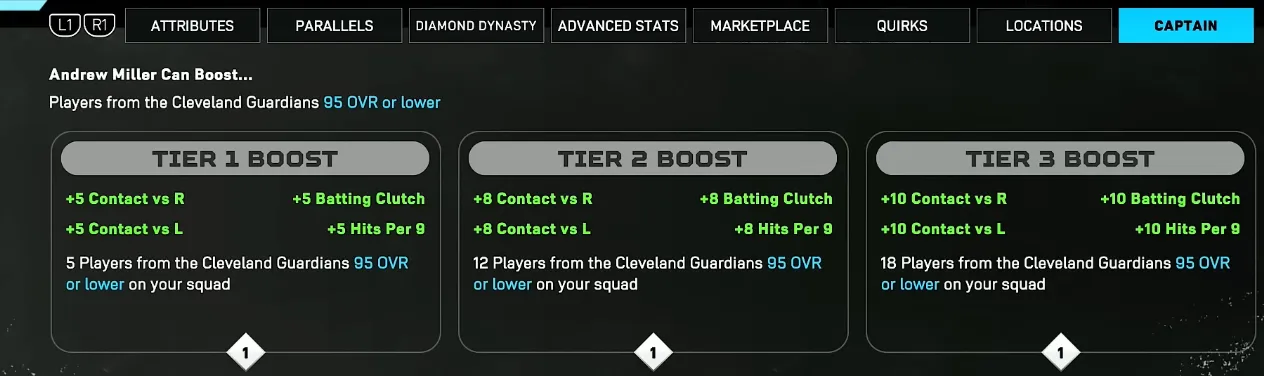
Mastering this tier system is easily one of the most cost-effective ways to dominate Diamond Dynasty this year. Instead of draining your stash of MLB The Show 26 Stubs on overpriced, top-tier marketplace cards, you can leverage these synergistic multipliers to transform budget-friendly players into elite competitors. By strategically pairing a Hitter Captain with a Pitcher Captain and hitting those maximum Tier 3 requirements, you can build a top-tier, competitive squad while keeping your hard-earned Stubs safely in the bank.
Once a captain is assigned and requirements are met, you will see a glowing, upward-facing boost arrow on the player cards in your lineup. You can view the exact attribute increases directly on their player profile card or attributes chart. You can track the current community rankings and full stat requirements on the ShowZone Captains Database or check eligible team filters on the ShowDD Captains Tool.
Assigning the card is only half the battle. To actually get the most out of your captain, keep these team-building fundamentals in mind:
By pairing a Hitter Captain and a Pitcher Captain that complement the same theme, you can elevate lower-tier cards into elite competitors, giving you a massive edge in Ranked Seasons and Battle Royale.
The U4N Editorial Team is made up of dedicated gamers and technical experts. We're not just a trusted marketplace for game assets—we're all about empowering players with top-tier, expert-driven content. Our team produces in-depth guides, strategies, and technical fixes for some of the biggest games out there, like MLB The Show 26, Aion 2, Forza Horizon 6, Arc Raiders, and Path of Exile.
Whether it's mastering market flipping in Diamond Dynasty or optimizing your endgame builds, all of our strategies are tested and proven by in-house experts. At U4N, we don't just follow the meta—we help you stay ahead of it.