Cart Empty
Continue ShoppingIn MLB The Show 26, Depth of Field is a new visual feature that enhances your batting experience by helping you focus on the ball more effectively. This feature works by blurring the background, reducing distractions, and making it easier for you to track pitches as they come toward the plate.
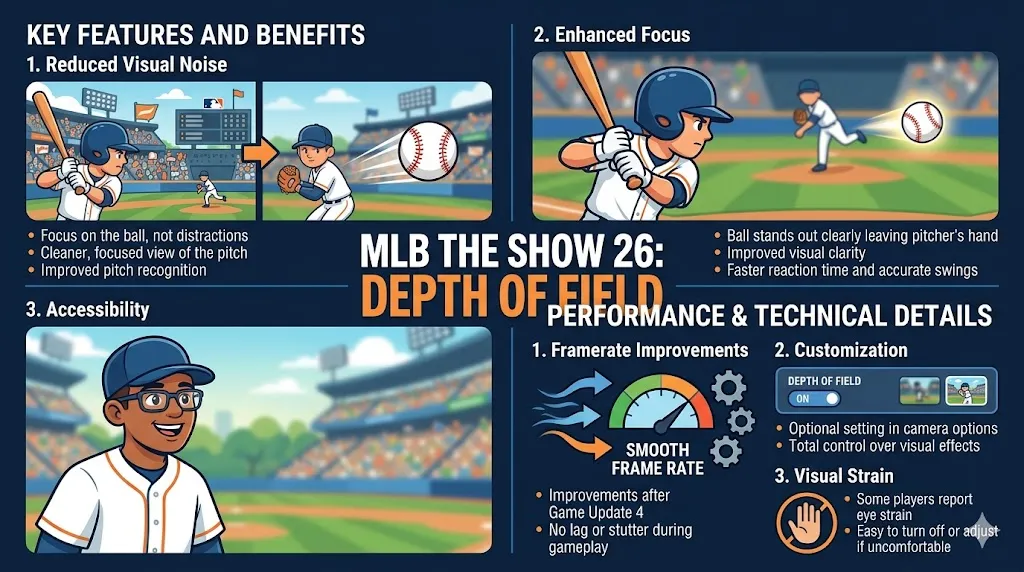
One of the standout benefits of the Depth of Field feature is how it reduces visual noise. During a game, the background can often be full of distractions, like crowd animations, stadium details, or a complex batter's eye that might make it harder to track the ball. With Depth of Field, these distractions are blurred, creating a cleaner, more focused view of the pitch. This means you can concentrate better on the ball and improve your pitch recognition.
By softening the background, the Depth of Field effect makes the ball stand out more clearly as it leaves the pitcher's hand. This enhanced visual clarity can improve your reaction time and pitch recognition, allowing you to make more accurate swings. Whether it's a fastball coming at you or a breaking pitch, having less visual clutter around the ball makes it easier to pick up and react to.
This feature is also helpful for players with visual impairments or sensitivity to bright lighting, especially during day games. By softening the harsh contrasts of the background, Depth of Field makes the game more accessible and comfortable for a wider range of players, ensuring that everyone has a better experience.
In response to some user feedback about performance issues, especially around framerate drops, San Diego Studio made improvements to the Depth of Field camera after Game Update 4. These updates ensure the game runs smoothly while the feature is enabled, preventing any lag or stutter during gameplay.
The Depth of Field effect is entirely optional, meaning you can toggle it on or off based on your personal preferences. You can find this setting in the camera options menu, so if you prefer to keep your background sharp or need to tweak the visual effects to your liking, you have full control over the feature.
While many players have found Depth of Field to be an improvement, some have reported experiencing eye strain after prolonged use. This can vary based on personal preferences and screen settings, so if you find it uncomfortable, it's easy to turn off or adjust.
For players looking to enhance their MLB The Show 26 experience, the Depth of Field feature provides a valuable tool for improving focus and pitch tracking. Whether you’re looking to reduce visual clutter or make the game more accessible, this feature can help you play your best. And if you need some extra resources to improve your team, make sure to visit the U4N MLB 26 Stubs store. With U4N, you can easily buy MLB 26 Stubs, helping you get the best players and unlock more features without the grind.
Q1: What is the purpose of the Depth of Field feature in MLB The Show 26?
The Depth of Field feature in MLB The Show 26 is designed to improve focus during gameplay, particularly when batting. It blurs the background, reducing distractions like the stadium's crowd, lighting, and other environmental factors. This helps players concentrate on the ball and the pitcher's actions, making it easier to track and react to pitches.
Q2: Why would I want to blur the stadium in a baseball game?
While it might seem odd to blur out the detailed stadium, the purpose is to reduce visual clutter that can distract players from the important task: tracking the ball. In some stadiums or lighting conditions, it can be difficult to pick up the ball, and this feature can improve visibility, especially during day games. It's especially useful in competitive play where precision is critical.
Q3: Is Depth of Field optional?
Yes, the Depth of Field effect is entirely optional. You can toggle it on or off depending on your preference. If you prefer to see the full stadium or feel that the blur distracts you, you can simply disable the feature in the camera settings.
Q4: Does Depth of Field only help with batting?
While the primary goal of Depth of Field is to assist with batting by improving focus on the ball, some players find it beneficial in reducing glare or visual noise in certain stadiums. This makes it easier to see the ball, which is especially important for players who have trouble seeing the pitch due to the background.
Q5: Will it affect game performance?
In some cases, Depth of Field might help improve game performance. By blurring parts of the background, it can reduce the strain on the system's rendering capabilities, particularly in crowded stadiums or during complex visual effects like crowd animations. However, the impact on performance will depend on the system you're using.
Q6: Why not just fix the stadium visuals instead of adding a blur?
While some players argue that the game should address the underlying graphical issues, the Depth of Field feature serves as a practical solution for players who struggle with background distractions. It helps improve visibility, particularly for those in competitive modes, without requiring major changes to the game's graphical engine. The feature gives players the option to enhance their focus, especially in challenging lighting conditions.
Q7: Can Depth of Field be useful in real-life situations?
The feature mimics real-life adjustments made by players when they are distracted by lighting or background elements in a stadium. In actual baseball games, players often focus on a "batter's eye" or adjust their environment to better track the pitch. MLB The Show 26's Depth of Field serves a similar purpose by improving clarity and focus, especially in competitive environments.
Q8: How do I turn off the Depth of Field effect?
To disable Depth of Field, navigate to the camera settings in the game. From there, you can toggle the feature on or off based on your preference. If you don't like the blurred backgrounds, simply turn the effect off.
Q9: Is this feature widely accepted by players?
The feature has sparked mixed reactions. Some players appreciate it for its ability to help with focus and visual clarity, especially during day games or in stadiums with poor visibility. Others feel it detracts from the experience of seeing the full, detailed stadium. Since it's optional, players have the freedom to choose how they want to experience the game.
Q10: Will Depth of Field be used for more than just batting?
As of now, Depth of Field primarily affects the batting perspective. However, its potential for improving visual clarity in other parts of the game—like during pitching or fielding—hasn't been fully explored. Since it's an optional feature, players can decide whether it's useful in other aspects of gameplay.
The U4N Editorial Team is made up of dedicated gamers and technical experts. We're not just a trusted marketplace for game assets—we're all about empowering players with top-tier, expert-driven content. Our team produces in-depth guides, strategies, and technical fixes for some of the biggest games out there, like MLB The Show 26, Aion 2, Forza Horizon 6, Arc Raiders, and Path of Exile.
Whether it's mastering market flipping in Diamond Dynasty or optimizing your endgame builds, all of our strategies are tested and proven by in-house experts. At U4N, we don't just follow the meta—we help you stay ahead of it.