In MLB The Show 26 , the Stadium Creator returns with some significant changes to the vault system and new preset environments.
Key Updates & Vault Reset
- No Stadium Transfers: Custom stadiums created in MLB The Show 25 (or earlier) do not carry over to MLB The Show 26.
- Fresh Stadium Vault: The game launched with a completely reset vault. According to the official MLB The Show FAQ, this reset was necessary to enable custom stadiums to be used in competitive modes again.
- Competitive Play: Unlike some previous years where custom parks were restricted, valid created stadiums can be used in online competitive play for this cycle.
New Environments & Features
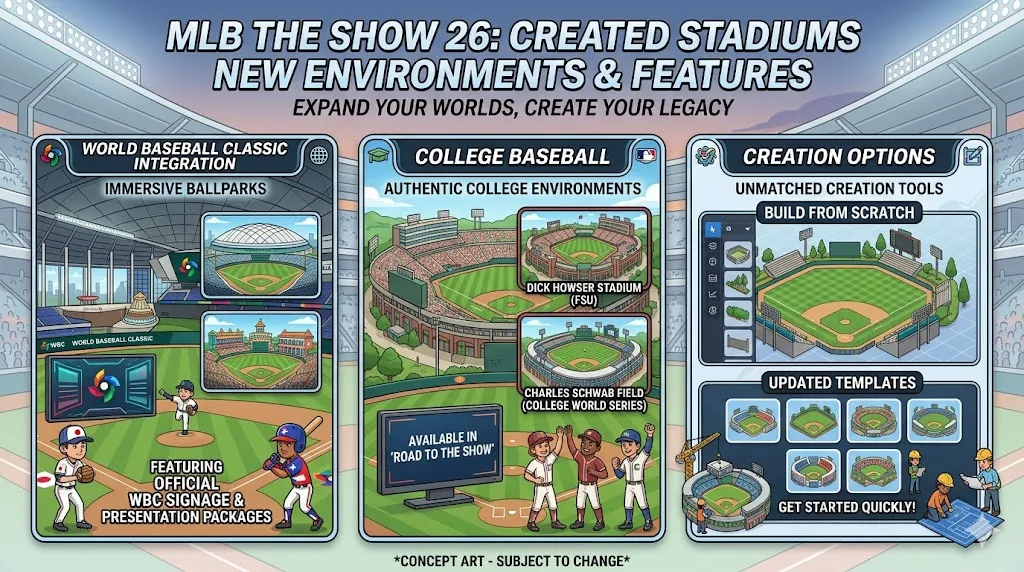
- World Baseball Classic Integration: The game features new immersive ballparks, including the Tokyo Dome and Hiram Bithorn Stadium in Puerto Rico, complete with official WBC signage and presentation packages.
- College Baseball: For the first time, authentic college environments like Dick Howser Stadium (FSU) and Charles Schwab Field (College World Series) are included in Road to the Show.
- Creation Options: Players can still build from absolute scratch or use one of the many updated templates to get started quickly.
- Authentic College Ballparks: To support the expanded Road to the Show college path, the game includes authentic stadiums for 19 playable college programs. New additions include Florida State's Dick Howser Stadium , while others like LSU , Tennessee , and Vanderbilt return with deeper integration.
- International Venues: New immersive ballparks like the Tokyo Dome and Hiram Bithorn Stadium in Puerto Rico are included, featuring official World Baseball Classic (WBC) signage and broadcast art packages.
Technical & Gameplay Updates
- Enhanced Atmosphere: Custom and authentic stadiums alike benefit from "Expanded Stadium Effects," which include new fireworks, CO2 smoke, and flames triggered by big plays.
- Prop & Creation Updates: While the core creator remains similar to previous years, new external props like roadways, parking lots, and decorative street lights have been added to help flesh out the areas outside the stadium walls.
- Mode Availability: Stadium Creator remains exclusive to PlayStation 5 and Xbox Series X|S; it is not available on the Nintendo Switch or previous-gen consoles.
How to Access & Manage
To use or find created stadiums, navigate to the Create icon at the top of the main menu:
- Stadium Creator: Start a new project or edit an existing one.
- Vault/Download: Use the "Most Popular" or "Search" tabs in the vault to find community creations like the "1960 Candlestick Park" or various "XP Grind" stadiums.
- Equipping: In Diamond Dynasty, go to Manage Squad > Stadium tile > My Stadiums to select your custom park.
Online Play Requirements
To use a created stadium in Diamond Dynasty's competitive modes (Ranked or Battle Royale), it must meet specific criteria:

- Template Walls: Most competitive modes require the use of pre-set outfield wall templates to prevent "cheat" dimensions.
- Disqualification: Some users report that stadiums specifically designed for Home Run Derbies or XP grinding may no longer meet the stricter requirements for online use in MLB The Show 26.
About the Author: U4N
U4N is a leading online marketplace offering secure, fast transactions for in-game items, currencies, accounts and boosting services. Covering a wide range of popular games, U4N provides players with reliable services, including fast delivery and verified sellers, ensuring a smooth and safe gaming experience.