Cart Empty
Continue ShoppingMLB The Show 26 has introduced an exciting Mini Seasons mode, but players have been facing several frustrating glitches that hinder the experience. These bugs can range from progress not saving, rosters being invalid, missing rewards, and more.
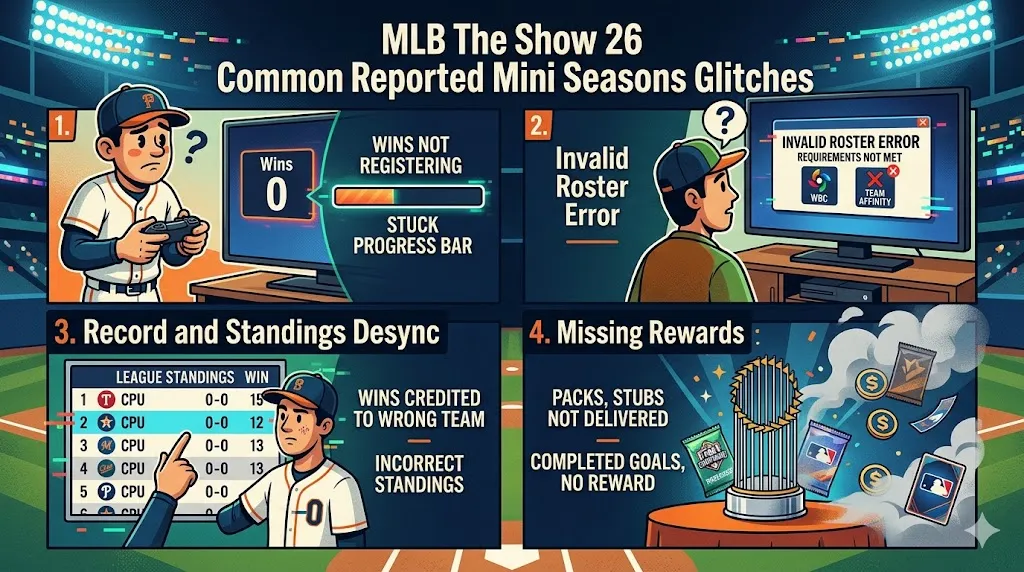
One of the most common issues players face in Mini Seasons is progress not being saved. This means that wins in the regular season or playoffs sometimes don't register, causing players to replay the same games over and over without advancing. Even after winning a game, the progress bar can stay stuck, forcing players to repeat matches or play through the same playoff round multiple times. This can be incredibly frustrating, especially if you've put a lot of time into the season and are close to finishing.
Even if you have a fully eligible team, some players have encountered an error where the game claims their roster is invalid. This glitch is most frequently seen in special seasons like the World Baseball Classic (WBC) or Team Affinity events. The game might not recognize that you've met the requirements for the roster, preventing you from starting a game altogether. Despite having a full team of eligible players, the error message can be an annoying barrier to gameplay.
Another issue that has been widely reported is the record and standings desynchronization. In some cases, your record will display as 0-0, even after you've won multiple games. In other cases, the game credits your wins to a different CPU-controlled team, causing discrepancies in the standings. This desync issue makes it difficult to track your progress, as you might think you've won the required games to advance when, in fact, the game hasn't recognized your victories properly.
Finally, some players have reported not receiving their well-earned rewards after completing a season or winning a championship. Packs, stubs, and other mission rewards may not be delivered to your account, even though you've met the necessary conditions to claim them. This can be especially frustrating if you've worked hard to complete specific goals and were expecting a reward at the end of your effort.
If you’re dealing with frustrating Mini Seasons glitches in MLB The Show 26, such as progress not saving, roster errors, or missing rewards, you’re not alone. While we await patches, these bugs can really hamper your gaming experience. But if you're looking to quickly enhance your team and bypass some of these issues, consider purchasing MLB 26 Stubs. You can buy MLB 26 Stubs at the lowest price through U4N, your trusted marketplace for fast, safe, and reliable in-game currency. Boost your progress and unlock rewards without the stress of bugs or slow grinding.
While these glitches can be disappointing, the community has found several temporary fixes that may help you get around the issues. Here are some recommended workarounds:
If you're stuck with progress not saving, the only verified fix is to restart the mini season. This involves going back to the season selection menu and starting a new season from scratch. While this isn't the most ideal solution, it's often the quickest way to get back on track when you encounter bugs that prevent you from advancing in a season.
For those encountering the "Invalid Roster" error, you can try a simple fix by going to Manage Squad -> Squad Options and selecting Generate Best Squad. This will automatically fill your roster with the best available players and may reset the internal check that's causing the eligibility issue. It doesn't always work, but it's worth a try if you're unable to start a game due to roster errors.
If you're missing packs or rewards that should have been delivered, a simple fix is to open the MLB The Show Companion App on your phone. By syncing the app, you can sometimes trigger the delivery of missing items to your account. While this isn't always guaranteed, it's a quick and easy step that can help resolve some of the reward-related glitches.
If you encounter an "Unexpected Error Occurred" message, sometimes the issue can be fixed by restarting the game app or your console. This can help clear any temporary server-side sync issues that might be affecting your gameplay experience. It's a basic fix, but it has helped some players resolve issues related to progress not saving or glitches preventing them from entering games.
The U4N Editorial Team is made up of dedicated gamers and technical experts. We're not just a trusted marketplace for game assets—we're all about empowering players with top-tier, expert-driven content. Our team produces in-depth guides, strategies, and technical fixes for some of the biggest games out there, like MLB The Show 26, Aion 2, Forza Horizon 6, Arc Raiders, and Path of Exile.
Whether it's mastering market flipping in Diamond Dynasty or optimizing your endgame builds, all of our strategies are tested and proven by in-house experts. At U4N, we don't just follow the meta—we help you stay ahead of it.