Cart Empty
Continue ShoppingMLB The Show 26 has been a hit with players, but since its March 2026 launch, many gamers have encountered various server and technical issues, particularly affecting online modes like Events April 2026. Whether it's matchmaking issues, technical bugs, or connectivity problems, we've got you covered with some common fixes and tips to get you back in the game quickly.
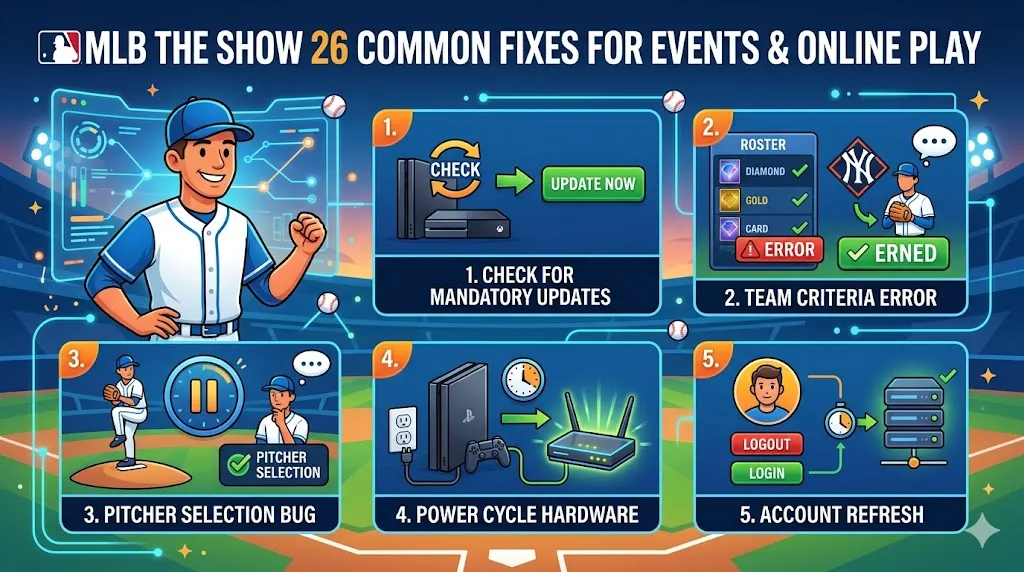
Sometimes, matchmaking can fail or cause issues like "No Opponent Found" if a new update hasn't been installed. These updates are critical for the game to run smoothly, especially for online play. To resolve this:
This should clear up most matchmaking issues related to missing updates.
Another common issue players face is the "Team Criteria Error" during Events. The game may fail to match you up with an opponent if your team doesn't meet the event's requirements, such as specific card types or overall team rating. Here's how to avoid this:
Make sure your team aligns with the event's restrictions to avoid frustration.
There have been reports of crashes during pitcher selection in certain online modes. If you're facing this issue, here's a community workaround:
If you're still encountering crashes, it's worth trying this fix before diving into further troubleshooting.
Connectivity issues often arise due to temporary cache problems that block online features. To solve this, you can perform a "power cycle" on your hardware:
This refresh can often clear up issues like slow matchmaking or disconnections.
Sometimes, simply refreshing your account can resolve persistent issues with online play. To do this:
This can help solve problems like matchmaking errors or connectivity glitches that don't seem to go away.
If you’re looking to enhance your MLB The Show 26 experience, solving these technical issues is just one part of the equation. Whether you’re grinding through Events or just enjoying online play, having enough Stubs can make a big difference in your team-building efforts. For those looking for the best deals, U4N offers competitive prices for bulk MLB 26 Stubs, allowing you to quickly boost your collection without breaking the bank. Check out U4N’s trusted marketplace to buy Bulk MLB 26 Stubs deals today and level up your game with ease!
San Diego Studio often schedules maintenance at 4 AM PT (7 AM ET) to apply updates, fix bugs, and improve server performance. During this time, online play, including Events, may be temporarily unavailable. To stay informed:
Server downtime is usually brief, but it can impact your ability to play online during those hours.
Some players have reported lag spikes, inconsistent hitting, and disconnections that result in losses. These issues can be particularly frustrating in competitive modes like Events. If you're experiencing these problems:
Some users, especially those using T-Mobile Home Internet, have reported persistent "Challenge Failed" errors in MLB The Show 26. This issue is typically caused by network incompatibility, particularly with restricted ports on certain internet providers. Here's what you can do:
By taking these steps, you can avoid some of the more frustrating network-related issues.
The U4N Editorial Team is made up of dedicated gamers and technical experts. We're not just a trusted marketplace for game assets—we're all about empowering players with top-tier, expert-driven content. Our team produces in-depth guides, strategies, and technical fixes for some of the biggest games out there, like MLB The Show 26, Aion 2, Forza Horizon 6, Arc Raiders, and Path of Exile.
Whether it's mastering market flipping in Diamond Dynasty or optimizing your endgame builds, all of our strategies are tested and proven by in-house experts. At U4N, we don't just follow the meta—we help you stay ahead of it.