Cart Empty
Continue ShoppingTo get the best hitting results in MLB The Show 26, competitive players agree that using the Zone Hitting interface paired with the Strike Zone camera view is a winning combination. This setup gives you full control over your Plate Coverage Indicator (PCI) and provides a clear view of the pitch's path, enabling quicker reactions and precise timing.
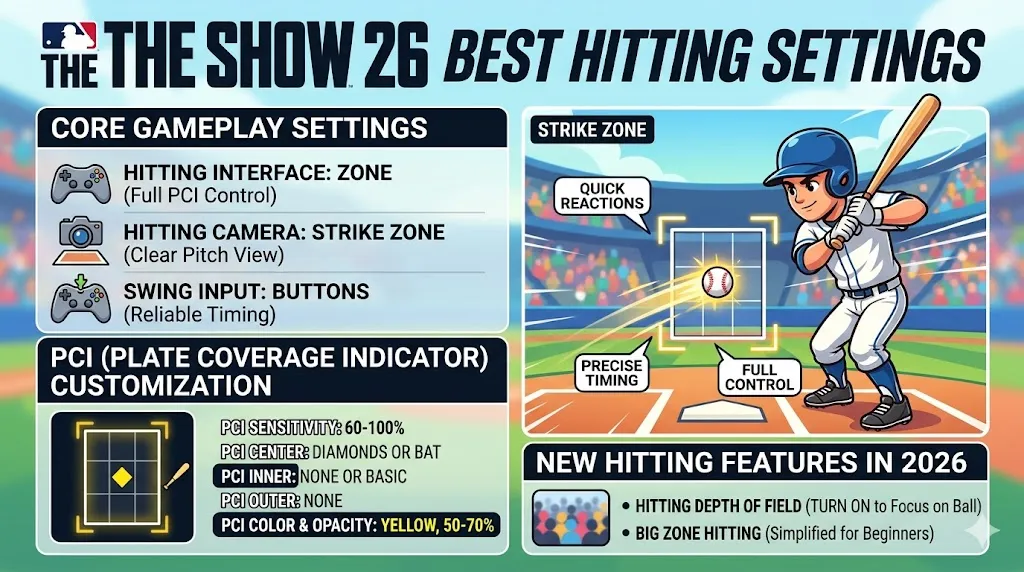
For consistent competitive performance, here are the settings that most players recommend:
| Setting | Optimal Choice | Why It Matters |
|---|---|---|
| Hitting Interface | Zone | Offers maximum control over PCI movement and accuracy. |
| Hitting Camera | Strike Zone | Brings the camera close to the batter, making pitch recognition easier. |
| Swing Input | Buttons | More reliable timing compared to analog input. |
| Guess Pitch | Off | Avoids penalties to your PCI size from incorrect guesses. |
Customizing the PCI is a matter of personal preference. Elite players generally use minimalist setups to avoid distractions and focus on the pitch.
| Setting | Optimal Choice | Why It Matters |
|---|---|---|
| PCI Sensitivity | Max (100%) or 60-75% | High sensitivity allows for quick reactions to different pitches. |
| PCI Center | Diamonds or Bat | These give you a clear "sweet spot" to focus on when making contact. |
| PCI Inner | None or Basic/Wedge | Keeps the screen clear by reducing unnecessary distractions. |
| PCI Outer | None | Reduces visual clutter, giving you a clean view of the zone. |
| PCI Color & Opacity | Yellow, 50-70% opacity | Stands out against most backgrounds, providing better visibility. |
A few new features in MLB The Show 26 have enhanced hitting, including:
To fully enjoy MLB The Show 26 and enhance your gameplay, it's important to use the optimal settings for hitting, like the Zone Hitting interface and the Strike Zone camera view. These settings give you excellent control over your Plate Coverage Indicator (PCI) and make pitch recognition easier. Whether you're aiming for better timing or fine-tuning your PCI customization, following these settings will help you perform at your best.
For those looking to get ahead in MLB The Show 26, having the right amount of stubs is key. If you’re searching for the lowest price on MLB 26 Stubs, be sure to check out U4N. U4N offers the lowest price for MLB 26 Stubs, allowing you to get the most out of your game without breaking the bank. Whether you're buying stubs to improve your team or unlock better cards, U4N is your go-to platform for affordable MLB 26 Stubs.
| Setting | Optimal Choice | Why It Matters |
|---|---|---|
| Hitting Interface | Zone | Gives full control over PCI for more precise contact. |
| PCI Sensitivity | Max (100%) | Provides the quickest reaction to fastballs and breaking balls. |
| PCI Style | Bat | Minimizes distraction, giving you a clearer view of the PCI. |
| Guess Pitch | Off | Focus on reading the pitch rather than guessing. |
| Camera | Strike Zone | Best for pitch recognition, especially against hard-throwing pitchers. |
| Depth of Field | On | Reduces background distractions, helping with ball tracking. |
These tweaks won't drastically change gameplay but can improve your comfort:
To get the most consistent and effective results in MLB The Show 26, use the following:
Must-Use Settings:
Swing Strategy:
Play Smart:
The U4N Editorial Team is made up of dedicated gamers and technical experts. We're not just a trusted marketplace for game assets—we're all about empowering players with top-tier, expert-driven content. Our team produces in-depth guides, strategies, and technical fixes for some of the biggest games out there, like MLB The Show 26, Aion 2, Forza Horizon 6, Arc Raiders, and Path of Exile.
Whether it's mastering market flipping in Diamond Dynasty or optimizing your endgame builds, all of our strategies are tested and proven by in-house experts. At U4N, we don't just follow the meta—we help you stay ahead of it.