How to complete the Outstanding Balance quest in ARC Raiders
To complete the Outstanding Balance quest in ARC Raiders, you must visit two specific locations on the Blue Gate map and successfully extract with Dodger's Note.
Both objectives must be done in a single round. If you die before extracting, your progress resets and you must start over. Equip an augment that grants a safe pocket to secure the quest item.
Step 1: Search the Traffic Tunnel
- Head to the Checkpoint POI located in the middle-northern area of the Blue Gate map.
- Enter the underground Traffic Tunnel (you can drop down via the headhouse circular vent stairs).
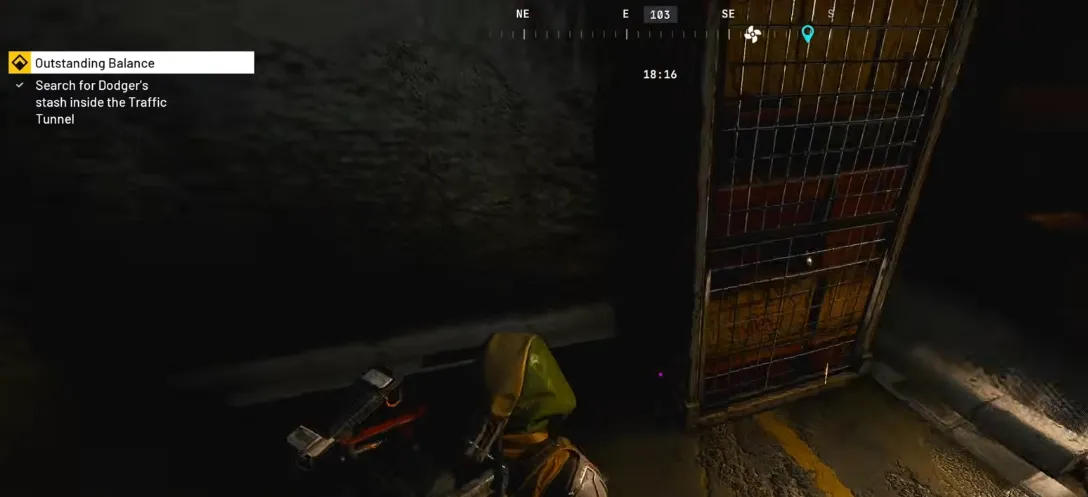
- Move toward the back-left corner of the tunnel until you see a blue tarp.
- Climb the metal platform and interact with the crate/shelf labeled "Search Dodger's Stash".
- An explosion/booby trap will trigger, updating your objective.
Step 2: Search Pilgrim's Peak Antenna
- Travel to the far north of the map to Pilgrim's Peak.
- Enter the base of the large antenna tower.
- Take the interior zipline upward.
- Jump off at the second-highest floor (the floor just below the very top).
- Turn right to find Dodger's bag/backpack tucked between machines.
- Search the bag, pick up Dodger's Note, and place it in your safe pocket.
Step 3: Extract
- Head straight to an extraction point and leave the map alive.
- Return to Speranza and deliver the note to Tian Wen at the gun shop to claim your rewards (including weapon attachments and cosmetics).
Rewards
Completing the Outstanding Balance quest gives you three specific, guaranteed items:
- 1× Gothic Graffiti (Aviator Colour) cosmetic outfit variant
- 1× Extended Medium Mag III weapon attachment
- 1× Silencer II weapon attachment
If you want to skip the intense grind of navigating the dangerous Blue Gate map or worrying about losing your loot before extraction, you can buy arc raiders blueprints instant delivery right here on our site to upgrade your arsenal without the hassle.
Additional Benefits
- Vendor Reputation: Completing this clears Dodger's debt and gives you XP toward Tian Wen's shop level. Higher levels unlock better ammunition types to buy.
- Next Mission Unlocked: Finishing this quest unlocks the follow-up mission, Settled in Full. That mission requires you to hunt down an ARC Bastion and extract its Cell.
You can equip your new cosmetic color in the Customisation section of your Raider tab. The magazine and silencer can be slotted right into your mid-game weapons.
How To Enter The Traffic Tunnel
To reach the Traffic Tunnel for the Outstanding Balance quest, you must deploy to the Blue Gate map and head to the Checkpoint POI .
How to Enter the Traffic Tunnel
You can access this underground area using two different paths:
- The Main Gates (Fastest): Walk directly through the massive industrial doors at the Checkpoint POI.
- The Vent Shaft (Safest): Drop into the "headhouse" circular vent located in the northern area of Checkpoint. Climb down the winding stairs or ride the zipline straight to the bottom floor to avoid fighting enemies outside.
Where to Find the Stash Inside
Once you are down in the tunnels, look for Dodger's Insignia (a symbol showing two squares) painted on the environment.
- Stick to the left side of the main tunnel road.
- Move northwest all the way to the very back wall.
- Look for a large blue tarp draped over some crates.
- Climb the small metal platform next to it and locate the shelf labeled "Search Dodger's Stash".
Interacting with this shelf will trigger a small explosion and empty smoke trap. Do not panic, it will not harm your Raider. This action updates your tracker, allowing you to move north to Pilgrim's Peak for the second half of the quest.
Where to Go at Pilgrim's Peak
To find the Pilgrim’s Peak objective for the Outstanding Balance quest, you must locate Dodger's Bag hidden inside the massive radio antenna tower . This location sits at the northern tip of the Blue Gate map.
Make sure you have already completed the Traffic Tunnel step in this exact same raid. The game will not allow you to pick up the item if you try to do it across separate rounds.
Where to Go at Pilgrim's Peak
- Travel to the far north of the map and look for the giant radio antenna tower.
- Head to the back of the building to find an opening with an interior vertical zipline.
- Take the zipline upward, but jump off at the floor just below the top level (the middle section of the tower structure).
- If you miss the jump, drop through the hole in the floor to reach the level characterized by orange walls and large power generators.
How to Find the Note
- Turn right from the zipline platform and head to the far side of the room.
- Look on the ground between the orange generators/machinery to spot a small, yellow tool backpack.
- Interact with the bag to make Dodger's Note spawn on the floor.
- Interact with the note to pick it up and immediately drag it into your Safe Pocket. This ensures you keep it even if you die on the way out.
How to Escape Safely
Once the note is secured, your final task is to extract alive. The closest extraction option is the Warehouse Airshaft directly south of Pilgrim's Peak. If you have a Raider Hatch Key, you can also use the nearby Prefab Hatch to escape quickly.
Extraction Points on Blue Gate
The Blue Gate map is a massive, multi-layered mountain region featuring broken highways, dense forests, and claustrophobic underground layouts.
Knowing how to safely navigate this map is the key to completing the Outstanding Balance quest, as you must cross from the center to the northern tip in a single run.
Blue Gate Map Layout & Navigation
- The Center (Checkpoint & Traffic Tunnel): This area is a highly contested, heavily patrolled industrial choke point. A dangerous ARC Bastion and several Comets usually guard the main roads above ground. Use the Headhouse circular vent shaft to drop directly underground, which completely bypasses the surface combat zones.
- The North (Pilgrim's Peak): Moving north from the tunnels requires climbing elevated mountain paths. Watch out for snipers and rival Raiders who often watch the ridges surrounding the giant radio antenna tower.
Extraction Points on Blue Gate
Once you have retrieved Dodger's Note, you must leave the map through one of Blue Gate's four primary Airshaft Extractions or a hidden hatch:
- Warehouse Airshaft: Located directly south of Pilgrim's Peak. It is the closest extraction point, but it is often camped by other players.
- Cliffside, Forest, or Overlook Airshafts: These alternative exits offer a longer trek but provide much better cover if the Warehouse area is too hot.
- Prefab Hatch: If you manage to find or bring a Raider Hatch Key, you can use the hatch near Pilgrim's Peak for an instant, silent getaway directly back to Speranza.
Bugged
Yes, the Outstanding Balance quest in ARC Raiders is known to get stuck or bugged for many players .
There are two primary reasons players experience this glitch: a progress tracking bug that fails to register your visit to Tian Wen, and an accidental item loss soft-lock if you die during the mission.
The Two Common Bugs
- The Completion Bug: You successfully visit both locations, grab the note, and escape alive, but Tian Wen acts like you never did it.
- The Lost Item Soft-Lock Bug: If you pick up Dodger's Note but die before extracting without a safe pocket, the game may think you already took the note from the backpack, preventing it from spawning again on your next try.
How to Fix or Bypass the Glitch
If you find yourself stuck, players in the community have discovered a few successful workarounds while waiting for a permanent developer patch:
- Do Every Step in One Single Round: Even if your quest log says "Search the Traffic Tunnel" has a checkmark from a past game, you must visit both spots in the exact same raid. Go to the Traffic Tunnel first, trigger the explosion, run straight up to the Pilgrim's Peak antenna, grab the note, and extract.
- Team Up with a Friend: If your backpack item is completely soft-locked and won't spawn, join a squad with a player who hasn't started the quest yet. Let them lead the lobby. When they interact with the stash and the bag, it will trigger the quest items to spawn for your character as well.
- Use a Safe Pocket: To avoid losing the item and bugging out your save tracking, make sure you bring an augment with a Safe Pocket. As soon as you grab Dodger's Note, drag it immediately into that slot.