Cart Empty
Continue ShoppingMLB The Show 26 introduces a new feature called the Automated Ball-Strike (ABS) Challenge System. This feature mirrors the system Major League Baseball is using in the 2026 season. It gives players the ability to contest umpire calls for balls and strikes, making the game even more realistic and interactive.
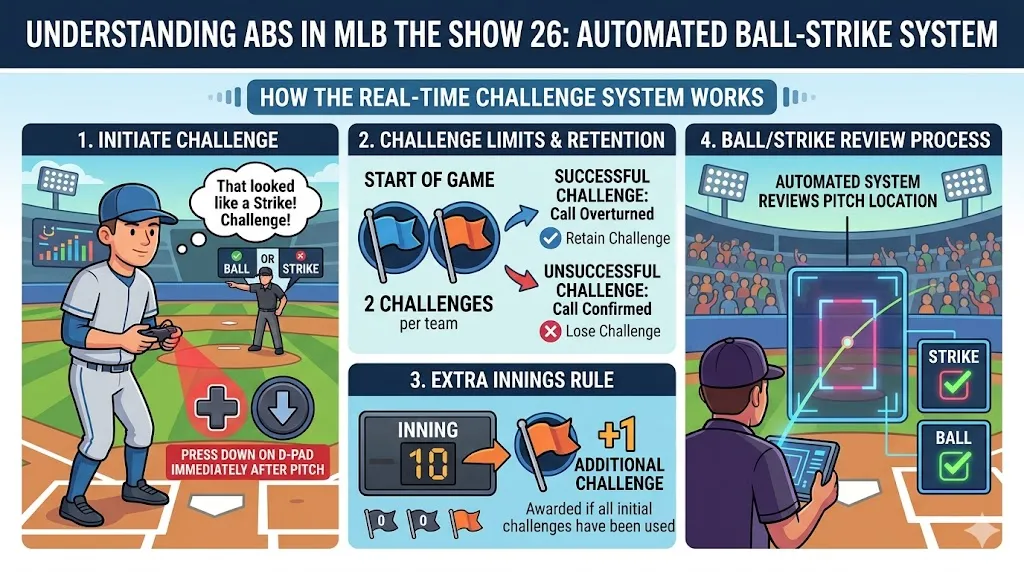
In MLB The Show 26, the ABS system lets players challenge home plate umpire calls on balls and strikes. If you think an umpire's decision is wrong, you can call for a review.
In case the game goes into extra innings, teams are given one more challenge, even if they've used up their initial two. This extra challenge is a helpful way to keep things fair in high-stress moments during overtime.
The ABS Challenge System isn't available everywhere in MLB The Show 26. Here's what you need to know about where and how you can use it:

If you prefer to play with or without the ABS system, you can easily turn it on or off. Here's how:
The U4N Editorial Team is made up of dedicated gamers and technical experts. We're not just a trusted marketplace for game assets—we're all about empowering players with top-tier, expert-driven content. Our team produces in-depth guides, strategies, and technical fixes for some of the biggest games out there, like MLB The Show 26, Aion 2, Forza Horizon 6, Arc Raiders, and Path of Exile.
Whether it's mastering market flipping in Diamond Dynasty or optimizing your endgame builds, all of our strategies are tested and proven by in-house experts. At U4N, we don't just follow the meta—we help you stay ahead of it.