


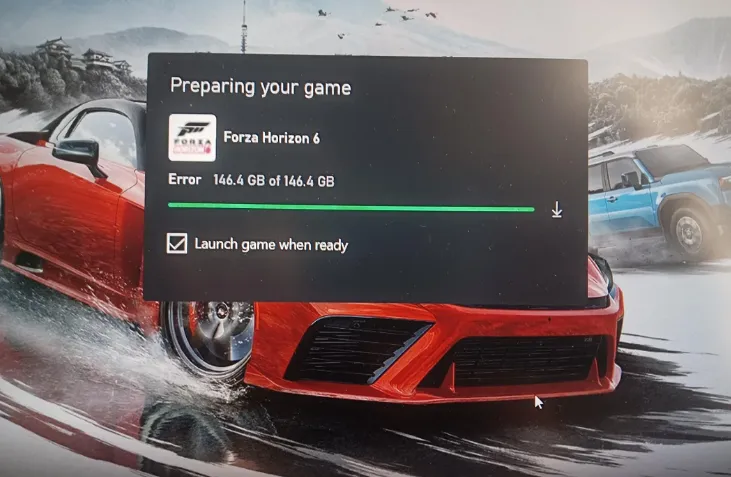
If your Forza Horizon 6 unpacking or decryption process is taking hours—or seems frozen entirely—you're not alone. This is a common issue on both Steam and the Xbox PC app, caused mainly by the game's massive file size and heavy compression. At over 135GB, the installer puts a serious strain on your CPU and storage drive, sometimes making the unpacking appear to stall indefinitely.
Why the Unpacking Error Happens
- Heavy Compression: The FH6 launch files are highly compressed to reduce download size. Unpacking them locally requires your PC to process and decrypt chunks of data continuously.
- CPU & Storage Load: Older CPUs or slower HDDs can bottleneck the process. Even high-end SSDs may show temporary pauses if the system's background tasks compete for I/O.
- Temporary Disk Duplication: During extraction, the game temporarily duplicates data chunks. If your drive is nearly full, this can trigger stalls or slowdowns.
- Launcher Bugs: Steam and Xbox App both have known issues where background services can interfere with unpacking, leading to freezes.
Fixes for Steam Users
1. Delete and Re-download (“Nuclear Option”)
If your internet speed is fast, the easiest solution is to delete the preloaded game files and download the fully unpacked version from Steam. Fresh downloads bypass the local CPU decryption entirely.
2. Kill Steam Web Helper
Close Steam completely. Open Task Manager (Ctrl + Shift + Esc), end all instances of Steam Web Helper, then relaunch Steam.
3. Verify Disk Activity
Check your SSD usage in Task Manager. If reads show 0%, the unpacker may be hung. Pause the download for 10 seconds, then resume—it often forces the queue to restart.
4. Ensure Enough Free Space
The decryption process needs extra space—usually 30–50GB beyond the game size—on the drive where FH6 is installed. Without this, unpacking may freeze.
For players who want to save time and avoid the hassle of long unpacking or dealing with CPU-heavy decryption, marketplaces like U4N offer a reliable way to get cheap Forza Horizon 6 credits instantly, letting you jump straight into upgrading cars, unlocking wheelspins, and enjoying the full Horizon experience without waiting hours for the game to finish unpacking.
Fixes for Xbox App / Microsoft Store Users
1. Reset Gaming Services
This often solves unpacking locks:
get-appxpackage Microsoft.GamingServices | remove-AppxPackage -allusers
start ms-windows-store://pdp/?productid=9MWPM2CQNLHN
The second command opens the Microsoft Store page for Gaming Services—reinstall it, restart your PC, and try again.
2. App Reset
Go to Settings → Apps → Installed Apps → Xbox → Advanced Options. Use Terminate, then Reset. Relaunch the installer afterward.
Extra Tips
- Pause Background Tasks: Close browsers, game launchers, or other heavy apps to free CPU and disk bandwidth.
- Check for Updates: Make sure Windows, Steam/Xbox App, and your GPU drivers are all updated.
- Use SSD if Possible: Unpacking on a traditional HDD can take several hours longer.
Unpacking errors can be frustrating, but following these steps usually resolves the problem. If nothing works, reaching out to Microsoft Support or Steam support with your logs can help.





