


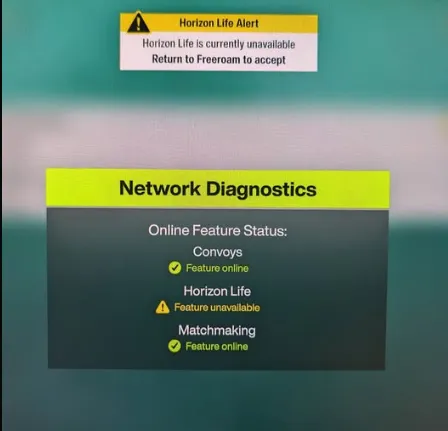
If you're booting up Forza Horizon 6 and suddenly find yourself unable to connect to Horizon Life, you're not alone. Many players have reported dropped connections, failed convoy creations, and “Feature Unavailable” errors following the recent 2.5GB update. From broken open-world matchmaking to intermittent session failures, the problem can be frustrating—but there are steps you can take to get back online.
1. Check Server Status
Before diving into fixes, make sure the servers aren't down. A recent patch pushed player numbers past 200,000, triggering widespread connection issues. You can check live reports via Downdetector Forza or the r/ForzaHorizon subreddit. If the servers are unstable, the only real solution is waiting for Playground Games to patch the issue.
2. Sign Out and Resync Profiles (PC)
Profile desyncs between the Xbox App and the Microsoft Store are common culprits. Here's how to fix them:
- Sign out from both apps.
- Close them completely using Task Manager.
- Relaunch and sign back in.
- Launch the game to see if Horizon Life reconnects.
Ensure your system clock is set to automatic—it helps prevent authentication errors.
3. Disable Conflicting Network Services
Certain background programs can block Forza's network handshake. Players have reported success by disabling:
- NI Domains or National Instruments network processes
- Citrix Workspace (disable App Protection)
Simply check Task Manager before launching the game and terminate these processes.
4. Enable Windows Firewall
If your firewall is turned off or a third-party antivirus is overly restrictive, Horizon Life may fail to connect. Make sure Windows Defender Firewall is on for both private and public networks.
5. Forward Teredo Ports (Xbox & PC)
Forza relies on Teredo Tunneling to communicate with Xbox Live. To restore connectivity:
- Check your Teredo state: Open Command Prompt as admin, type netsh interface teredo show state.
- Forward ports 3544 and 4500 UDP on your router.
This allows your console or PC to bypass blocked connections and properly handshake with servers.
6. Console-Specific Fixes
Xbox players can force a local profile save to reset online status:
- Drive into any unlocked festival house and set it as your primary home base.
- Exit to the open world and let the game auto-save.
- Restart from the dashboard to trigger a fresh server handshake.
Additionally, toggling between Horizon Solo and online mode can help bypass boot server queues.
With these steps, most players have been able to restore their connection to Horizon Life. While Playground Games continues to stabilize the servers after the recent update, these workarounds ensure you're not completely locked out of the shared world.

For anyone looking to jump back in faster or bypass grind delays, platforms like U4N also offer reliable, safe ways to boost credits or modded accounts in Forza Horizon 6, letting you focus on the racing action instead of waiting for server issues to clear.





