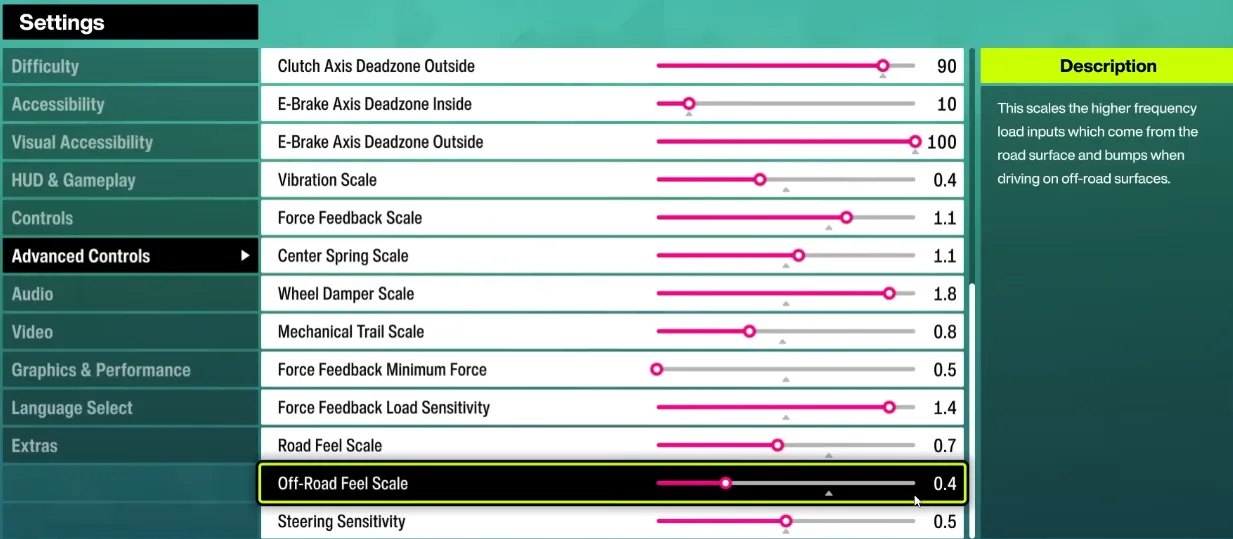
If you want to get the most out of your wheel in Forza Horizon 6 (FH6), proper setup is essential. Players have reported that default wheel settings often lead to oversteer, spinning out, and poor alignment between wheel input and on-screen car behavior. Below is a practical guide to optimize your setup for both direct drive and belt-driven wheels like the Logitech RS50, G920/923, and Thrustmaster series.
1. Core Wheel Settings
| Setting | Recommended Range | Notes |
|---|---|---|
| Steering Sensitivity | 40–50 | Lower values give smoother control; higher values make the wheel twitchier. |
| Operating Range (Angle) | 540–720° | 540° is favored for tighter control and avoiding spinouts; 720° for more natural cockpit feel. Avoid 900°–1080° for FH6 unless you want delayed responses. |
| Dampener | 0–35 | Reduces oscillations; 0 for a sharper feel, 30+ for smoother, slower steering return. |
| Strength / Torque | 5–8 Nm | Max strength helps sense car weight; too high can be fatiguing. Adjust to wheel type. |
| Force Feedback Filter | 1–8 | Low for sharper feedback; higher filters reduce small vibrations and noise. |
| Auto Force Feedback Filter | Off | Manual control is recommended for fine-tuning FH6 feel. |
Tip: Adjust one setting at a time and test in a safe environment to find your personal sweet spot.
2. Steering Linearity
Steering linearity controls how the wheel's rotation maps to the car's turning:
- Recommended starting value: 25
- Too high → wheel feels too sensitive at small angles.
- Too low → wheel feels “floaty” and unresponsive.
Check alignment by slowly turning the wheel in first-person view. The in-game steering should match your real-world input.

3. Drifting vs Normal Driving
- Normal driving: Focus on lower wheel rotation (540°–720°) and moderate strength for precise control.
- Drifting: Some players increase dampener and slightly reduce FFB filter to allow smoother counter-steering. For example: dampener 35, FFB filter 5, strength ~5.4 Nm.
4. Pedal Calibration
- Ensure pedals are correctly rebinding in-game.
- Brake force can be adjusted to taste; too soft → late braking, too hard → jerky stops.
- Some users prefer maximum pedal linearity for consistent throttle feel.
5. Common Community Observations
- Spinouts: Many users find FH6 more sensitive than FH5; turning down operating range helps.
- Cockpit mismatch: Using 540° rotation often keeps steering aligned with cockpit visuals.
- Compatibility mode: RS50 vs Pro mode affects pedal mapping and wheel feel; restart the game after changing modes.
- G923/G920 users: Try steering linearity first; adjust FFB strength in the Logitech software and disable Auto Filter for better results.
- Direct drive wheels: Max strength gives better weight and resistance; filter and dampener reduce jitter.
6. Testing & Adjustment Strategy
- Start with 540° rotation, sensitivity 50, linearity 25, dampener 0.
- Test in a mountain pass or festival circuit.
- Adjust strength or FFB filter if the car feels too light or harsh.
- For drifting, increase dampener and slightly reduce FFB filter.
- Only change one setting per test to isolate effects.
By carefully adjusting these parameters, FH6 wheel users can enjoy a smoother, more controllable experience. The goal is control over raw force, letting you confidently take sharp turns without spinning out.
If you want to skip trial and error and get fully optimized credits and items in FH6, you can visit U4N, a trusted platform to quickly buy safe Forza Horizon 6 credits, letting you upgrade cars and experiment with setups without worrying about grind time.