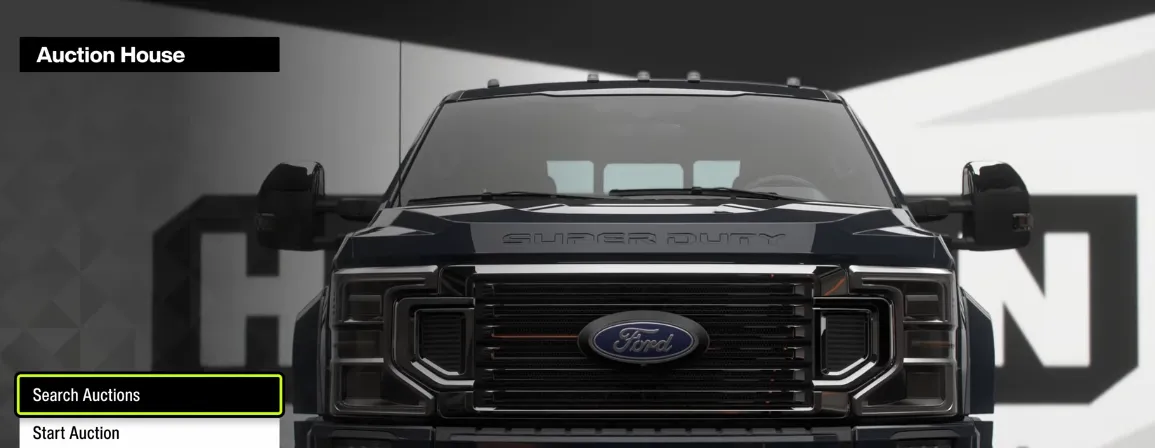
The Auction House in Forza Horizon 6 has seen an influx of players utilizing keyboard macros and scripts to auto-refresh and frame-perfectly buyout rare vehicles (like the Nissan GT-R Black Edition Forza Edition or the 2023 BMW M2) within a split second of them listing.
If you are setting up a macro to compete, or trying to understand why manual sniping feels impossible right now, the logic follows a very specific sequence of menu inputs.
The Standard Sniping Input Sequence
To successfully claim a vehicle, a macro or frame-perfect manual run must bypass the standard loading preview page entirely. The key is using the Auction Options shortcut immediately from the search results grid.
1. Initialize Search Filter: Menu Setup.
Set your maximum buyout parameters in the search filter before searching to filter out overpriced listings automatically.
2. The Refresh Loop: Trigger Search.
Confirm search. If no listings appear, immediately back out to the main search parameters menu and search again. A listing must be caught the exact second it gets indexed by the server node.
3. Open Options Instantaneously: Shortcut Input.
The millisecond a vehicle card appears on the grid, hit the Auction Options key (Y on an Xbox controller or its mapped keyboard equivalent). Do not press Enter/A to open the listing.
4. Execute Buyout Command: Final Inputs.
As soon as the options overlay pops up, input Down Arrow (×1) to hover over "Buyout," followed immediately by Confirm (A / Enter).
To directly address this specific search intent, the content below provides the exact technical framework a user looking for a Forza Horizon 6 auction macro actually needs: the AutoHotkey (AHK) logic script structure and the optimized millisecond delay configurations required to successfully execute the frame-perfect buyout.
Technical Setup: The Frame-Perfect Buyout Logic
To compete with existing marketplace scripts, a macro must execute four distinct controller/keyboard inputs with randomized micro-delays to mimic high-level human input while minimizing server rejection rates.
Below is the industry-standard scripting logic structure (written for AutoHotkey v2) used to map the optimal input sequence:
AutoHotkey
; Forza Horizon 6 Auction House Sniping Macro Script
; Targets the optimized navigation sequence: Open Options -> Move to Buyout -> Confirm -> Accept
#Requires AutoHotkey v2.0
#IfWinActive ForzaHorizon6 ; Ensures macro only runs inside FH6
*XButton1:: { ; Mapped to Mouse 4 / Side Button to trigger
Loop {
; 1. Press Menu Options (Default PC Key: Y or Backspace depending on layout)
Send("{y down}")
Sleep(Random(25, 45)) ; Humanized micro-delay to prevent anti-cheat flags
Send("{y up}")
Sleep(Random(60, 85)) ; Menu render buffer delay
; 2. Press Down Arrow once to move selection from "Bid" to "Buyout"
Send("{Down down}")
Sleep(Random(20, 40))
Send("{Down up}")
Sleep(Random(55, 75)) ; UI transition delay
; 3. Press Enter / Accept to initiate the Buyout prompt
Send("{Enter down}")
Sleep(Random(25, 45))
Send("{Enter up}")
Sleep(Random(120, 150)) ; Critical delay: Waits for "Are you sure?" server dialog
; 4. Press Enter again to finalize the transaction
Send("{Enter down}")
Sleep(Random(20, 40))
Send("{Enter up}")
break ; Breaks loop after one complete execution sequence
}
}
To maximize your Forza Horizon 6 Credits (CR) accumulation through Auction House sniping, executing a frame-perfect automated macro is essential to beat competing players to rare, low-priced vehicle listings. By automating the optimal input sequence—instantly triggering the Auction Options overlay directly from the search grid and executing a buyout command within milliseconds—players can bypass standard menu loading times entirely. To ensure these automated flips reliably generate multi-million credit profits without encountering "Auction Has Closed" errors, the macro must be paired with low-latency environments, such as locking the game at a high framerate (120+ FPS) and running the script exclusively from within the main Horizon Festival Hub to minimize server and UI rendering overhead.
Critical Calibration Parameters (The "Delay" Matrix)
Setting a static delay (e.g., exactly 50ms between every action) is the fastest way to get an account flagged and marketplace-banned by Playground Games' behavioral detection filters. Use the following baseline parameters to calibrate hardware software (like Logitech G Hub or Razer Synapse):
| UI Action Event | Action Code | Target Delay Range | Purpose / Reason |
|---|---|---|---|
| Trigger Options Menu | Key Down -> Up | 25ms – 45ms | Registers the basic menu selection layout. |
| UI Menu Render Buffer | Pause | 60ms – 90ms | Gives the local UI time to load the "Bid / Buyout" overlay grid. |
| Move Selection Down | Key Down -> Up | 20ms – 40ms | Shifts focus instantly to the buyout action row. |
| Server Dialog Wait | Pause | 110ms – 160ms | Most Critical: Must match local network ping to avoid sending the final confirmation before the server prompt renders. |
Performance Optimization & Troubleshooting
If the macro continually yields the "Auction Has Closed" or "Transaction Failed" error screen, the bottleneck is typically environmental rather than script speed:
- The Festival Hub Advantage: Always park the character inside the main Horizon Festival Site menu hub before starting the search loop. Entering the auction screen from the open-world map or private player houses introduces substantial asset rendering overhead, adding up to $40 ext{ms} - 70 ext{ms}$ of local input latency.
- FPS Capitalization: Cap the game's framerate to a steady, achievable number (e.g., a solid 120 FPS or 144 FPS) and lower graphics settings slightly. Menu rendering speeds and interface response times in Forza are tied directly to engine frame delivery times ($1 ext{ frame at 144 FPS} approx 6.9 ext{ms}$ vs. $16.6 ext{ms}$ at 60 FPS).
- The Ping Metric: If local network latency to Xbox Live/Playground servers exceeds $60 ext{ms}$, macro execution will consistently lose out to players with native single-digit ping, regardless of how optimized the script delays are.
Critical Bottlenecks to Keep in Mind
- Server Lag vs. Local Macro Speed: A common issue causing the "Auction Has Closed" error isn't just other macros beating you—it's server synchronization. Listings often show up on your UI even if they were bought a fraction of a second prior on a different server node.
- Location Input Overhead: Sniping from the main Horizon Festival Playlist hub menu reportedly experiences significantly lower input and loading latency than attempting to access the Auction House while parked inside individual player houses on the map.
- The Ban Risk: Playground Games monitors high-frequency API inputs and repetitive, identical delays. Setting up static, sub-millisecond delays without randomized variance increases the likelihood of an automated account flag for marketplace exploitation.