AION 2 is now live globally, and one of its most talked-about features is not a raid, class, or boss fight. Players in Japan and overseas are sharing clips of the game's unusually detailed character creator, which offers more than 200 customization options and far more control over body proportions than most MMORPGs.
The discussion has focused on the number of separate torso and chest controls, but that is only part of the story. AION 2 lets players shape the face, body, outfit colors, wings, and overall silhouette of their Daeva before entering Atreia. For players who treat character creation as the real first boss of an MMO, this editor can easily consume more time than expected.
Source note: This article is based on reporting published by Game*Spark on October 6, 2026, and has been independently rewritten and expanded with official AION 2 information for U4N readers.
Why AION 2's Character Creator Is Going Viral
Character customization is expected in a modern MMORPG, but most games group body editing into a few broad controls such as height, build, and muscle definition. AION 2 goes further by dividing the torso into multiple adjustable regions. That level of separation is what caught the attention of players on social media shortly after the global launch.
The viral reaction is partly humorous, but it also highlights a serious strength of the editor. Players are not limited to making a character larger or smaller as a whole. They can change how different body areas relate to one another, producing a much wider range of silhouettes.
This matters in an MMO because the same character may remain on screen for hundreds of hours. Armor, costumes, wings, emotes, and cutscenes all look different depending on the proportions chosen during creation. A flexible editor gives players a better chance of making a character they still enjoy looking at long after the opening quests are finished.
AION 2 Has More Than 200 Customization Options
The official AION 2 description promotes more than 200 customization options. These settings cover much more than a few face presets. Players can work on facial structure, body proportions, colors, clothing, and wings to build a Daeva with a distinct identity.
That depth fits AION particularly well. Wings are central to the series, and AION 2 is built around aerial movement, vertical exploration, and combat in three dimensions. Your character's appearance is constantly visible while running, fighting, gliding, and flying across the world.
The game is powered by Unreal Engine 5 and takes place in a world described as 36 times larger than the original AION. With a larger world and a stronger focus on vertical travel, character presentation becomes part of the overall fantasy rather than something players see only on a profile screen.
Which Body Sliders Are Getting the Most Attention?
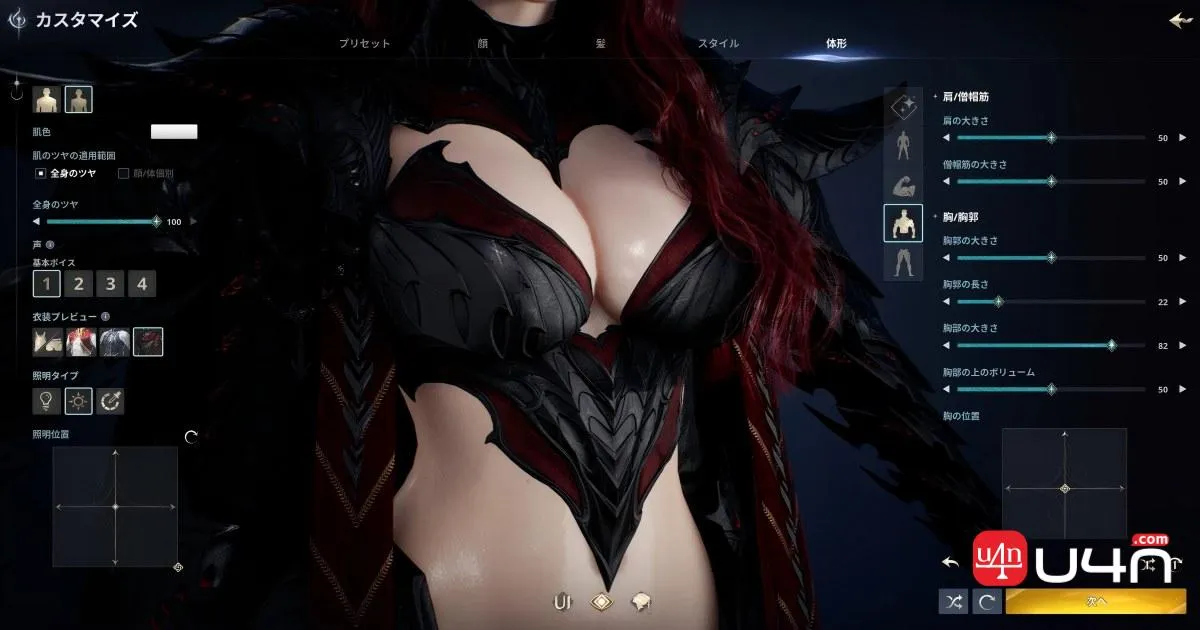
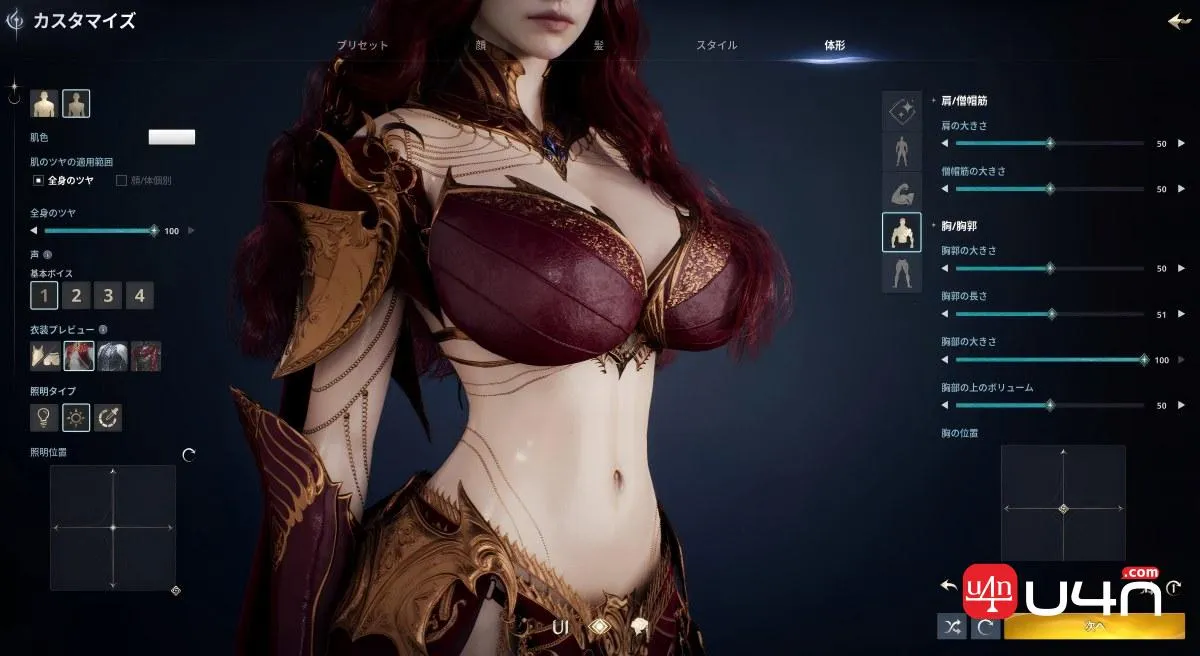
According to the Japanese report, AION 2 separates several torso-related settings that are commonly merged into one or two sliders in other games. The available controls include:
- Rib cage size: adjusts the overall width or scale of the chest structure.
- Rib cage length: changes the vertical proportions of the upper torso.
- Chest size: controls the primary chest-volume setting.
- Upper chest volume: changes where volume is distributed instead of simply scaling the entire area.
- Chest position: raises or lowers the placement relative to the torso.
- Latissimus dorsi: adjusts the width and shape of the back and side torso.
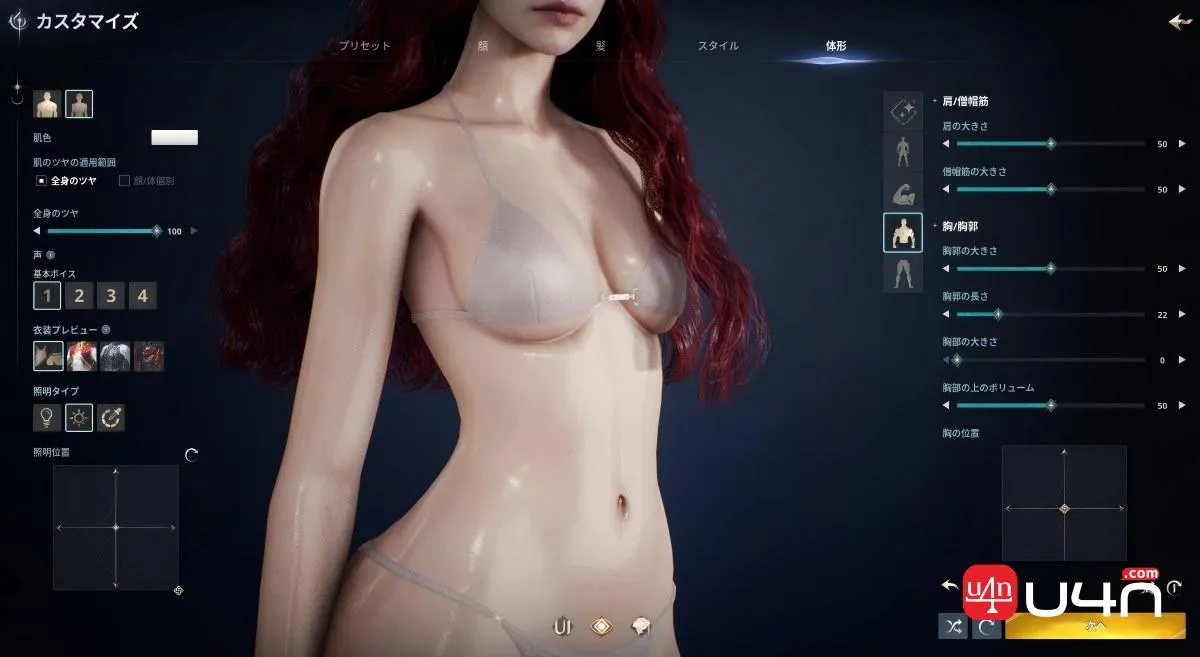
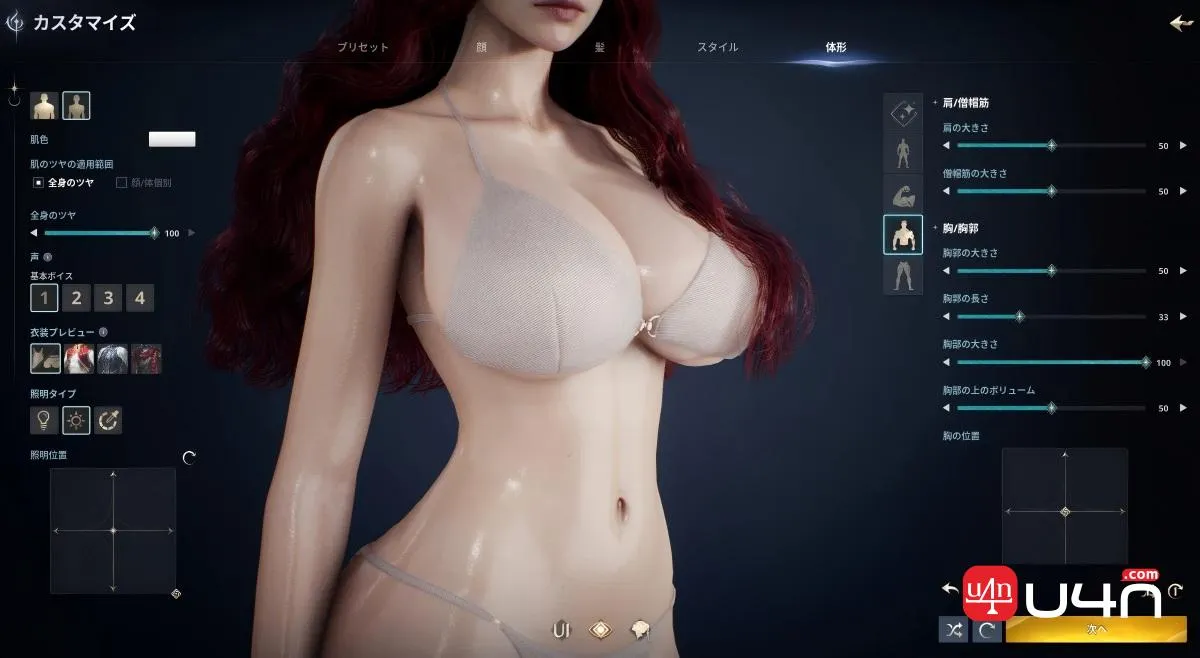
The important point is not any single slider. It is the way the settings work together. Two characters using the same chest-size value can still have very different proportions depending on rib cage width, torso length, placement, and back shape.
This creates more control over both stylized and realistic designs. Players can build a compact, broad, athletic, slender, or exaggerated silhouette without forcing every body area to scale in the same direction.
Abdomen and Lower-Body Customization Add Another Layer
The editor also includes a separate abdomen-protrusion setting. This gives players control over whether the stomach appears flatter or more pronounced, independent of several upper-body settings.
In practice, this makes the body creator much more flexible. A player can combine a larger upper body with a flatter abdomen, use a softer midsection, or create a more balanced silhouette without being locked to a single preset body type.
The rear-body panel adds more controls for the pelvis, glutes, thighs, calves, and legs. Players can adjust values such as pelvis size, glute size and height, thigh length and thickness, and calf proportions instead of accepting one fixed lower-body preset.
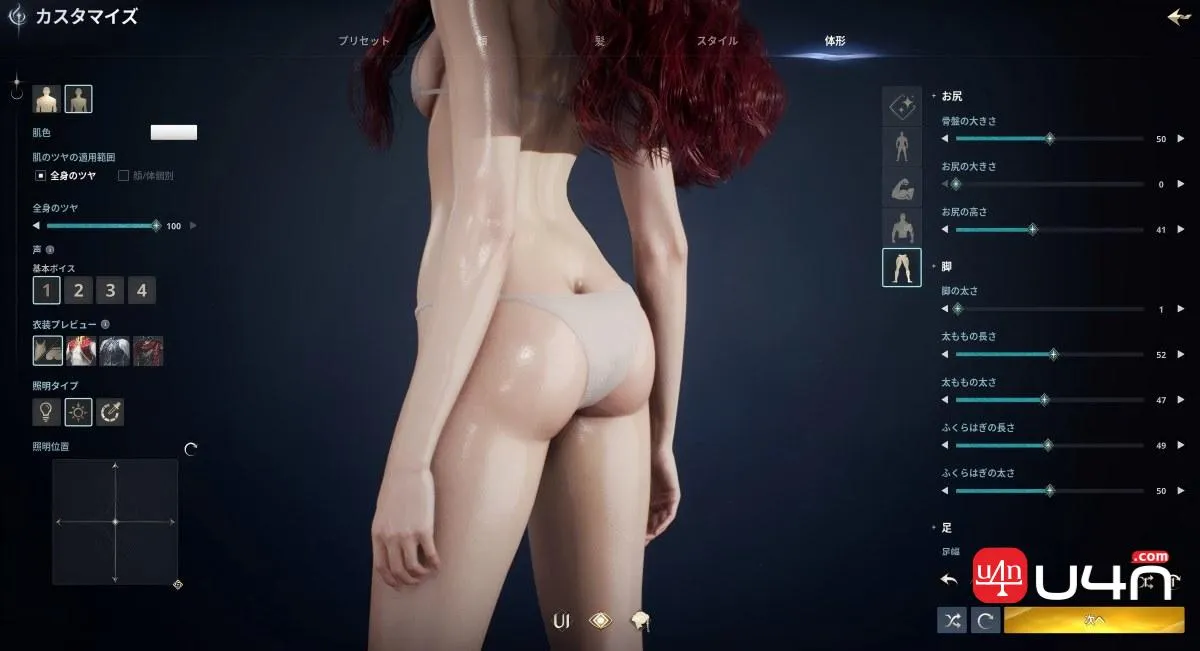
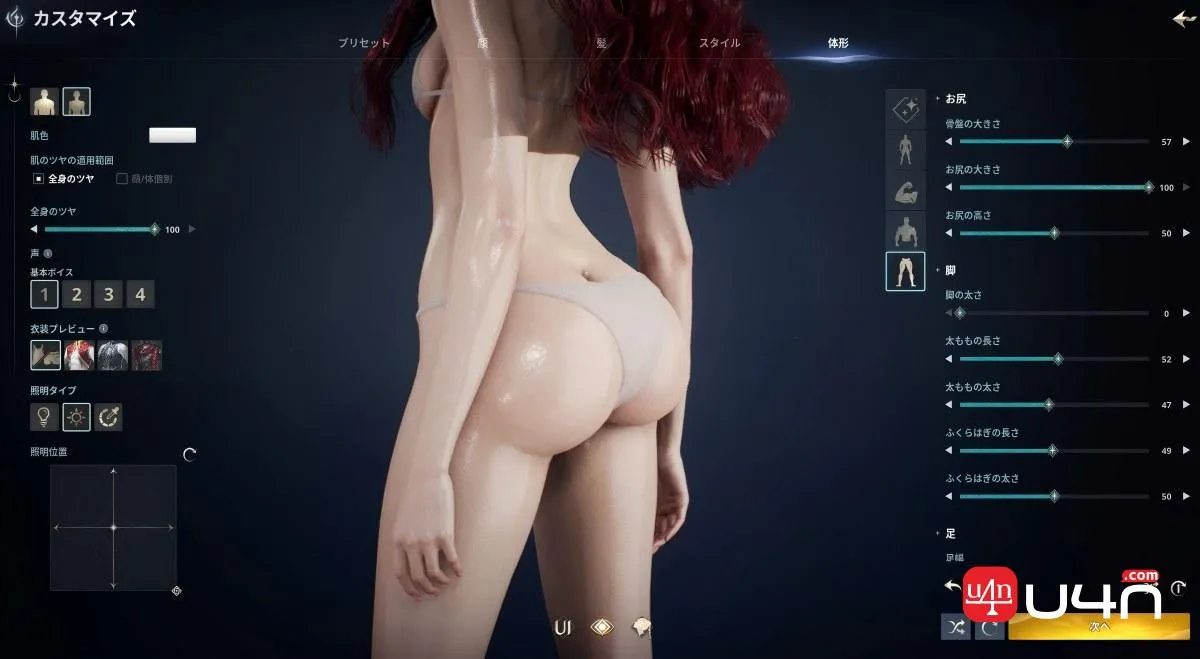
Detailed controls like these explain why screenshots of the creator gained so much attention after launch. AION 2 does not simply offer a list of complete body presets; it allows players to modify the relationships between individual body regions.
Character Creation Goes Beyond Body Shape
It would be misleading to reduce AION 2's editor to the handful of sliders currently circulating on social media. The larger system is designed to give players control over the complete character presentation.
Facial features and body proportions form the base, while color choices, outfits, and wings expand the look after creation. Because AION 2 includes collectible appearance options, mounts, and wings, a character can continue developing visually as the player progresses.
For role-players, screenshot enthusiasts, and players who enjoy collecting cosmetics, that long-term visual progression can be as important as equipment upgrades. The character creator establishes the foundation, and later rewards build on top of it.
Veteran Tips for Creating a Better AION 2 Character
A creator with more than 200 options can be overwhelming. The fastest way to get a good result is to work from large proportions to small details instead of adjusting every slider in menu order.
1. Establish the Overall Silhouette First
Begin with height, torso proportions, shoulder width, and general build. Zoom out regularly and judge the whole character rather than focusing on one body part. If the silhouette looks wrong from a distance, tiny facial adjustments will not fix it.
2. Adjust Related Sliders Together
Rib cage size, torso length, chest position, back width, and abdomen shape all influence one another. Move them in small steps and rotate the character after every group of changes. A setting that looks natural from the front can appear very different from the side.
3. Check More Than the Front View
Rotate through front, side, three-quarter, and rear views. This is especially important for shoulder, back, chest, waist, and abdomen settings. The final character will spend most of the game moving through a 3D world, not standing in a fixed portrait pose.
4. Test the Character Under Different Lighting
Strong creator lighting can hide or exaggerate facial and body contours. When the editor allows it, compare the character under different light directions and backgrounds. Skin tone, makeup, eye color, and fine facial details may change significantly once the character enters the world.
5. Leave Room for Armor and Costumes
Extreme proportions can look impressive without equipment but may interact differently with bulky armor, fitted costumes, capes, or wings. If your main goal is fashion, build a silhouette that will work with several outfit styles rather than one specific preview set.
6. Record Your Important Settings
Before confirming the character, take screenshots of the face, side profile, full body, and the most important slider values. If you later create an alt or want to reproduce the design on another server, a visual reference is far more useful than trying to rebuild it from memory.
Do Not Let Character Creation Delay Your Entire Launch
AION 2's editor is deep enough to become a game by itself, but launch-week MMO progression still rewards players who enter the world and begin moving. Once you are satisfied with the major proportions and face, confirm the character and start the Episode quests. Minor indecision can easily turn into another hour in the creator.
After entering Atreia, your priorities shift toward leveling, unlocking travel points, improving gear, and managing the game economy. Avoid spending every early resource on temporary appearance or equipment choices. Keeping enough AION 2 Kinah available for meaningful progression will make the early journey smoother, especially once enhancement and equipment costs begin to rise.
Why Detailed Character Creation Matters in an MMORPG
A single-player character may disappear when the story ends. An MMO character can remain with the player across expansions, guilds, raids, PvP seasons, and years of social activity. That changes the value of customization.
A detailed creator supports several types of players at once. Some want an idealized fantasy hero, some want a grounded and believable person, and others want a deliberately exaggerated design. By separating body regions and facial features into many controls, AION 2 gives all three groups more room to work.
It also improves variety in towns and social spaces. When an editor relies too heavily on presets, many players end up looking alike. More granular options make it easier for guild members, role-players, and content creators to build recognizable identities.
AION 2 Character Creation FAQ
How many character customization options does AION 2 have?
AION 2 officially promotes more than 200 customization options covering the face, body, colors, and broader character appearance.
Can you customize body proportions in AION 2?
Yes. The editor includes separate controls for multiple body regions rather than relying only on complete body presets. Reported options include rib cage size and length, chest volume and position, back shape, and abdomen protrusion.
Why are AION 2's chest sliders getting attention?
Most MMORPGs use only one or two broad size controls. AION 2 separates several structural and placement settings, allowing players to change proportions in more detail. That level of control surprised players in both Japan and other regions after launch.
Is AION 2 free to play?
Yes. AION 2 launched globally as a free-to-play MMORPG on October 5, 2026.
Where can I play AION 2?
AION 2 is available on PC through Steam and NC's PURPLE platform. The global version supports English along with several additional interface languages.
Does character appearance replace gear progression?
No. Character creation establishes your base appearance, while leveling, equipment, enhancement, skills, and other progression systems determine how your character develops in gameplay. Outfits and wings provide additional visual options as you continue playing.
AION 2 Makes the First Choice Surprisingly Difficult
AION 2 may sell itself through flight, faction conflict, a vast Unreal Engine 5 world, and large-scale PvE, but the character creator is already proving to be one of its most visible features. More than 200 options give players enough control to create characters that feel distinct before the first quest even begins.
The viral body sliders are the attention-grabbing part, but the broader appeal is creative freedom. Whether you want a heroic Daeva, a realistic adventurer, or a highly stylized fantasy character, the editor provides enough control to make the result feel personal. Just remember to leave the creator eventually; Atreia is waiting.