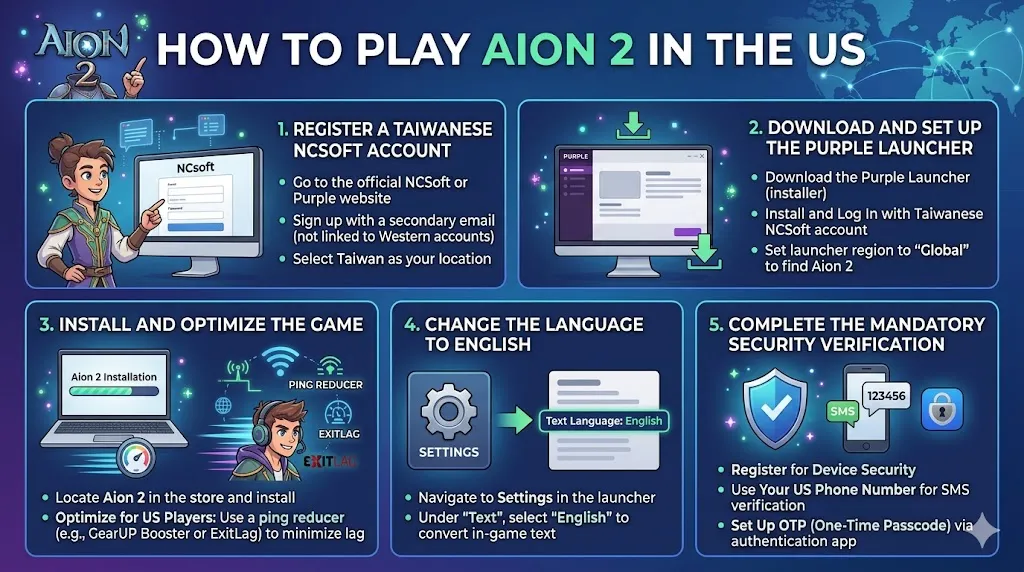
Aion 2 is one of the most anticipated MMORPGs, and while the global version isn't expected until late 2026, US players can still dive into the game by accessing the Taiwanese (TW) servers. Here's how to get started playing Aion 2 from the US:
1. Register a Taiwanese NCSoft Account
To play Aion 2 on the Taiwanese servers, you'll first need to create a Taiwanese NCSoft account. Here's how:
- Go to the official NCSoft or Purple website: Navigate to the Taiwanese NCSoft or Purple site to register for a new account.
- Sign up with a secondary email: Use an email that is not linked to any Western NCSoft account. This ensures no conflicts with other regional accounts.
- Select Taiwan as your location: When prompted, make sure to select Taiwan as your country or region. This step is crucial for accessing the Taiwanese servers.
2. Download and Set Up the Purple Launcher
Once you've registered your account, it's time to download the game launcher:
- Download the Purple Launcher: This is the official launcher for Aion 2. Head to the Purple website to get the installer.
- Install and Log In: After installing the launcher, log in using your newly created Taiwanese NCSoft account. Make sure the launcher's region is set to “Global,” so you can see Aion 2 as an available option.
3. Install and Optimize the Game
Now that you have the launcher, follow these steps:
- Locate Aion 2: Open the Purple Launcher, find Aion 2 in the store, and click to install it.
- Optimize for US Players: Since you're playing from the US, you might face high latency (ping). To minimize lag, consider using a ping reducer like GearUP Booster or ExitLag. These tools can help stabilize your connection and improve your overall gaming experience by bypassing any regional blocks that might affect the game.
4. Change the Language to English
Aion 2 offers a full English text client, making it easier for US players to navigate the game:
- Navigate to Settings: In the Purple Launcher, click on the game settings (usually near the "Start" button).
- Change the Text Language: Under the "Text" section, select "English." This will convert the in-game text to English, making it more accessible as you play.
5. Complete the Mandatory Security Verification
Before you can start playing Aion 2, you'll need to register for a Security Service. Here's what to do:
- Register for Device Security: Follow the in-game prompts to register your device with the security service. This step ensures that your account is protected from unauthorized access.
- Use Your US Phone Number: For the SMS verification step, you can typically use a standard US phone number to receive the required verification code.
- Set Up OTP (One-Time Passcode): It's highly recommended to set up an OTP via an authentication app (like Google Authenticator or Authy). This adds an extra layer of security and helps prevent login issues down the road.
Once you're all set up and ready to explore Aion 2, you'll need in-game currency to help you progress. If you're looking to level up faster or buy better items, you can always rely on trusted platforms like U4N to buy Aion 2 Kinah. U4N is a popular and reliable marketplace where gamers can purchase virtual currencies safely and securely, ensuring that you can focus on enjoying the game without worrying about grinding for hours. Make your Aion 2 experience even better by getting the resources you need from U4N!
Tips for Playing Aion 2 from the US
- High Latency: While the Taiwanese servers are the best option for US players, you may experience high ping. Using a VPN or ping-reducing software can improve your connection quality.
- Stay Updated: Since Aion 2 is still in early access in Taiwan, make sure to follow official sources for any updates or server changes.
FAQs
1. Can I Play Aion 2 in the U.S. right now?
Yes, you can! While Aion 2 hasn't officially launched in the U.S., you can still play it by accessing the game through the Taiwanese servers. Here's how to get started:
2. How Do I Access Aion 2 from the U.S.?
To play Aion 2 on the Taiwanese servers, you need to follow these steps:
- Create a Taiwanese NCSoft Account:
- Head over to the official NCSoft Taiwan website or Purple launcher page.
- Sign up with a fresh email address (don't use your existing NCSoft account if you already have one).
- Make sure to select Taiwan as your country or region. This is essential for creating an account that lets you access the Taiwanese servers.
- Download the Purple Launcher:
- NCSoft uses the Purple launcher for Aion 2. Download and install it from their official site.
- Once installed, launch the Purple launcher, and log in with the account you just created.
- Start Playing:
- After logging in, you can select Aion 2 from your library and start playing the game on the Taiwanese servers. If needed, adjust the language settings to English in the launcher.
Tip: Some players prefer using a VPN to get around potential region restrictions when creating accounts or downloading the game. Just keep in mind that using a VPN might violate NCSoft's terms of service, and can also cause lag or other issues. Proceed with caution!
3. Can I Play Aion 2 on My Mobile Device?
Yes! Aion 2 is available on mobile devices too, but you'll need to go through a similar process.
- For Android: Search for the game on the Google Play Store. If it's not available in your region, you may need to switch your Google account to a Taiwanese one, or use an APK file from a trusted source.
- For iOS: You'll need to use an Apple ID from Taiwan to download the game from the App Store.
4. Will Aion 2 be Available in the U.S. Soon?
While we don't have an official launch date for the U.S. version of Aion 2, there are reports that NCSoft is planning a global release in 2026. This will likely include servers for North America and other regions, and the game will be fully localized in English.
If you're eager to play the game in its full U.S. version, it might be worth waiting for this official release. It should be smoother, and you won't have to worry about using third-party services or servers.
5. What Should I Do While Waiting for the U.S. Release?
If you're itching to play now, here are a few things you can do in the meantime:
- Join the Community: Head to Reddit and official forums to join discussions with other players. There's a growing community of U.S. players enjoying the Taiwanese version.
- Start Learning the Game: There are plenty of guides and videos available for the Taiwanese version, so you can start familiarizing yourself with the gameplay, systems, and mechanics before the official U.S. launch.
- Check out News and Updates: Keep an eye on NCSoft's announcements. They'll likely share news about the global release and any early access opportunities.
6. Is It Safe to Use a VPN to Play Aion 2?
Using a VPN to connect to the Taiwanese servers can be an effective way to bypass regional restrictions, but it's not without its risks. Here's what to keep in mind:
- Risk of Account Bans: Some online games, including Aion 2, have rules against using VPNs. While it might not be a major issue at the moment, it could lead to account penalties in the future.
- Possible Lag or Latency: VPNs can sometimes cause lag, which may affect your gameplay experience, especially in a fast-paced MMO like Aion 2.
- Service Terms: Always check the game's Terms of Service. If you're caught violating their rules, you could risk having your account banned.
7. What Should I Do If I Want to Buy Aion 2 Items or Currency?
If you're playing the Taiwanese version, buying in-game currency or items might be a little more complicated due to region-locking. However, there are third-party platforms like U4N that can offer Aion 2 Kinah and items at affordable prices, especially for those who want to skip the grind.
If you want to get started with buying Aion 2 Kinah, you can visit U4N for a quick and reliable way to boost your game without waiting hours to farm.
8. Can I Play Aion 2 on My Console?
Currently, Aion 2 is a PC and mobile-only game. If you're hoping to play on PlayStation or Xbox, you'll have to wait for any official announcements about potential console releases.