The Wheelbarrow is one of the most exciting Legendary gears added to Grow A Garden 2 upon its release on June 12, 2026. If you want to carry your friends around the map, move players to specific areas, or use a handy teleportation trick, this guide will show you exactly how to get and master this item.
Wheelbarrow Overview & Key Stats
Here is a quick breakdown of everything you need to know about this legendary item's specifications:
| Gear Feature | Details |
|---|---|
| Rarity | Legendary |
| Primary Effect | Allows you to carry another player inside the wheelbarrow |
| In-Game Price | 500,000 Sheckles OR 129 Robux |
| External Shop Price | $0.93 |
| Stock Chance | TBA% (Rotates in the Gear Shop) |
| Currently Obtainable? | Yes |
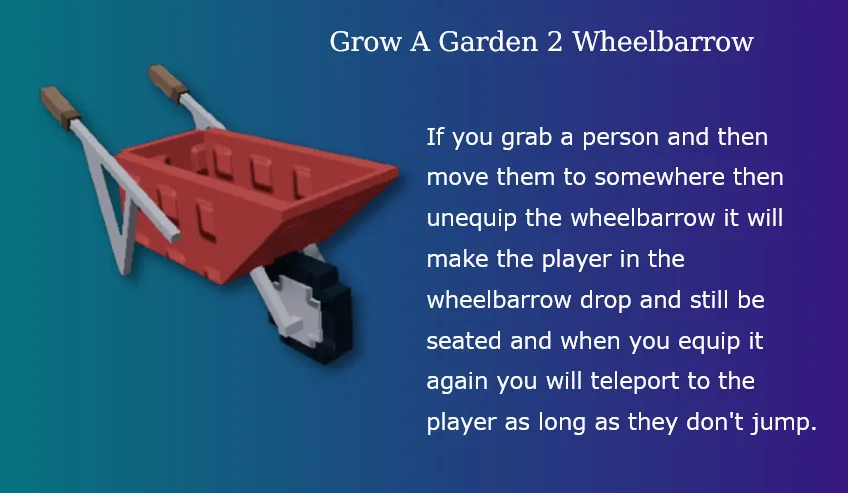
The Wheelbarrow features a distinct single-wheel design with a classic steel frame holding it together. The main body where players sit is painted red with a traditional stud texture, while the frame and wheel remain untextured for a clean look.
How to Get the Wheelbarrow
There are three main ways to secure this gear depending on whether you want to grind for in-game currency, spend Robux, or buy it directly:
- The Gear Shop (Sheckles): You can purchase the Wheelbarrow for 500,000 Sheckles when it appears in the shop rotation. Because the stock chance is currently TBA%, you should check the shop frequently and grab it as soon as it appears.
- Robux Purchase: If you don't want to wait for the shop rotation or grind for Sheckles, you can buy it instantly at any time for 129 Robux with a 100% success rate.
- Direct Store Purchase: For players looking to save their Robux and in-game funds, you can buy Wheelbarrow directly from our platform for just $0.93.
How to Use the Wheelbarrow
Using the Wheelbarrow is simple, but it introduces some fun physics and interactions to the game:
- Picking Up Players: Equip the Wheelbarrow from your inventory, walk up to another player or a friend, and use the gear to place them inside the red basket.
- Moving Around: Once a player is loaded in, you can drive them anywhere around the garden terrain. They will remain securely seated until dropped.
- Dropping Players: Simply switch items or unequip the gear to let the player out.
The Wheelbarrow Teleportation Glitch (Pro Tip)
The Wheelbarrow currently has a very useful movement glitch that you can take advantage of for fast travel:
- Grab a player in your wheelbarrow and drive them to a specific location.
- Unequip the wheelbarrow. This drops the player out, but their character model will still look like they are sitting down.
- As long as that player does not jump, you can walk anywhere else on the map, re-equip your wheelbarrow, and you will instantly teleport right back to where that player is located.