Cart Empty
Continue ShoppingAs an Aion 2 player, encountering the message "This account is temporarily restricted" can be frustrating, but it's a common issue, particularly during high-traffic periods like server launches or maintenance. This restriction is typically a security measure or a result of server capacity limitations. Let's dive into the reasons behind the restriction and the steps you can take to resolve it.
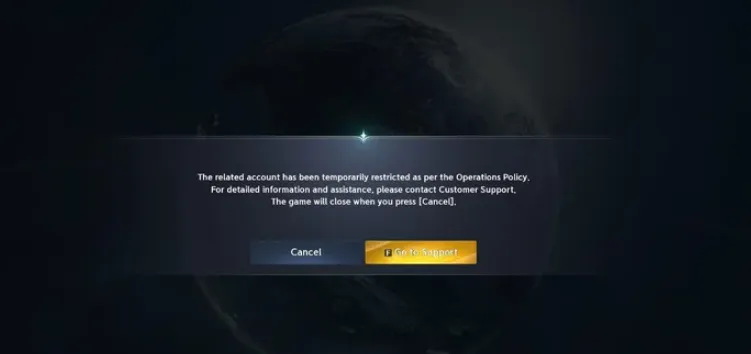
During peak times, especially at launch or following major updates, Aion 2 can experience heavy traffic. This can trigger temporary account restrictions as NCSoft works to stabilize server performance. Restrictions are usually lifted once traffic stabilizes.
Repeated failed attempts at phone number verification, captcha completion, or email confirmation can result in a lockout. This is a standard measure to prevent unauthorized access and ensure account security.
Using a VPN or playing from a shared IP address, especially if located outside the server's region (like accessing Taiwan or Korean servers from the US), may trigger security blocks. Aion 2's security system flags unusual activity like this to prevent potential fraud or abuse.
If the system detects rapid login attempts or other activity patterns resembling bot behavior, it may lock your account temporarily. This is another safeguard to maintain fair play and prevent automated actions in the game.
Depending on the cause of the restriction, you can usually fix it by following these steps:
In many cases, restrictions are "soft" and can be resolved by completing the "Verify" prompt in the game launcher. If prompted, you may need to complete a CAPTCHA verification (which may take multiple attempts) or re-enter your email address or phone number. This can help lift the block immediately.
To reduce the likelihood of future restrictions, consider enabling One-Time Password (OTP) or two-factor authentication. This adds an extra layer of security to your account and can prevent many common issues related to account locks.
If you're using a VPN, turn it off during the verification process to avoid getting stuck in an endless CAPTCHA loop. If you need to use a VPN, opt for specialized gaming VPN services like ExitLag or NoPing, which work better for bypassing regional blocks compared to standard VPNs.
Some players have resolved regional restrictions by switching to Google's DNS addresses in their network settings. This change can help bypass certain regional IP blocks and allow smoother access to servers.
If you’re looking for a way to quickly recover from account restrictions or just want to make your Aion 2 experience smoother, you might also want to consider purchasing or selling in-game currency. Whether you’re farming Kinah or need a boost to get back into the action, U4N is a reliable platform to Buy & Sell Aion 2 Kinah. It's a trusted resource for competitive players who want to skip the grind and focus on enjoying the game. With U4N, you can find the best deals, ensuring you have the resources you need to advance without unnecessary delays.
Aion 2 enforces regional restrictions to ensure players connect to servers in their designated areas. For example, trying to play on Taiwanese servers from the US without using a proper gaming VPN will likely result in a block.
Aion 2's anti-bot system is quite sensitive, flagging accounts that exhibit suspicious login patterns or irregular activity, particularly during peak times or after maintenance. These restrictions are usually temporary, but they can cause interruptions in your gameplay.
During heavy server load, especially when many players are trying to log in or create new characters, restrictions are imposed to ensure the servers remain stable. These restrictions typically lift once the load decreases.
If you repeatedly fail phone number or email verification steps, your account might be temporarily locked. Make sure to input the correct information and ensure that your phone number or email is accessible for verification.
Many users report that these restrictions are temporary and often resolve on their own after 1-2 hours. It's worth waiting to see if the block is lifted automatically.
If you're stuck in a CAPTCHA loop, try completing the CAPTCHA multiple times in a row. Some players on Reddit have reported success after completing 5-7 CAPTCHA attempts or restarting the game launcher.
If you're stuck on phone verification and not receiving SMS, consider using a temporary number service from regions like Hong Kong or Taiwan. Some players have had success with these services for bypassing verification issues.
If none of the above solutions work, try restarting or reinstalling the Purple launcher. Make sure your launcher is up to date and attempt to log in again after refreshing the app.
If the restriction persists and you believe it was a mistake, contacting NCSoft support is the next step. Be ready to provide detailed information, which may include the server you're on and any verification steps you've completed. Keep in mind that support may request information in the local language (e.g., Traditional Chinese for Taiwan servers).
In summary, the “This account is temporarily restricted” message is typically due to server congestion, verification issues, or anti-bot measures. By following these steps and resolving any possible causes, you should be able to regain access to your Aion 2 account quickly.
If you are experiencing repeated account restrictions, it could be due to several reasons. One common cause is using third-party programs like VPNs or ExitLag. These programs may alter your login location, causing the game to flag your account for suspicious activity. Players from regions like the U.S. or Europe may face this more often because Aion 2 is region-locked to Taiwan and Japan, and bypassing this restriction can trigger a ban.
To lift the restriction, you will need to go through the verification process. Often, this involves completing CAPTCHA puzzles or confirming your phone number or email. However, it may not always be immediate, and you might be required to verify your account multiple times before you can access the game again.
Sometimes, even if you successfully complete the verification process, the system may still display the "please verify" message. This could be due to multiple failed verification attempts, issues with your IP address (especially if you're using a VPN), or inconsistencies in your region settings. Try verifying again, and if the issue persists, consider contacting Aion 2 support for assistance.
While using VPNs or ExitLag can help with connection issues or geo-locking, it is not recommended to use these services for logging into the game. Aion 2's system may flag accounts using multiple regions in a short time span or logging in with suspicious IP addresses. To minimize risk, use a consistent VPN location (preferably Taiwan or Japan) for all your logins and avoid bouncing between multiple regions.
To avoid repeated account restrictions, consider the following tips:
If you're stuck in an endless verification loop, try this:
If you don't receive the verification email or link, it could be due to an issue with your email provider or the Aion 2 servers. Check your spam folder or ensure that your email address is correctly associated with your account. If the problem continues, reach out to Aion 2 support for assistance.
The verification issue is not limited to the Taiwan region. Players from other regions (like Korea or Europe) have also reported similar problems, especially when using VPN services to bypass regional restrictions. This suggests that the issue is not confined to one server but affects players globally, depending on their login methods and IP addresses.
The U4N Editorial Team is made up of dedicated gamers and technical experts. We're not just a trusted marketplace for game assets—we're all about empowering players with top-tier, expert-driven content. Our team produces in-depth guides, strategies, and technical fixes for some of the biggest games out there, like MLB The Show 26, Aion 2, Forza Horizon 6, Arc Raiders, and Path of Exile.
Whether it's mastering market flipping in Diamond Dynasty or optimizing your endgame builds, all of our strategies are tested and proven by in-house experts. At U4N, we don't just follow the meta—we help you stay ahead of it.