Cart Empty
Continue ShoppingTo check your ping in Aion 2, you can use a few methods, like the Windows Resource Monitor, third-party tools, or online ping testers. Since the game is often played on Korean and Taiwanese servers, monitoring your ping is key for smooth gameplay.
This method gives you real-time latency information of the game without needing extra software.
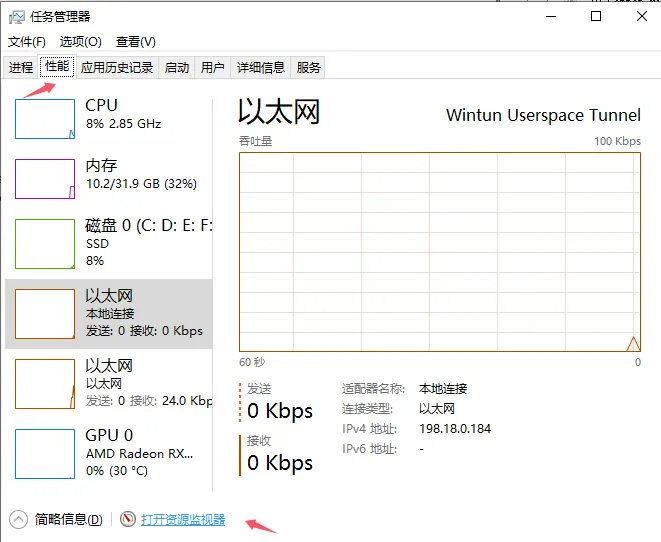
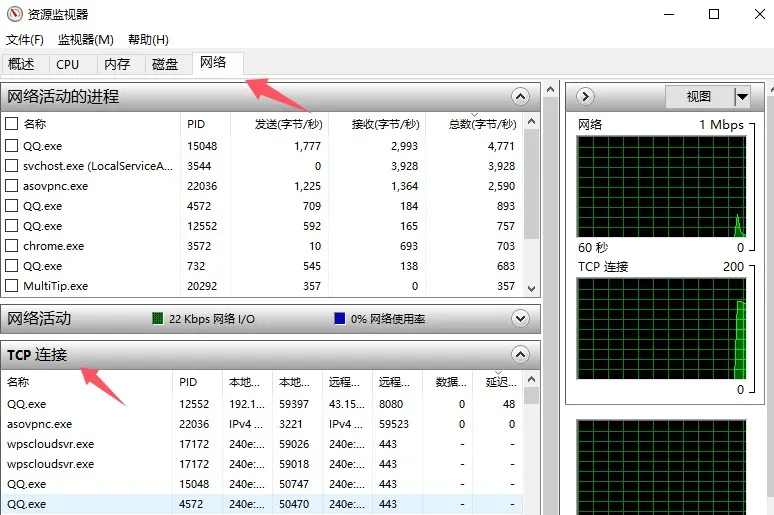
If you want to improve your gaming experience in Aion 2, knowing your ping is essential, especially since the game relies on precise timing for combat and movement. A steady low ping ensures smoother gameplay and better responsiveness, which is crucial for success in both PvE and PvP activities. If you're looking to level up faster or get the best gear without the frustration of lag, consider optimizing your ping with third-party tools or even purchasing Aion 2 gold through trusted platforms like U4N. This will give you more in-game currency to upgrade your gear, ensuring you're always ahead of the competition, no matter your ping.
Since Aion 2 doesn't always show a ping display, some players use third-party tools that display your ping while you're playing:
If you want to check your ping before starting the game, there are several online tools you can use:
Ping is very important in Aion 2, especially during combat. Players with low ping (like 48ms) can land almost 50% more attacks in a minute compared to those with higher ping (around 170ms). High ping can also cause issues with dodges and dashes not registering properly.
The U4N Editorial Team is made up of dedicated gamers and technical experts. We're not just a trusted marketplace for game assets—we're all about empowering players with top-tier, expert-driven content. Our team produces in-depth guides, strategies, and technical fixes for some of the biggest games out there, like MLB The Show 26, Aion 2, Forza Horizon 6, Arc Raiders, and Path of Exile.
Whether it's mastering market flipping in Diamond Dynasty or optimizing your endgame builds, all of our strategies are tested and proven by in-house experts. At U4N, we don't just follow the meta—we help you stay ahead of it.