

Table of Contents
Changing the language in Aion 2 depends on whether you are using the official Purple launcher or trying to switch settings from within the game client itself. Since the game launched in Korea and Taiwan with English support already built-in, you don't need a patch to see most of the UI in English.
Option 1: Via the PURPLE Launcher (Recommended)
You can set the language before you even launch the game. This is usually the most reliable method.
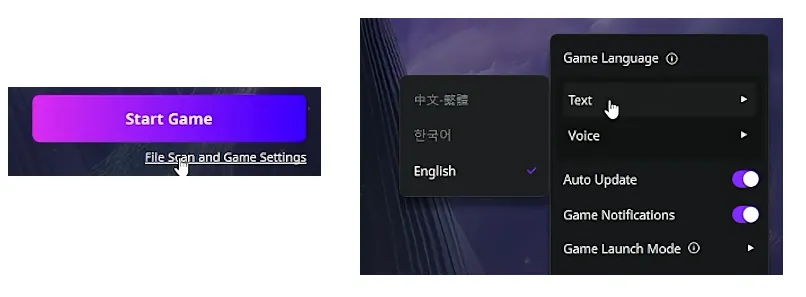
- Open the Purple launcher and select Aion 2.
- Look for the "File Scan and Game Settings" option (often located just below or near the "Start Game" button).
- In the settings window, look for the Text Language dropdown.
- Select English.
- Note: Voice language is typically restricted to the regional server (Korean or Chinese), so the audio will likely remain in the original language.
Option 2: In-Game Settings

If you are already inside the game and the UI is in a language you don't recognize:
- Click the Gear icon (Settings) in the top-right corner.
- Look for the tabs at the top of the settings menu. Click the far-right tab (System/Account settings).
- The first row usually contains the language selection.
- Select the option for English (usually at the bottom of the list if there are multiple choices).
- Click the Yellow button at the bottom to confirm and apply the changes.
Once you have successfully navigated the settings to switch your game to English, you can fully immerse yourself in the expansive world of Atreia without any language barriers holding you back. To ensure your character is truly ready for the challenges ahead, having a steady supply of currency is essential for upgrading gear and mastering the economy; for a fast and reliable way to gear up, you can visit U4N to buy Aion2 Kinah and gain a competitive edge in your adventures.

Option 3: For Unsupported Languages
If you are looking for a language other than English, Korean, or Chinese (like French, German, or Spanish), the official global release with full localization is slated for later in 2026. Until then, many players use third-party tools like GearUP Booster or LagoFast, which offer "Real-time Translation" overlays or file replacement features to translate the UI into other languages.
AION2 supported languages
| Interface | Full Audio | Subtitles | |
|---|---|---|---|
| English | ✔ | ✔ | ✔ |
| French | ✔ | ✔ | |
| German | ✔ | ✔ | |
| Spanish - Spain | ✔ | ✔ | |
| Japanese | ✔ | ✔ | ✔ |
| Portuguese - Brazil | ✔ | ✔ | |
| Russian | ✔ | ✔ | |
| Simplified Chinese | ✔ | ✔ | |
| Korean | ✔ | ✔ | ✔ |
| Traditional Chinese | ✔ | ✔ | ✔ |