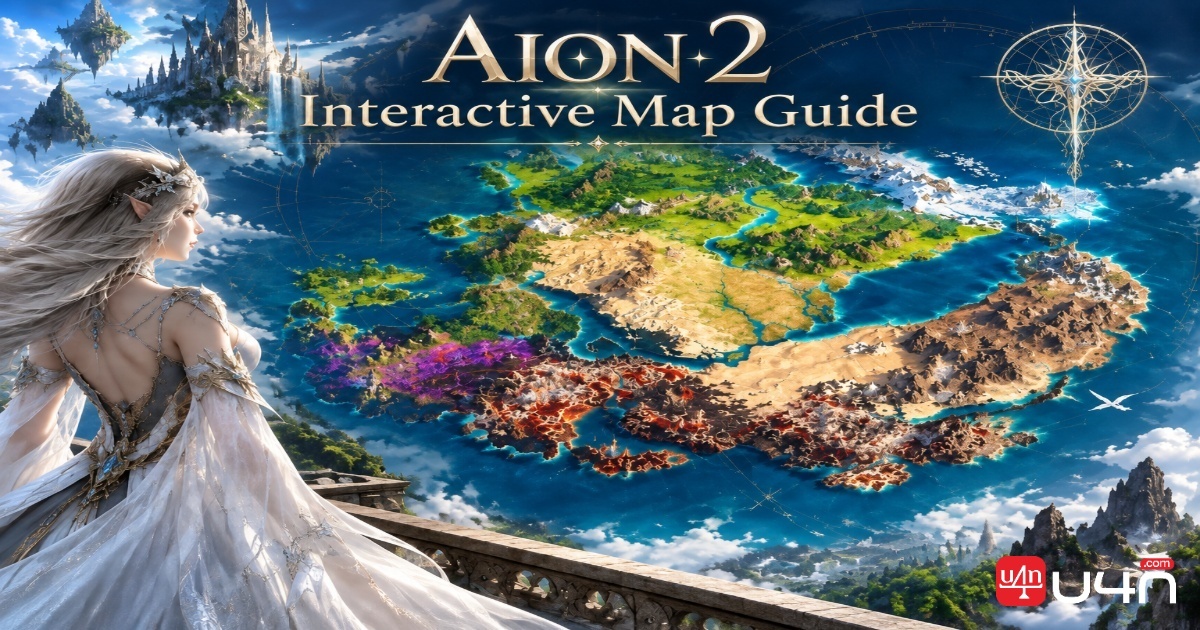
An Aion 2 interactive map is an essential tool for players who want to streamline exploration, optimize resource gathering, locate rare monsters, and progress efficiently through the game's expansive world. Instead of relying exclusively on manual exploration, players can use detailed map markers, regional databases, character synchronization, and event timers to plan activities with greater precision.
The most effective mapping tools combine geographic information with gameplay data, including monster spawn coordinates, resource locations, hidden collectibles, boss encounters, and fast-travel points. Advanced features can also help players organize crafting routes, prepare for open-world PvP, and track exploration objectives across different realms.
This guide explains how to use the Aion 2 interactive map to improve farming efficiency, manage exploration progress, and coordinate daily and weekly activities.

1. Understanding the Aion 2 Interactive Map
Aion 2 mapping requirements extend beyond a conventional two-dimensional world map. Players need to distinguish between realm-specific territories, layered aerial environments, exploration objectives, and locations that become accessible through progression.
An interactive map consolidates these elements into a searchable interface. Players can select a region, activate specific marker categories, inspect individual locations, and build routes around their current objectives.
Major regions and realm categorization
| Region or territory | Realm or map category | Primary mapping purpose |
|---|---|---|
| Verteron | Elyos territories | Locate regional monsters, gathering nodes, and exploration objectives |
| Elthen | Elyos territories | Organize regional exploration and resource collection |
| Altgard | Asmodian territories | Identify monster spawns, materials, and progression targets |
| Morheim | Asmodian territories | Plan farming sessions and discover hidden objectives |
| Reshanta | Abyss and aerial zones | Track aerial navigation, combat locations, and multi-level exploration |
| Upper Abyss | Layered Abyss navigation | Distinguish ring-based routes, elevation levels, and strategic destinations |
These categories provide a useful framework for organizing map information. Exact zone availability, naming, and access requirements should be verified against the current game version and the mapping database being used.
Elyos territories: Verteron and Elthen
For Elyos players, regional mapping helps organize exploration into manageable sections. Instead of moving randomly between objectives, players can filter the map for specific monster types, gathering materials, or undiscovered collectibles.
A practical workflow is to select one territory, enable only the relevant marker categories, and complete nearby objectives in a single session. This reduces unnecessary travel and makes it easier to identify remaining exploration tasks.
Asmodian territories: Altgard and Morheim
Asmodian territories benefit from the same location-based approach. Players can use regional filters to identify suitable farming areas, compare nearby resource clusters, and locate exploration objectives without repeatedly searching the entire map.
For material farming, combining monster locations with resource-node markers can help players create routes that include both combat and gathering activities.
The Abyss and layered aerial navigation
The Abyss introduces additional mapping challenges because elevation, aerial movement, and layered navigation can make ordinary map coordinates insufficient.
Reshanta and the upper Abyss should be approached as environments where vertical positioning and route selection matter alongside horizontal distance. Ring-based navigation, when represented by the map, can help players distinguish between upper and lower paths and identify the correct approach to a target.
When navigating a multi-level zone, verify the destination's elevation or layer before committing to a route. A marker that appears close on a flat map may be difficult to reach from the player's current level.
2. What the Interactive Map Markers Represent
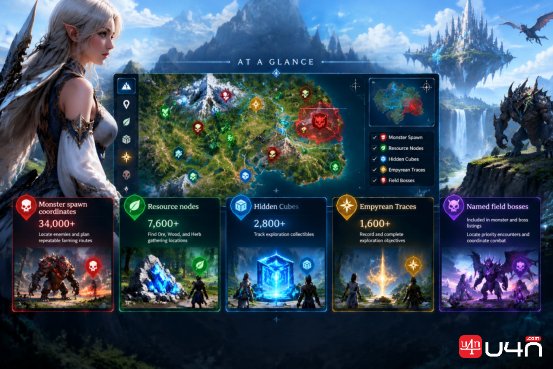
A comprehensive Aion 2 map can contain tens of thousands of individual markers. Each marker represents a specific location, collectible, encounter, or point of interest.
The supplied mapping figures illustrate the scale of the proposed database. They should be treated as reported database counts rather than independently verified live-game totals, since coverage may change as the game and map service are updated.
| Marker category | Reported database coverage | Primary use |
|---|---|---|
| Monster spawn coordinates | 34,000+ | Locate enemies and plan repeatable farming routes |
| Resource nodes | 7,600+ | Find Ore, Wood, and Herb gathering locations |
| Hidden Cubes | 2,800+ | Track exploration collectibles |
| Empyrean Traces | 1,600+ | Record and complete exploration objectives |
| Named field bosses | Included in monster and boss listings | Locate priority encounters and coordinate combat |
The categories serve different progression goals. Monster markers support combat and material farming, resource markers improve gathering efficiency, and collectible markers help players systematically complete exploration objectives.
Monsters and bestiary tracking
Monster databases are particularly useful when players need a specific crafting ingredient or equipment-related drop.
With more than 34,000 reported spawn coordinates, a detailed map can help players narrow their search to the appropriate region and enemy type. Named field bosses can also be highlighted separately, allowing players to distinguish ordinary farming targets from encounters that may require group coordination.
Useful monster-marker information includes:
- Enemy name and approximate or exact spawn location.
- Regional classification and nearby points of interest.
- Available drops and associated crafting materials.
- Boss status and relevant encounter requirements.
- Respawn or event information, where the database provides it.
Spawn markers should be treated as location references, not guarantees that a monster is currently present. Respawn cycles, server conditions, and game updates can affect availability.
Resource nodes: Ore, Wood, and Herb
The reported 7,600-plus resource nodes provide a starting point for building efficient gathering routes.
| Resource category | Typical activity | Route-planning objective |
|---|---|---|
| Ore | Mining and material collection | Connect nearby mineral deposits |
| Wood | Wood gathering | Minimize travel between resource clusters |
| Herb | Herbal gathering | Build loops around concentrated gathering areas |
Players should filter the map to show only the resource types required for their current crafting goals. Once the relevant nodes are visible, they can plan a circuit that collects materials in a logical order rather than traveling back and forth across the region.
Resource availability and exact node classifications should be checked against the active database.
Hidden Cubes and Empyrean Traces
Hidden Cubes and Empyrean Traces are exploration-focused objectives that can be difficult to track manually, particularly when spread across large territories or multiple elevation levels.
A dedicated collectible layer helps players separate completed objectives from those still requiring discovery.
For the best results:
- 1. Activate only the collectible category you intend to complete.
- 2. Divide the territory into smaller exploration sections.
- 3. Mark each discovered location as completed.
- 4. Check nearby elevation changes and concealed paths before leaving an area.
- 5. Review the remaining markers to identify gaps in exploration progress.
If the mapping service supports account synchronization, saved completion states can persist across devices, reducing the need to repeat searches.
3. Maximizing Progression and Combat Efficiency
An interactive map becomes more valuable when it supports character-specific planning rather than simply displaying locations.
By combining character equipment data, Combat Power (CP), skill selections, enemy information, and drop tables, players can make more informed decisions about which targets to farm and which regions to prioritize.
Character profiling and armory synchronization
Some mapping ecosystems offer character profiles or armory integrations that import available character information into the application.
Depending on the service and its supported data sources, a profile may display:
- Equipped gear and equipment progression.
- Combat Power (CP) or other available character statistics.
- Selected skills or skill configurations.
- Character identity and progression information.
- Equipment-related objectives and farming priorities.
The practical benefit is the ability to connect character needs with map locations. For example, a player pursuing a particular equipment upgrade can identify the required materials, locate relevant enemies or resource nodes, and plan a farming session around those requirements.
Important: Real-time character synchronization depends on the mapping service's supported integrations and the game's available data interfaces. Do not assume that every Aion 2 map can directly retrieve live gear or skill information. Confirm the integration's compatibility, authentication requirements, and update frequency before relying on it.
Target farming with regional database filters
Target farming is more efficient when players combine three sources of information: enemy locations, item-drop data, and character progression requirements.
A practical target-farming workflow is:
- 1. Identify the material, equipment piece, or crafting component you need.
- 2. Check the relevant item database for known sources.
- 3. Filter the interactive map by enemy name or monster category.
- 4. Compare candidate spawn locations and nearby farming opportunities.
- 5. Build a route around the most suitable targets.
- 6. Record results and adjust the route based on observed availability and drop outcomes.
For Daevanion board equipment or other progression-related items, use the game's current item database to establish whether a target actually drops the required Aion 2 items. Avoid assuming that proximity, enemy type, or equipment category alone proves a drop relationship.
Drop rates should also be interpreted carefully. Unless a source provides reliable, sufficiently large sample data, displayed percentages may be estimates rather than authoritative probabilities.
Finding Hidden Strongholds and Sealed Dungeons
Exploration markers can reveal objectives that are easy to overlook during ordinary combat or gathering sessions.
Hidden Strongholds may be worth investigating when their associated rewards include upgrade scrolls or other useful progression materials. Sealed Dungeons and exploration question marks can similarly point toward objectives that require additional investigation.
A systematic discovery process works best:
- Enable Stronghold and dungeon markers where available.
- Prioritize unexplored question marks near your current route.
- Inspect surrounding terrain, entrances, and elevation changes.
- Record any access conditions or progression requirements.
- Return to inaccessible locations when your character meets the relevant requirements.
The map can reduce wasted searching, but it does not necessarily reveal every trigger or unlock condition. Some locations may require quests, interactions, combat encounters, or other prerequisites.
4. Tactical Mapping Features for Advanced Players
Beyond basic exploration, advanced mapping tools can support event scheduling, gathering automation at the planning level, and safer movement through contested areas.
Live event trackers: Rifts, invasions, bosses, and sieges
Daily and weekly schedules can be difficult to manage when several activities compete for the same playtime. A map-linked event tracker provides a central reference for upcoming encounters and time-sensitive objectives.
| Event category | What to track | Tactical benefit |
|---|---|---|
| Spacetime Rifts | Event windows, locations, and access conditions | Prepare for cross-region encounters and potential PvP |
| Dimensional Invasions | Start times, affected territories, and objectives | Coordinate movement and participation |
| World Bosses | Spawn windows, locations, and group requirements | Reduce missed encounters and improve preparation |
| Artifact Siege | Active windows, artifact locations, and objectives | Organize group movement and strategic positioning |
Exact schedules may vary by server, region, game version, and event rules. Confirm current timings using the game's official announcements or the map service's updated event data.
For recurring activities, create a schedule that distinguishes daily resets, weekly resets, and event-specific timers. Where possible, account for your server's time zone rather than assuming that all displayed times use local device time.
Optimizing gathering routes
A route planner helps convert a collection of individual resource markers into a repeatable farming circuit.
Instead of visiting each node in isolation, connect nearby nodes into a loop that minimizes backtracking and accounts for terrain, elevation, and travel time.
A practical route-building process includes:
- 1. Select the material category you need.
- 2. Filter the map to show relevant nodes.
- 3. Identify clusters of nearby locations.
- 4. Choose a starting point near a convenient travel hub.
- 5. Connect the clusters in a logical sequence.
- 6. Test the route and remove detours that do not provide sufficient value.
- 7. Save the route for future gathering sessions.
Where the map supports custom routes, players can create separate circuits for different crafting materials rather than maintaining one unnecessarily complicated route.
To compare route efficiency, track the time spent and the amount collected during each run.
| Performance metric | How to use it |
|---|---|
| Total route duration | Measure how long one complete circuit takes |
| Materials collected | Record the quantity gathered per run |
| Travel time | Identify excessive movement between clusters |
| Nodes visited | Measure route coverage |
| Materials per minute | Compare alternative routes objectively |
Materials per minute can be calculated as:
Materials per minute = Total materials collected ÷ Total route time in minutes
This provides a simple way to determine whether a longer route is worthwhile. A route with more nodes is not necessarily better if the additional travel time reduces its overall yield.

Kisk and Kibelisk fast-travel planning
Kisk and Kibelisk-related locations can be important reference points when planning movement, depending on the mechanics available in the relevant game version.
A map that records bind points, travel hubs, and associated coordinates can help players establish convenient starting locations for farming circuits and identify potential return routes.
For open-world PvP, planning should focus on legitimate in-game travel and escape options. Before entering a contested region, identify accessible hubs, understand applicable travel restrictions, and avoid assuming that every bind point remains usable during combat.
Useful planning priorities include:
- Starting long farming sessions near an appropriate travel hub.
- Identifying alternate routes around dangerous areas.
- Recording the nearest accessible return point.
- Checking whether travel or binding is restricted by the current encounter.
- Keeping a contingency route for unexpected hostile encounters.
The value of fast-travel planning is not simply reduced travel time; it is the ability to make movement decisions before a situation becomes urgent.
5. Hardware and Integration: Desktop Overlay and Second-Monitor Setups
The best mapping workflow depends partly on how much screen space is available and how frequently the player needs to consult location data.
Desktop overlays can keep map information close to the game, while a second monitor offers a larger workspace for route planning, item research, and collectible tracking.
Using a desktop map overlay
An overlay can place an interactive map above or alongside the game without requiring repeated switching between windows.
A potential setup involves a compatible Windows overlay manager, such as an Overwolf-based application, and a map utility that explicitly supports Aion 2.
If Wikily for Windows or another map application provides a compatible overlay, players can use its supported controls to inspect markers while remaining in the game.
A typical setup procedure is:
- 1. Verify that the overlay application supports the current Aion 2 client and game version.
- 2. Download the application from its official distribution source.
- 3. Install the required overlay platform, if applicable.
- 4. Configure the game and overlay permissions.
- 5. Set the preferred display mode and keyboard shortcut.
- 6. Test the overlay in a safe area before using it during combat.
- 7. Adjust its size, opacity, and position to avoid obscuring important gameplay information.
A shortcut such as Shift + F9 may be available in a particular setup, but it should not be treated as a universal default. Check the application's current configuration and change the shortcut if it conflicts with an in-game action.
Compatibility and permitted overlay behavior can change. Review the game's current policies and the overlay provider's documentation before use, particularly if the software interacts with the game process or offers additional automation features.
Second-monitor optimization
A second monitor is often the simplest way to keep the map, item database, and event schedule visible without covering the game interface.
A useful layout separates gameplay from reference information:
| Display | Recommended content | Primary purpose |
|---|---|---|
| Main monitor | Aion 2 gameplay | Combat, navigation, and interaction |
| Secondary monitor | Interactive map | Inspect spawns, routes, and nearby objectives |
| Browser tab or panel | Collectible tracker | Review completed and outstanding exploration markers |
| Additional browser tab | Item database or event schedule | Check drop sources, materials, and upcoming activities |
If the mapping service supports Google or Discord account authentication, use the same account across supported devices or browser sessions to access saved progress.
Account synchronization is not guaranteed merely because a service offers Google or Discord sign-in. Confirm that the map actually stores marker completion and route data in the account before relying on it.
Keeping collectible progress synchronized
For players working through hundreds or thousands of exploration objectives, reliable completion tracking is essential.
A good system should allow players to mark Hidden Cubes, Empyrean Traces, and other discoveries as completed and preserve those changes between sessions.
To minimize mistakes:
- Sign in before beginning a collectible run.
- Confirm that the service saves completion states.
- Test synchronization with one marker before completing a large section.
- Organize objectives by region.
- Check the map after switching browsers or devices.
- Keep a backup record for important route notes if the application does not support reliable synchronization.
This approach reduces duplicated effort and makes it easier to resume an exploration session after a break.
6. Building an Efficient Aion 2 Daily Routine
The interactive map is most effective when it supports a repeatable routine rather than becoming another source of information to manage.
A balanced session can combine time-sensitive activities, targeted farming, gathering, and exploration.
| Session stage | Recommended activity | Map features to use |
|---|---|---|
| Preparation | Review character needs and upcoming events | Character profile, event tracker |
| Early session | Travel to priority objectives | Regional filters, travel hubs |
| Main farming block | Collect targeted drops or crafting materials | Monster database, drop tables |
| Gathering block | Complete a resource circuit | Resource markers, custom routes |
| Exploration block | Discover remaining collectibles | Hidden Cube and Empyrean Trace layers |
| Session wrap-up | Save progress and plan the next run | Completion tracking, saved routes |
Adapt the sequence to the current server schedule. If a limited-time boss or siege window is approaching, it may be more efficient to prioritize that activity and postpone gathering until later.
Players should also distinguish between activities that benefit from fixed routes and activities that require flexible responses. Gathering and collectible completion are often suitable for planned circuits, while contested objectives and dynamic encounters may require immediate changes to the route.
7. Choosing an Aion 2 Interactive Map
Not every map service offers the same level of detail or integration. Before committing to a tool, evaluate its database coverage, usability, and compatibility with your preferred setup.
| Feature | What to verify | Why it matters |
|---|---|---|
| Regional coverage | Elyos, Asmodian, Abyss, and relevant expansion areas | Prevents gaps in exploration planning |
| Marker database | Monsters, bosses, resources, and collectibles | Supports multiple progression goals |
| Search and filters | Enemy names, item sources, marker categories | Reduces time spent locating targets |
| Vertical navigation | Elevation and layered-zone support | Improves navigation in complex aerial areas |
| Route planning | Custom paths and resource circuits | Helps optimize gathering efficiency |
| Event tracking | Current server schedules and reset times | Supports time-sensitive activities |
| Character integration | Supported gear, CP, and skill data | Enables more personalized progression planning |
| Progress synchronization | Account-based completion tracking | Preserves discoveries between sessions |
| Overlay compatibility | Current game and operating-system support | Enables convenient in-game reference |
| Update frequency | Recent changes and correction history | Reduces reliance on outdated coordinates |
The most suitable tool is not necessarily the one with the highest marker count. Data accuracy, current compatibility, useful filters, and dependable progress tracking are equally important.
Frequently Asked Questions About the Aion 2 Interactive Map
What is an Aion 2 interactive map used for?
An Aion 2 interactive map helps players locate monsters, field bosses, resource nodes, hidden collectibles, dungeons, and other points of interest. Depending on the service, it may also provide custom routes, event schedules, and character-related information.
How many locations can an Aion 2 map track?
The database figures covered in this guide report more than 34,000 monster spawn coordinates, 7,600 resource nodes, 2,800 Hidden Cubes, and 1,600 Empyrean Traces. These are reported figures for the described mapping dataset, not independently verified totals for every available map service.
Can the map show exact monster spawn locations?
A detailed map may provide precise coordinates or specific spawn markers. However, actual monster availability can depend on respawn cycles, server conditions, encounter mechanics, and database freshness.
Can I track Hidden Cubes and Empyrean Traces automatically?
Some map services offer completion checkboxes and account synchronization. Automatic tracking depends on the application's capabilities; otherwise, players must manually mark discovered locations.
Can I use an Aion 2 map overlay while playing?
Potentially, provided the overlay supports the current game client, operating system, and applicable game policies. Verify compatibility with the overlay provider rather than assuming that every Windows map application supports Aion 2.
How can I farm materials more efficiently?
Filter the map for the materials or enemies relevant to your objective, connect nearby locations into a custom route, and record the time and quantity collected. Comparing materials per minute helps identify the most productive circuit.
Are event timers and drop rates always accurate?
No. Event schedules can change, and drop-rate information may be estimated or incomplete. Cross-check time-sensitive information against current official announcements and treat unsupported drop-rate percentages as provisional.
Turn the Aion 2 Map Into a Progression Tool
An effective Aion 2 interactive map does more than display the world. It brings together regional navigation, monster and resource databases, exploration tracking, event scheduling, and route planning in a single workflow.
By combining location filters with character-specific goals, players can spend less time searching and more time completing meaningful activities. Custom gathering circuits help improve material efficiency, collectible tracking makes exploration more systematic, and carefully planned travel routes support safer movement through contested areas.
The most reliable approach is to choose a map with current regional coverage, verify its data and integrations, and build repeatable routines around the activities that matter most to your character. As the game evolves, regularly updated coordinates and event information will remain essential to keeping those routines useful.