購物車空
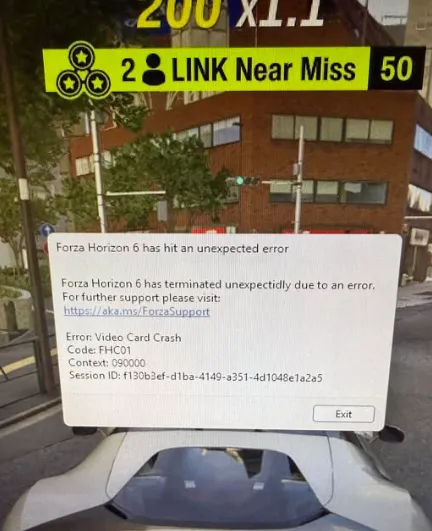
繼續購物Many players of Forza Horizon 6 have reported sudden crashes to desktop, often accompanied by error codes FHC00 or FHC01. These issues are typically linked to GPU instability, driver conflicts, or demanding graphics settings like ray-tracing. If your game crashes when launching, loading zones, or switching between city and off-road areas, here's a practical, step-by-step guide to stabilizing your PC and keeping your racing experience smooth.
Follow these steps sequentially. Skipping steps can leave underlying problems unresolved.
Hardware-accelerated GPU scheduling in Windows sometimes causes instant crashes on launch or mid-game, especially with high-end ray tracing enabled.
Many users on Reddit report that this simple toggle resolves immediate desktop crashes.
If the game crashes during environment transitions or off-road sections, your GPU may be overloaded by ray-tracing calculations.
Lowering or disabling extreme settings can prevent GPU overload.
Forza Horizon 6 is sensitive to overlay and driver hooks. Close or disable:
These apps can interfere with drivers and cause repeated crashes.
Corrupt drivers or residual files are common culprits for FHC00 errors.
This ensures shaders and GPU code fragments don't conflict with the game.
Corrupted shader caches can repeatedly crash your GPU during loading.
This removes old compiled assets that may be triggering the crash.

| Error Code | Meaning | Primary Fix |
|---|---|---|
| FHC00 / FHC01 | Video Card Crash / Driver Instability | Disable HAGS, turn off Ray-Tracing, clean install GPU drivers |
| FHD01 | Out of Video Memory (VRAM) | Lower texture quality and resolution scaling |
| FH205 | Graphics Card Not Supported | Ensure GPU supports DirectX 12 natively |
Fixing video card crashes in Forza Horizon 6 mostly revolves around managing GPU load, cleaning drivers, and disabling settings that push your graphics card beyond stability. For players seeking a shortcut to avoid long grinding for wheelspins or cars while troubleshooting, marketplaces like U4N provide safe, instant delivery of cheap Forza Horizon 6 credits, letting you maintain progression while optimizing your setup.
U4N編輯團隊由一群熱愛遊戲的分析師和技術專家組成。我們不僅是一個可靠的遊戲資產市場——我們的核心目標是通過專業內容幫助玩家。我們的團隊為一些大熱門遊戲製作詳細的攻略、經濟策略和技術問題解決方案,包括《MLB The Show 26》、《Aion 2》、《Forza Horizon 6》、《Arc Raiders》和《Path of Exile》等。
無論是掌握遊戲市場的買賣技巧,還是幫助你打造最強的遊戲角色或策略,我們發布的每一份內容都經過我們團隊的實際測試。在 U4N,我們不僅跟隨遊戲的趨勢,我們還幫助你領先一步