購物車空
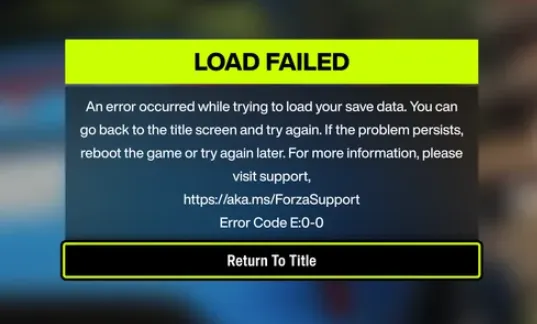
繼續購物If you're booting up Forza Horizon 6 and suddenly find yourself unable to connect to Horizon Life, you're not alone. Many players have reported dropped connections, failed convoy creations, and “Feature Unavailable” errors following the recent 2.5GB update. From broken open-world matchmaking to intermittent session failures, the problem can be frustrating—but there are steps you can take to get back online.
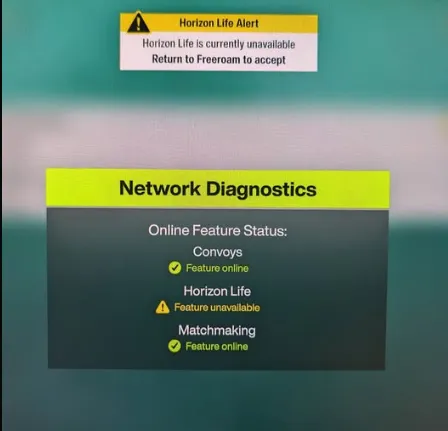
Before diving into fixes, make sure the servers aren't down. A recent patch pushed player numbers past 200,000, triggering widespread connection issues. You can check live reports via Downdetector Forza or the r/ForzaHorizon subreddit. If the servers are unstable, the only real solution is waiting for Playground Games to patch the issue.
Profile desyncs between the Xbox App and the Microsoft Store are common culprits. Here's how to fix them:
Ensure your system clock is set to automatic—it helps prevent authentication errors.
Certain background programs can block Forza's network handshake. Players have reported success by disabling:
Simply check Task Manager before launching the game and terminate these processes.
If your firewall is turned off or a third-party antivirus is overly restrictive, Horizon Life may fail to connect. Make sure Windows Defender Firewall is on for both private and public networks.
Forza relies on Teredo Tunneling to communicate with Xbox Live. To restore connectivity:
This allows your console or PC to bypass blocked connections and properly handshake with servers.
Xbox players can force a local profile save to reset online status:
Additionally, toggling between Horizon Solo and online mode can help bypass boot server queues.
With these steps, most players have been able to restore their connection to Horizon Life. While Playground Games continues to stabilize the servers after the recent update, these workarounds ensure you're not completely locked out of the shared world.

For anyone looking to jump back in faster or bypass grind delays, platforms like U4N also offer reliable, safe ways to boost credits or modded accounts in Forza Horizon 6, letting you focus on the racing action instead of waiting for server issues to clear.
U4N編輯團隊由一群熱愛遊戲的分析師和技術專家組成。我們不僅是一個可靠的遊戲資產市場——我們的核心目標是通過專業內容幫助玩家。我們的團隊為一些大熱門遊戲製作詳細的攻略、經濟策略和技術問題解決方案,包括《MLB The Show 26》、《Aion 2》、《Forza Horizon 6》、《Arc Raiders》和《Path of Exile》等。
無論是掌握遊戲市場的買賣技巧,還是幫助你打造最強的遊戲角色或策略,我們發布的每一份內容都經過我們團隊的實際測試。在 U4N,我們不僅跟隨遊戲的趨勢,我們還幫助你領先一步