購物車空
繼續購物If you've been spinning out or losing control in Forza Horizon 6 on Xbox, the culprit is often improper wheel settings combined with the game's upgraded physics. To get a smooth, realistic driving experience, you need to switch your Steering Type to Simulation and fine-tune the Advanced Wheel Settings to match your hardware.
Before diving into the advanced wheel configuration, adjust the main difficulty toggles to ensure your wheel reacts accurately:
These settings give your wheel full authority over the car, allowing for precise handling and better drift control.
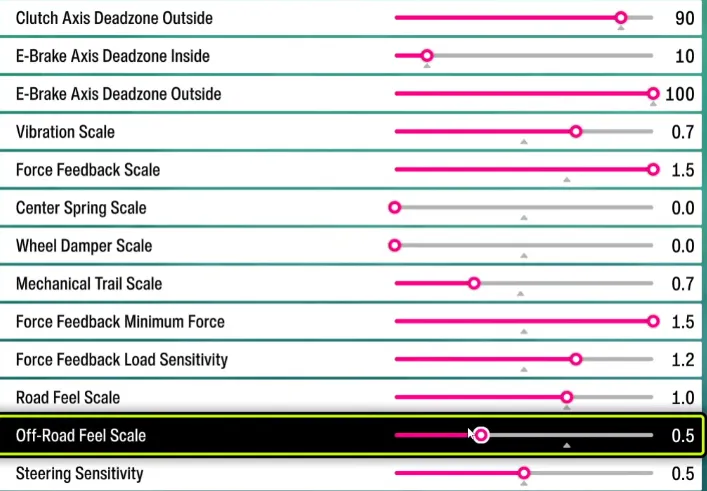
Go to Settings → Controls → Advanced Wheel Settings. Different wheel types behave differently: gear-driven wheels like the Logitech series require higher deadzone and damper settings, while Direct Drive (DD) wheels like Fanatec or Moza need more subtle adjustments.
| Setting | Logitech G920 / G29 | Logitech G923 (TrueForce) | Fanatec / Moza (Direct Drive) |
|---|---|---|---|
| Steering Linearity | 50 | 50 | 50 |
| Vibration Scale | 0.3 | 0.2 | 0.2 |
| Force Feedback Scale | 1.2 | 1.0 | 0.7 – 1.0 |
| Center Spring Scale | 1.1 | 1.3 | 0.0 – 0.4 |
| Wheel Damper Scale | 1.8 | 1.2 | 0.2 – 0.5 |
| Mechanical Trail Scale | 0.9 | 1.1 | 0.7 – 1.0 |
| FFB Minimum Force | 0.6 | 0.8 | 0.0 – 0.2 |
| FFB Load Sensitivity | 1.4 | 1.3 | 1.0 |
| Road Feel Scale | 0.6 | 1.0 | 0.5 |
| Off-Road Feel Scale | 0.4 | 0.5 | 0.2 |
Tips:

Steering Rotation / Operating Angle:
FH6 now animates steering realistically up to 540°. If your wheel feels sluggish when counter-steering a slide at higher angles, reduce your operating angle to 540°–720° for a snappier response.
Wheel Damper Scale:
Adds artificial resistance to the wheel. Gear-driven wheels benefit from higher damper (1.5+) to prevent oscillations, while DD wheels can keep this low for sharper feedback.
FFB Minimum Force:
Fills the “dead zone” in the center of your wheel. Gear-driven wheels need higher values to overcome internal friction. Direct Drive wheels can remain low for more subtle, nuanced feedback.
Force Feedback Scale:
Controls overall intensity. Too high can overload gear-driven wheels; too low reduces road feel. Test with your favorite car and track to find balance.
Road & Off-Road Feel:
Adjust to feel surface transitions accurately. Off-road events in Japan's mountains or coastal tracks benefit from slightly higher off-road feel for traction cues.
If you want to skip endless trial and error and immediately enjoy the ultimate wheel setup, U4N offers ready-to-go Forza Horizon 6 modded accounts pre-configured with all cars, max Wheelspins, and advanced wheel settings. This allows you to jump straight into racing, drifting, and exploring the Japan map with perfect feedback, without spending hours dialing in every parameter manually.
U4N編輯團隊由一群熱愛遊戲的分析師和技術專家組成。我們不僅是一個可靠的遊戲資產市場——我們的核心目標是通過專業內容幫助玩家。我們的團隊為一些大熱門遊戲製作詳細的攻略、經濟策略和技術問題解決方案,包括《MLB The Show 26》、《Aion 2》、《Forza Horizon 6》、《Arc Raiders》和《Path of Exile》等。
無論是掌握遊戲市場的買賣技巧,還是幫助你打造最強的遊戲角色或策略,我們發布的每一份內容都經過我們團隊的實際測試。在 U4N,我們不僅跟隨遊戲的趨勢,我們還幫助你領先一步