Cart Empty
Continue ShoppingFew things are more frustrating than settling in for a session of Forza Horizon 6 only to be greeted by a "Load Failed" message. Error code E:0-19 indicates a profile loading or synchronization failure. It happens when your local game launcher loses sync with the Xbox Cloud Save servers, an issue that frequently plagues players across Windows PC, the Xbox App, and Steam Deck.
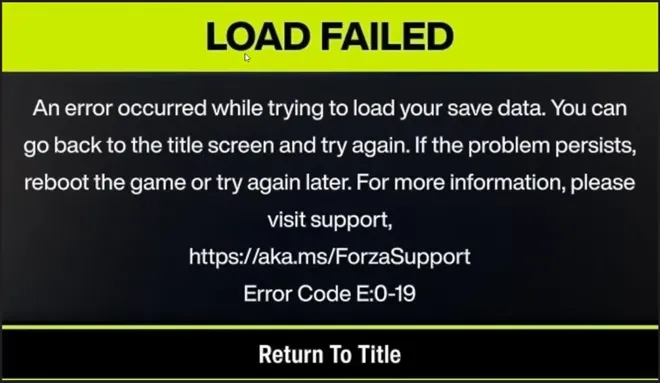
If you are stuck at the title screen with a broken save, do not panic. Follow these verified troubleshooting steps sequentially to clear the corruption and restore access to your profile.
If your local save data becomes corrupted or desynced, forcing the Xbox network to pull a fresh copy from the cloud usually resolves the issue.
Go to the following directory: C:\XboxGames\GameSave\PGS
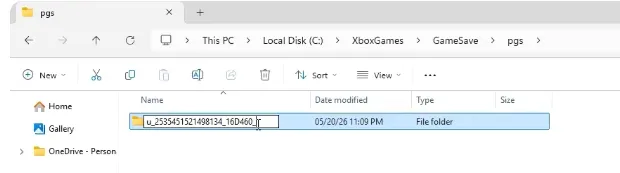
Outdated or corrupted background cloud sync protocols within Windows are a primary trigger for this error. The Xbox App has a built-in tool specifically designed to fix this.
Select Support from the dropdown menu.
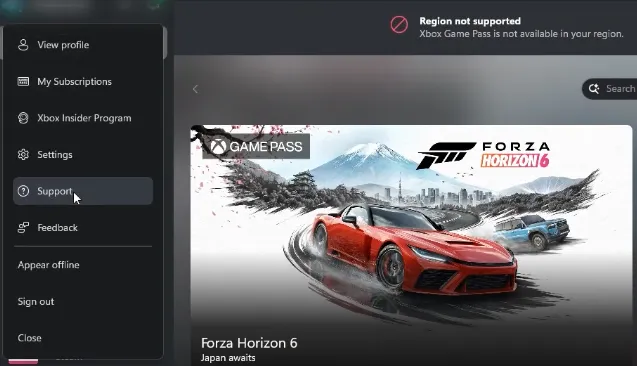
Click on the Gaming Services Repair Tool.
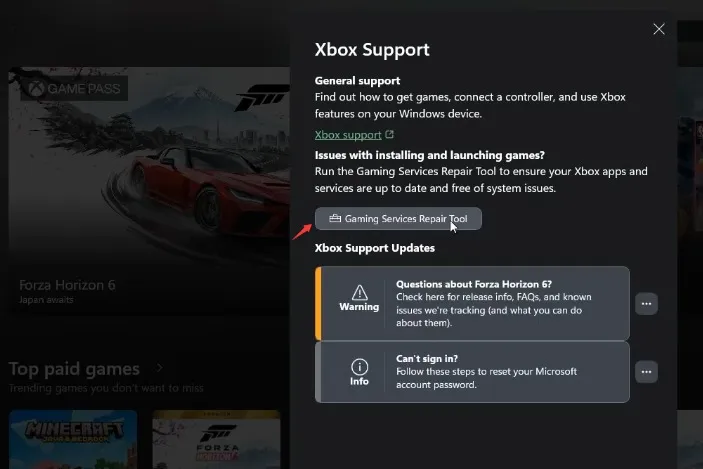
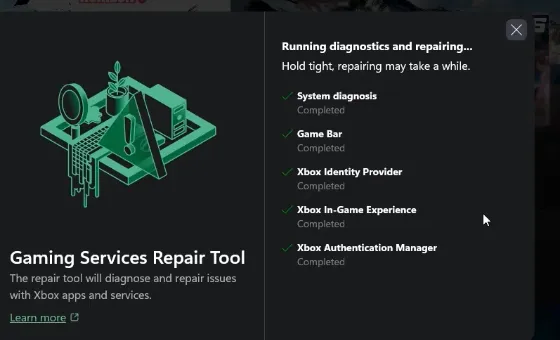
Click Start Repairing and allow the process to finish.

If you ever find that a persistent sync issue or server-side error completely corrupts your save file beyond repair, you won't have to face the grueling grind of rebuilding your collection from scratch. Platforms like U4N offer a reliable safety net for drivers looking to bounce back quickly, making it easy to buy rare forza horizon 6 cars and instantly restock your garage with the hard-to-find rides you lost. While technical glitches like error E:0-19 are an annoying roadblock, utilizing the right troubleshooting fixes or stepping into a trusted marketplace ensures your racing journey stays firmly on track without losing momentum.
Whether you purchased the game through Steam or the Microsoft Store, a missing or corrupted game file can prevent your profile from loading correctly.
If the server is experiencing high traffic or lag, your cloud data might fail to fetch, timing out into error E:0-19. You can sometimes force the game to bypass this by shifting into local offline verification.
Playing across multiple machines or switching between online and offline modes on portable devices like the Steam Deck can fragment your profile status. If your game hangs indefinitely while syncing, try clearing your Windows network cache.
If none of these steps get you past the title screen, your cloud profile container might be severely corrupted on the server side.
If this happens, log a ticket on the official Forza Motorsport Support Portal. While the support team usually cannot recover the specific broken file, they can manually wipe the corrupted cloud container, prompt a fresh initialization of your account, and gift back your earned cars, garage history, and credits to your new save instance.
The U4N Editorial Team is made up of dedicated gamers and technical experts. We're not just a trusted marketplace for game assets—we're all about empowering players with top-tier, expert-driven content. Our team produces in-depth guides, strategies, and technical fixes for some of the biggest games out there, like MLB The Show 26, Aion 2, Forza Horizon 6, Arc Raiders, and Path of Exile.
Whether it's mastering market flipping in Diamond Dynasty or optimizing your endgame builds, all of our strategies are tested and proven by in-house experts. At U4N, we don't just follow the meta—we help you stay ahead of it.