Cart Empty
Continue ShoppingHitting a roadblock before you even reach the starting line is incredibly frustrating. If you are trying to launch Forza Horizon 6 and getting hit with a "Load Failed" screen alongside Error Code E:0-17, you aren't alone.
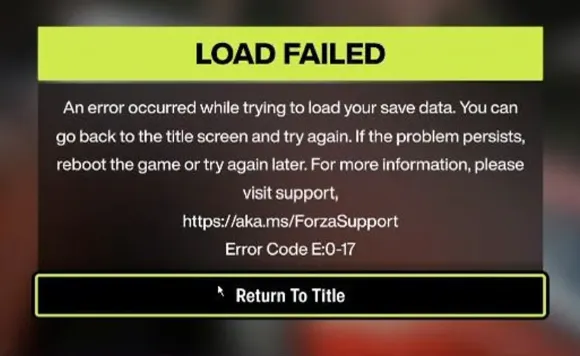
This specific error points to a save file loading failure. It usually happens when the game cannot properly authenticate or sync your profile data with the cloud servers. Most of the time, the culprit isn't a permanently corrupted save file, but rather network restrictions or aggressive Windows privacy settings blocking communication with Microsoft's servers.
Here are the most effective ways to clear the error and get back on the road.
If you have ever used Windows "debloating" tools, privacy scripts, or manually modified your system settings to block telemetry, your computer might be intentionally blocking the exact servers Forza needs to load your profile.
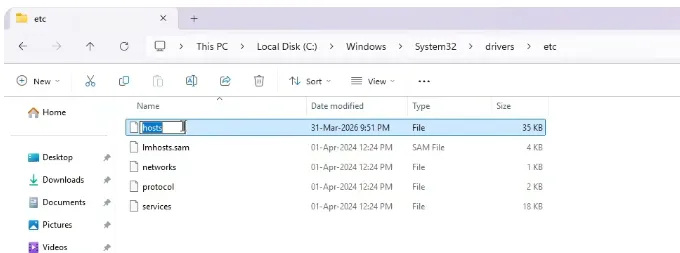
You can fix this by resetting your Windows hosts file to default:
Navigate to the following path:
C:WindowsSystem32driversetc
Right-click the file and select Rename. Change it to hostsBACKUP. (Alternatively, if you don't care about previous tweaks, you can simply delete it).
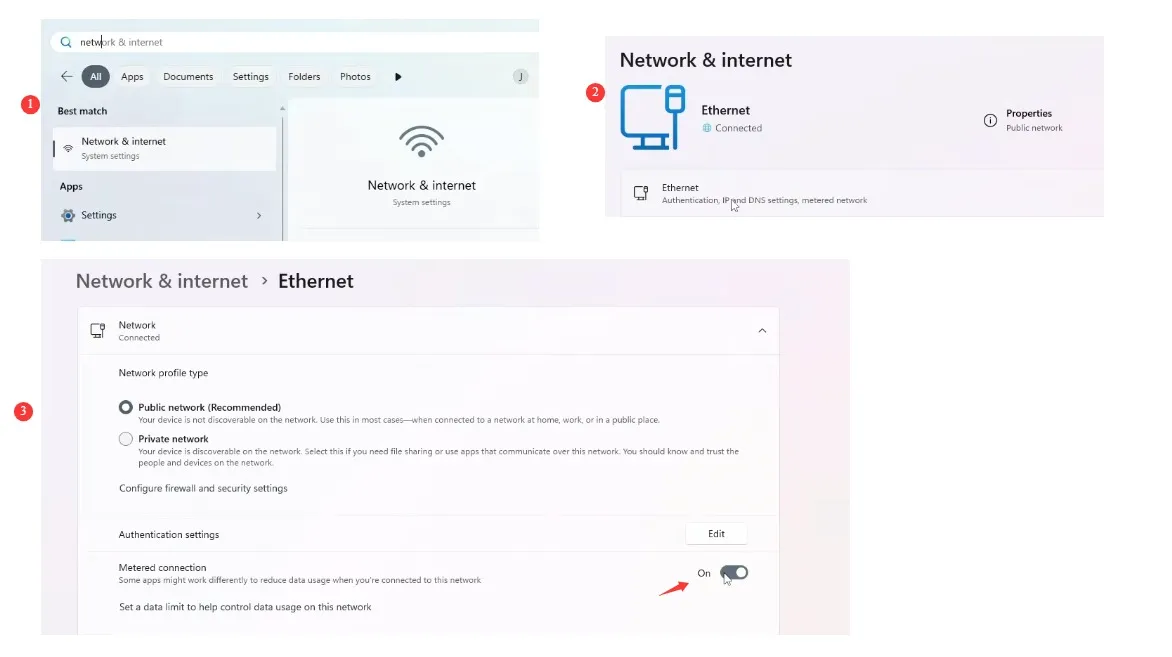
Windows has a feature called "Metered Connection" designed to save data on limited internet plans. However, this feature frequently restricts background data syncing, which prevents the Xbox network from pulling your latest cloud save.
To turn it off:

If troubleshooting those system settings feels like too much of a headache and you just want to get straight to the fun part of racing, there are ways to fast-track your progress once your game is running smoothly again. Instead of spending hours grinding through repetitive races to rebuild your garage after a save error, you can visit U4N to buy fast forza horizon 6 cars directly. It is a quick and reliable shortcut to lock down the highest-performance vehicles in the game, letting you bypass the technical frustrations and jump right back onto the asphalt with the best rides available.
If you used third-party optimization programs like O&O ShutUp10 or the Chris Titus Tech Windows Utility, these tools often disable core Windows telemetry and error reporting systems. Forza Horizon 6 requires these services active to validate your profile.
Because Error E:0-17 is heavily tied to server communication, your security software might be getting in the way.
If you purchased Forza Horizon 6 on Steam, the game still relies on an underlying handshake with the Xbox network. Sometimes this handshake fails if the background environment is idle.
Corrupted background modules can cause sudden authentication drops. Ensuring everything is updated can solve the issue.
The U4N Editorial Team is made up of dedicated gamers and technical experts. We're not just a trusted marketplace for game assets—we're all about empowering players with top-tier, expert-driven content. Our team produces in-depth guides, strategies, and technical fixes for some of the biggest games out there, like MLB The Show 26, Aion 2, Forza Horizon 6, Arc Raiders, and Path of Exile.
Whether it's mastering market flipping in Diamond Dynasty or optimizing your endgame builds, all of our strategies are tested and proven by in-house experts. At U4N, we don't just follow the meta—we help you stay ahead of it.