If you are currently sitting at 669 or 670 out of the 671 total roads in Forza Horizon 6, welcome to the club. You've probably spent the last two hours staring blankly at your map, zooming in until your eyes hurt, looking for that one tiny, microscopic grey sliver you missed.
Here is the bad news: you might be looking for something that isn't even there. Because of the layered map design in this latest Horizon layout (especially around the complex, multi-level Tokyo areas), the game's user interface has a habit of bugging out. Several roads are actively glitching—they will turn solid white or orange/red on your map to look like they are "discovered," even though the game tracking system still marks them as unexplored. No matter how good your vision is, you physically cannot see a grey spot if the game is drawing it as a completed white line.
Thankfully, the Forza community has figured out a brilliant UI workaround that doesn't rely on your eyesight at all. It's called the Fast Travel Map Scrubbing trick, and here is exactly how to do it to find those last sneaky pieces of road.
The Fast Travel "Scrubbing" Trick
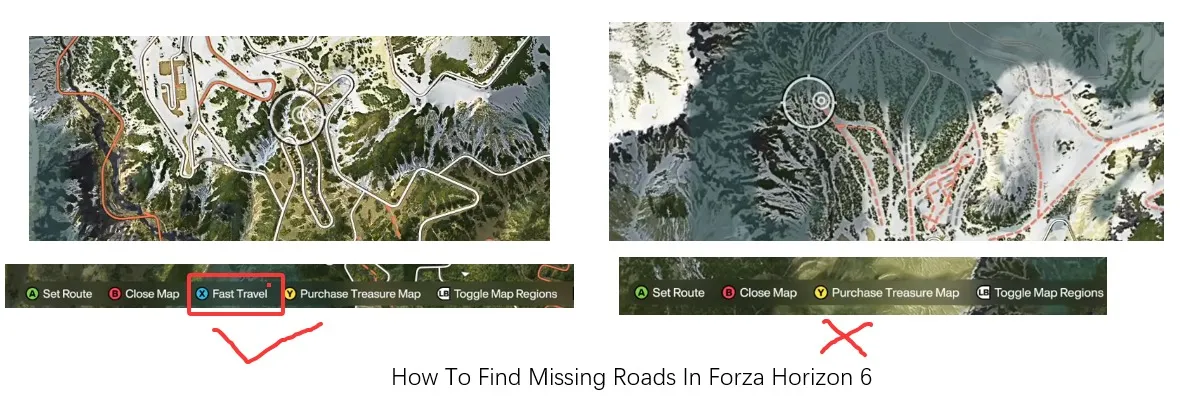
The logic behind this trick is simple: you can fast travel to any road you've already discovered. If a piece of road looks white but hasn't actually been recorded as completed by the game, the system won't let you teleport to it.
Instead of looking at the map itself, you need to keep your eyes locked on the button prompts at the very bottom of your screen—specifically the prompt for "Fast Travel."
If you are on PC (Mouse Method):
This is by far the fastest and most precise way to do it.
- Open your world map and zoom in quite close.
- Grab your mouse and quickly wiggle or "scrub" your cursor back and forth along the road segments.
- Watch the bottom of the screen. The exact millisecond your cursor passes over a glitched, undiscovered section of road, the "Fast Travel" button prompt will instantly vanish from the UI legend.
- When it flickers and disappears, stop, narrow down that exact spot, mark it, and go drive over it.
If you are on Xbox (Controller Method):
It takes a little bit longer with an analog stick, but it is completely doable.
- Zoom in on the map.
- Treat the map like you are mowing a lawn: start at a corner and use the D-Pad to sweep completely left to right, drop down slightly, and then sweep right to left.
- Keep a steady pace and watch for that bottom Fast Travel prompt to flicker off.

Once you finally clear that 671/671 hurdle and claim your hard-earned exploration bragging rights, you can finally shift your focus back to what Horizon is truly about: building the ultimate garage. Tracking down every last glitched street takes time, but upgrading and tuning a massive fleet of hypercars takes a serious amount of in-game cash. If you want to skip the endless grinding for prize wheels and immediately buy up those multi-million credit festival masterpieces or rare auction house gems, the easiest shortcut is to safely order Forza Horizon 6 credits online. With your map completely uncovered and a bankroll thick enough to buy any car you want, you'll be fully equipped to dominate the streets of Tokyo in style.
Keep an Eye Out for Glitched Landmarks (The Player House Bug)
While you are hunting down roads, keep in mind that the map UI bugs aren't just limited to tarmac. A prime example of this game-side weirdness is the Fuji Unai House.
A lot of players have noticed that even after they have completely explored and driven all over the roads surrounding the Fuji Unai property, they cannot directly fast travel to the house itself. On every other player house in the game, the fast travel function works perfectly the moment it's unlocked. But for this specific house, it frequently glitches out. If your map looks a bit strange around this area, or if you notice things aren't registering properly, you aren't crazy—it's a known bug that many of us are dealing with right now.
Quick Checklist for the Final Stretch
If you've scrubbed the map and are still short, check these common culprits that traditionally plague Horizon games:
- Tiny Driveways and Roundabouts: Sometimes a massive white intersection has a tiny literal nub of a turn-in that you technically didn't clip.
- On/Off Ramps: Multi-layered highway interchanges in the city can look fully colored on the map because the upper level is discovered, but the lower ramp hidden directly beneath it is untouched.
- Dirt Track Offshoots: Look closely at the very ends of dirt roads in the rural areas. Sometimes a road "ends" but has a tiny 5-meter tail that counts toward the 671 total.
Don't waste your time straining your eyes looking for grey pixels that don't exist. Switch over to the scrubbing method, watch for the UI text to disappear, and you'll have that achievement popped in no time. Good luck out there!