


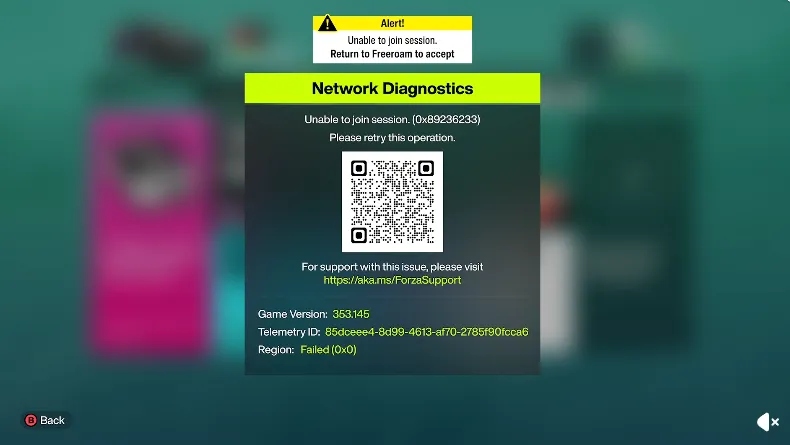
One of the most frustrating moments in Forza Horizon 6 is trying to join a friend's convoy or hop into the open world, only to see the dreaded “unable to join session” or “convoy unavailable” message. This is usually caused by recent launch issues, profile desyncs, or conflicts with PC software and network protocols. Fortunately, there are several reliable steps you can take to get back online and racing.
1. Disable "National Instruments" Services (PC Only)
If you're on PC, certain hardware calibration tools like SimJack Pedal Calibration can interfere with online connections. These often use National Instruments (NI) code, which may prevent players from seeing anyone in the open world.
- Open Task Manager (Ctrl + Shift + Esc).
- Look for any processes starting with NI or National Instruments, like NI Domain Service.
- Right-click and choose End Task.
- For a permanent fix, open the Windows Services app, find these NI services, right-click, select Properties, and set Startup type to Disabled.
2. Resync Your Profile and Store
A “Feature Unavailable” or 0x80600460 error usually means your profile is out of sync with Microsoft servers.
- Sign out completely of the Xbox App and Microsoft Store.
- Close both applications.
- Click your Windows taskbar clock → Adjust date and time → Sync now. Make sure Set time automatically is enabled.
- Log back into your Microsoft account in both apps.
3. Clear Account Tokens and Re-authenticate
Corrupted login credentials are a common culprit blocking session connections.
- PC: Open Credential Manager → Windows Credentials, remove any entries starting with Xbl|. Restart the game to force a fresh login.
- Console: In-game menu → Sign Out, restart the game, then sign back in.
4. Use the Steam Overlay Workaround
Steam users sometimes encounter broken invites through the in-game menus.
- Press Shift + Tab to open the Steam Overlay.
- Access your Friends List, right-click a friend, and select Join Game or send an invite directly via Steam.
5. Clear DNS and Refresh Network Protocols
If network protocols are stuck, refreshing your cache can help.
- Open Command Prompt as administrator.
- Enter the following commands one by one:
ipconfig /flushdns
netsh winsock reset
netsh int ip reset - Restart your PC.
6. Check Xbox Live Status and Network Settings
Even after these fixes, sometimes the issue is on Microsoft's end.
- Verify Xbox Live Status to ensure servers are online.
- Check NAT Type: It should be Open on Xbox; PC users need Teredo tunneling active.
- Forward Xbox Live ports if needed: UDP 3544 and UDP 4500.
- Make sure your date and time are set to sync automatically.
7. PC-Specific Fixes
- Run the game as Administrator.
- On Steam: Properties → Installed Files → Verify integrity of game files.
- Allow the game executable through Windows Defender Firewall.
By following these steps, most players can quickly resolve the unable to join session error and get back to the open roads and mountain passes of Forza Horizon 6. Consistently keeping your profile synced, network healthy, and background software in check ensures smooth multiplayer connections and a better Horizon Play experience.

For players looking to jump straight into multiplayer without any delays, consider marketplaces like U4N, where you can safely buy Forza Horizon 6 credits for sale. This allows you to upgrade vehicles, unlock events, and join sessions faster while avoiding common session errors tied to incomplete progress or account issues.





