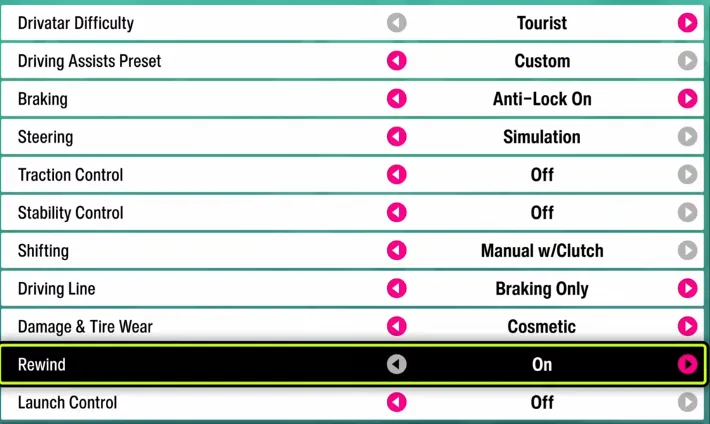
Forza Horizon 6 offers a wide range of difficulty options and driving assists, allowing players to customize their racing experience to suit their skill level and playstyle. Whether you're a newcomer to racing games or a seasoned veteran, fine-tuning your settings can dramatically improve both your performance and enjoyment.
Choose Your Preferred Difficulty
Here's a quick guide to each difficulty level and who it's best suited for:
| Difficulty | Recommendation |
|---|---|
| Tourist | New to racing games in general. |
| New Racer | New to the Forza Horizon series. |
| Novice | Relaxed, but with some challenge. |
| Average | The baseline experience intended by the developers. |
| Above Average | Slightly more challenging than baseline. |
| Highly Skilled | Hard, but not overly difficult. |
| Expert | Challenging for most players. |
| Pro | For seasoned veterans wanting maximum difficulty. |
| Unbeatable | Push your limits to the extreme. |
Spend some time experimenting with these levels to find the perfect balance between challenge and fun.
Recommended Settings to Improve Your Gameplay
| Setting | Recommended Option | Why It Helps / Tips |
|---|---|---|
| Driving Line | Braking Only | Shows the racing line only before turns, giving guidance without overhand-holding, improving cornering skills. |
| Steering Mode | Simulation | Provides realistic car handling. For more challenge, turn off Traction Control and Stability Control. |
| Proximity Radar | On (near in-game horizon) | Helps track nearby cars in tight races, improving situational awareness and avoiding collisions. |
| Graphics Mode | Performance | Ensures smooth frame rates for better reaction time and visibility. |
| Motion Blur | Short | Reduces visual blur to maintain clarity while driving. |
| Traction Control | Off | For advanced players who want full control over acceleration and handling. |
| Stability Control | Off | Removes assistive steering corrections, making driving more skill-based. |

Best Difficulty Settings for Street & Road Racing
Street and road races demand precision, smooth cornering, and consistency. These settings help you stay competitive while enjoying the ride:
- Drivatar Difficulty: User preference – adjust based on your skill to make AI opponents fair but challenging.
- Driving Assists Preset: Custom – allows full control over individual assists.
- Braking: Anti-Lock On – prevents wheel lockups while still letting you brake hard into corners.
- Steering: Standard – smooth and forgiving, ideal for tight city streets or long highway sections.
- Traction Control: Off – encourages better throttle control, useful for handling mid-corner oversteer.
- Stability Control: Off – lets skilled players control the car's behavior manually.
- Shifting: Manual Shifting – gives you more control over acceleration and engine performance.
- Driving Line: Braking Only – shows the optimal line only before corners, helping you master braking points.
- Damage & Tire Wear: Cosmetic – ensures cars stay visually consistent without affecting performance.
- Rewind: On – allows correcting minor mistakes without frustrating restarts.
Tip: Practicing braking zones and corner exits can dramatically improve lap times. Look for Street & Road cars with balanced handling and acceleration stats for consistent results.
Best Difficulty Settings for Dirt & Cross-Country Racing
Off-road racing is unpredictable, so these settings focus on control and adaptability:
- Drivatar Difficulty: User preference – tough enough to challenge you without AI dominating rough terrain.
- Driving Assists Preset: Custom – gives flexibility for off-road handling tweaks.
- Braking: Anti-Lock On – prevents skidding on loose surfaces like gravel or mud.
- Steering: Standard – gives responsive handling without over-sensitivity on rough terrain.
- Traction Control: Off – skilled players can control wheelspin for faster acceleration on soft surfaces.
- Stability Control: Off – allows drifting and sliding naturally over uneven terrain.
- Shifting: Automatic – helps you focus on steering and navigation instead of gear timing.
- Driving Line: Braking Only – assists before turns but keeps you fully engaged on off-road tracks.
- Damage & Tire Wear: Cosmetic – maintains visual appeal without affecting performance in rough environments.
- Rewind: On – handy for correcting mistakes on unpredictable terrain.
Tip: Off-road racing often requires balancing speed and control. Look for cars with strong suspension and torque for the best performance on dirt trails.
Best Difficulty Settings for Touge Racing
Touge mountain passes require precision, smooth transitions, and total focus:
- Drivatar Difficulty: User preference – set high for competitive AI, low for practice runs.
- Driving Assists Preset: Custom – full control over simulation-style driving.
- Braking: Anti-Lock Off – allows precise braking for sharp corners.
- Steering: Simulation – realistic handling and feedback for tight curves.
- Traction Control: Off – needed for advanced drifting and corner control.
- Stability Control: Off – enables full skill-based handling.
- Shifting: Manual Shifting – lets you time gear changes perfectly for corners.
- Driving Line: Off – removes on-screen guidance to train your memory of each turn.
- Damage & Tire Wear: Cosmetic – keeps your car visually intact while pushing limits.
- Rewind: On – useful for small mistakes without breaking rhythm.
Tip: Touge racing rewards practice and muscle memory. Use light throttle modulation and learn each hairpin to gain an edge. Cars with good balance and light weight are ideal.
Best Difficulty Settings for Drag Racing
Drag racing is all about reaction timing, acceleration, and perfect launches:
- Drivatar Difficulty: User preference – AI doesn't need to be aggressive, focus on personal bests.
- Driving Assists Preset: Custom – precise control over assist features.
- Braking: Anti-Lock Off – prevents unwanted ABS intervention for optimal launch control.
- Steering: Standard – minimal adjustments required for straight-line racing.
- Traction Control: Off – allows maximum power transfer to the ground.
- Stability Control: Off – ensures no interference when launching or shifting.
- Shifting: Manual Shifting – essential for timing gear changes and maximizing speed.
- Driving Line: Off – unnecessary in straight-line racing.
- Damage & Tire Wear: Cosmetic – looks only, doesn't impact straight-line performance.
- Rewind: Off – drag races are quick; mistakes are part of learning reaction timing.
Tip: Focus on launch timing and gear changes for the best results. Light throttle control before launch can help prevent wheelspin on powerful cars.