購物車空
繼續購物Dynamic Difficulty in MLB The Show 26 adapts to your performance in real-time. If you string together multiple hits or consecutive strikeouts, the game scales up the challenge. However, hitting a performance wall or trying to earn progression achievements can make you want to reset this metric back to Beginner.
The game lacks a single "Reset" button for this mechanic, but you can force a reset or modify your current progress using the verified methods detailed below.
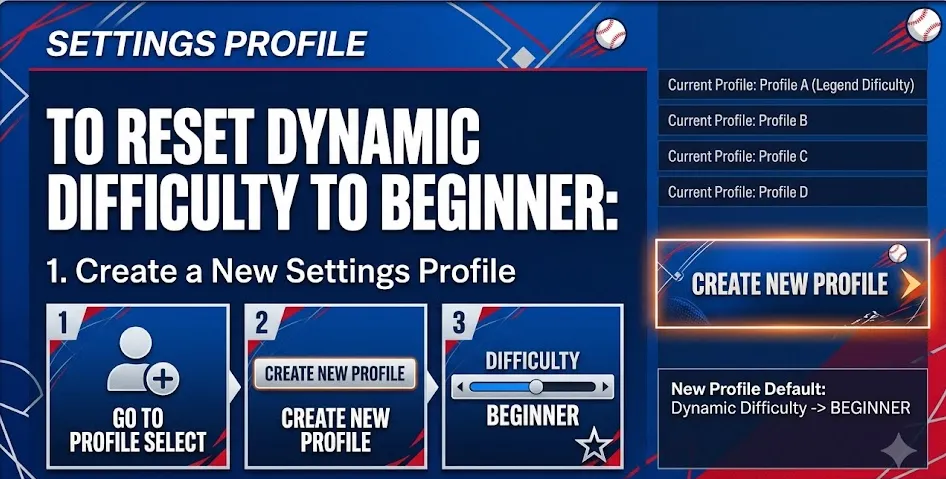
Creating a clean settings profile overrides your cached dynamic progression data without deleting your game saves or progress in Road to the Show (RTTS) and Franchise modes.
| Step | Action | Location / Menu Path |
|---|---|---|
| 1 | Open Settings | Main Menu (Top Right Corner) > Settings |
| 2 | Enter Settings Management | Select Settings > Press Square (PlayStation) or X (Xbox) to manage presets |
| 3 | Create New Preset | Select Create New Preset, name it, and set it as your active profile |
| 4 | Configure Difficulty | Go to Gameplay > Defensive/Offensive > Set Difficulty to Dynamic |
| 5 | Verify Reset | Launch any offline game mode; the progress bar will start from the Beginner level |
If adjusting your gameplay settings isn't enough to push past a frustrating performance wall, upgrading your Diamond Dynasty roster is the most reliable way to gain a permanent competitive edge. Buying cheap MLB The Show 26 stubs directly from our secure marketplace allows you to instantly bypass the tedious offline grind and secure elite player items. Check out our current stock today to unlock premium packs and build your ultimate dream team without the hassle.
If you prefer not to change your global profile settings, you can intentionally lower the difficulty level through gameplay. This adjusts the dynamic evaluation slider back down organically.
| Strategy Component | Implementation Steps | Resulting Impact |
|---|---|---|
| Target Mode | Launch an Exhibition game or an offline entry-level game mode. | Prevents performance drops from ruining competitive stats in Diamond Dynasty. |
| Sensitivity Adjustment | Go to Settings > Gameplay > Slider Selection. Turn the Dynamic Difficulty Sensitivity slider all the way to the maximum right setting. | Accelerates the rate at which the system registers poor performance, causing faster rank drops. |
| Gameplay Execution | Batting: Purposefully strike out swinging or take pitches down the middle.
Pitching: Throw intentional balls or high-velocity fastballs right down the middle to allow hits. | Each consecutive strikeout or allowed hit forces the internal rating system to drop your active level. |
| Completion Requirement | Finish the game completely until you return to the post-game reward screen. | Saves the newly downgraded difficulty status to your current game profile. |
If the profile reset fails to clear your cached slider progression, you must delete your locally stored profile data. This does not impact cloud-saved Diamond Dynasty teams or career save files.
| Platform | Navigation Path to Clear Cache |
|---|---|
| PlayStation 5 | Settings > Storage > Saved Data (PS5) > MLB The Show 26 > Delete Console Storage Profile Data |
| Xbox Series X/S | My Games & Apps > MLB The Show 26 > Manage Game and Add-ons > Saved Data > Delete Profile Everywhere |
| Nintendo Switch | System Settings > Data Management > Delete Save Data > MLB The Show 26 > Delete User Profile Data |
U4N編輯團隊由一群熱愛遊戲的分析師和技術專家組成。我們不僅是一個可靠的遊戲資產市場——我們的核心目標是通過專業內容幫助玩家。我們的團隊為一些大熱門遊戲製作詳細的攻略、經濟策略和技術問題解決方案,包括《MLB The Show 26》、《Aion 2》、《Forza Horizon 6》、《Arc Raiders》和《Path of Exile》等。
無論是掌握遊戲市場的買賣技巧,還是幫助你打造最強的遊戲角色或策略,我們發布的每一份內容都經過我們團隊的實際測試。在 U4N,我們不僅跟隨遊戲的趨勢,我們還幫助你領先一步