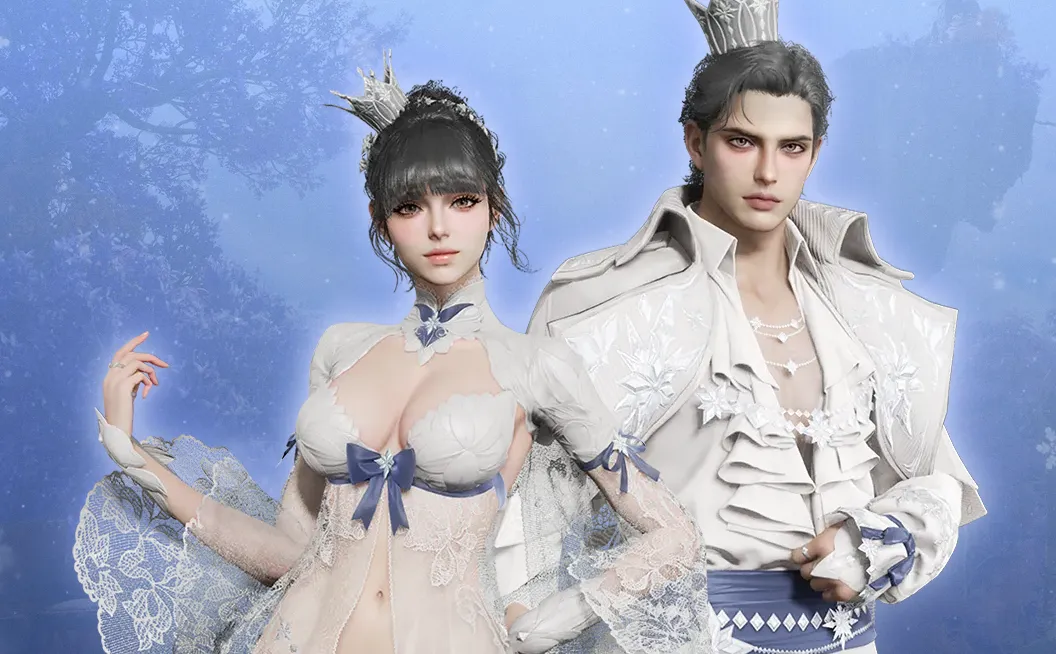
In Aion 2, the "Lookbook" is an in-game feature that shows off outfits and cosmetics. You can access it through several methods:
In-Game Style Shop & Closet
The main way to view and get Lookbook styles is through the in-game shop and your character's menus:
- Appearance Tab: Open the Shop (from the menu or with a hotkey) and go to the Appearance or Cosmetic tabs.
- Style Shop Web Page: Clicking on Download Storage (which has eight slots) will take you to an external Style Shop webpage. Here, you can browse and download custom character designs made by other players, similar to a social feed in the game.
- Closet: Once you own an item, you can manage and equip it through your character's Closet.
How to Acquire Lookbook Items
You can get the Lookbook outfits using different methods:
- Kinah (In-game Currency): Many items, like the Windborne WOW skin or the Red Horse Westman's cowboy set (about 2,500 Kinah), can be bought with Kinah earned from regular gameplay.
- Real Money / Kuna: Some exclusive outfits, like the Frostflower Lace outfit, must be bought with real money or the premium currency, Kuna.
- Gameplay Rewards: You can earn high-tier gear for free by completing certain tasks. For example, the Dwati and Faded Shadow sets are rewards from the Dying Dramata Nest four-star dungeon.
- Vouchers: Items like "Heroic Skin Reward Vouchers" can be used to redeem specific cosmetic skins.
作者簡介
U4N編輯團隊由一群熱愛遊戲的分析師和技術專家組成。我們不僅是一個可靠的遊戲資產市場——我們的核心目標是通過專業內容幫助玩家。我們的團隊為一些大熱門遊戲製作詳細的攻略、經濟策略和技術問題解決方案,包括《MLB The Show 26》、《Aion 2》、《Forza Horizon 6》、《Arc Raiders》和《Path of Exile》等。
無論是掌握遊戲市場的買賣技巧,還是幫助你打造最強的遊戲角色或策略,我們發布的每一份內容都經過我們團隊的實際測試。在 U4N,我們不僅跟隨遊戲的趨勢,我們還幫助你領先一步