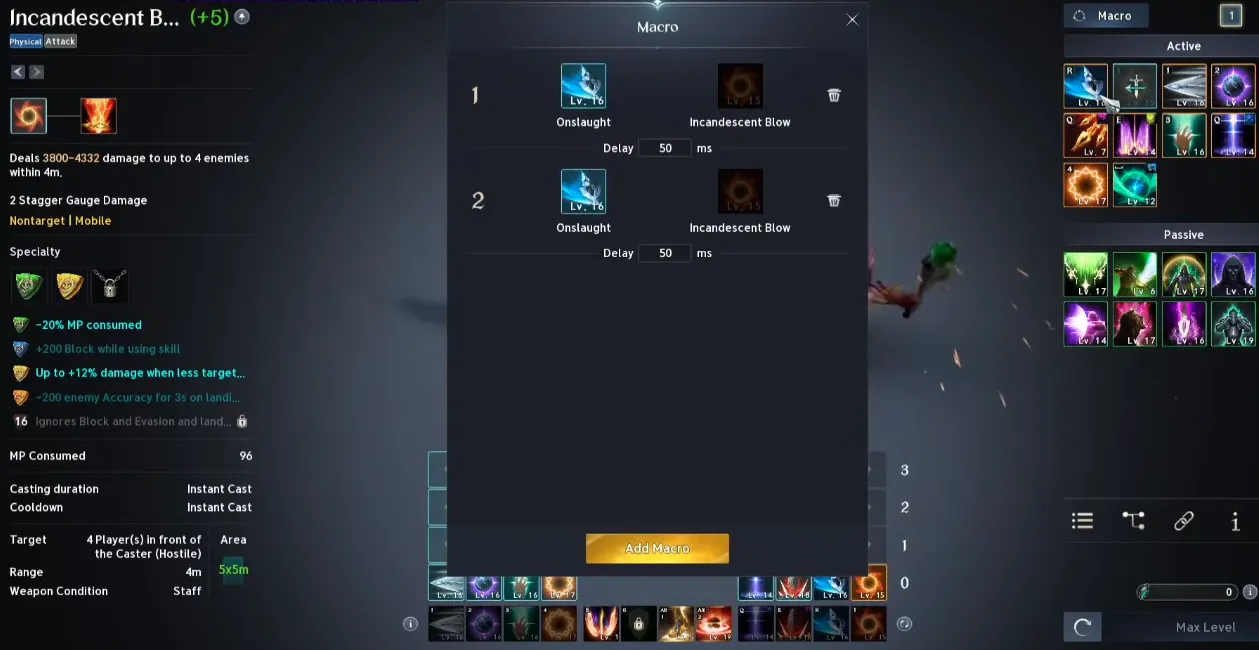
In AION 2, macros are an officially supported feature designed to help players maintain high damage-per-second (DPS) and ease the strain of repetitive inputs. The system primarily focuses on alternating sequences of Left-Click (LMB) and Right-Click (RMB) abilities, which are the foundation of combat rotations.
Setting Up In-Game Macros
To access and configure your macros:
- Open the Macro Menu: Press U (default) or navigate to the System Menu and select "Macro."
- Add New: Click the "New Macro" button at the bottom.
- Name and Icon: Give it a name and select an icon that you will drag onto your hotbar later.
- Enter Commands: You can drag skills directly from your skill window into the macro edit box, or type them manually. Syntax: /Skill [Skill Name]. Delays: Between skills, you must add a delay to account for the Global Cooldown (GCD) and animation time. Example:
/Skill Ferocious Strike II
/Delay 1.5
/Skill Rage II - Save: Click "Save" and drag the icon from the Macro window to your action bar.
How to Use During Combat
- Activation: You must hold down the assigned macro key to keep the sequence running. It is not a "one-press" automation.
- Manual Overrides: While holding the macro key, it will automatically pause if you manually trigger another skill that is off-cooldown.
- Auto-Targeting: Most players combine these macros with the game's auto-target setting to streamline combat.
Key Tips for Aion 2 Macros
- Animation Canceling: The primary goal for many players is to replicate ideal "animation cancel" rotations flawlessly.
- Testing: Always test your new macro on a DPS dummy or training NPC to ensure it doesn't break your skill chains or reduce your damage.
- Ping Sensitivity: The system is highly dependent on your connection. If your ping is high, you will need longer delays between skill commands to ensure they register correctly.
- Optimal Delays: Start with a 50-millisecond delay and adjust based on your latency (ping) to ensure smooth execution.
- Chain Management: Macros work best for repeating your class's default 3-chain skill on left-click and 2-chain on right-click.
- Active Usage: You may need to hold down or spam the macro key, allowing it to pause for manual skill usage when necessary.
- Avoid AFK Farming: While permitted for enhancing combat, using macros for automatic farming (AFK) is not allowed.
Important Note: While in-game macros are permitted, using external third-party software for "auto-farming" kinah or endless repeating loops can lead to account bans for bot-like behavior.
About the Author
Authored by elite gamers and industry insiders, the U4N Editorial Team delivers authoritative game updates, patch notes breakdowns, and expert strategies for trending titles including World of Warcraft, Path of Exile 2, MapleStory, Aion 2, and Arc Raiders.
From deep-dive guides to the latest meta shifts, our in-house veterans test every tactic firsthand to keep you ahead of the game.