If you want to dominate at the plate in MLB The Show 26, your hitting settings are crucial. The right settings can help you read pitches faster, track them better, and make consistent contact. Here's a guide to help you optimize your hitting settings for the best performance, especially in competitive or ranked play.
Zone Hitting is the most popular and effective option for players looking for full control. With Zone Hitting, you have to manually move your Plate Coverage Indicator (PCI) to track pitches and make contact. This gives you the most accurate results, making it the gold standard for competitive gameplay.
2. Hitting View: Strike Zone or Strike Zone High
The camera angle can make or break your ability to see pitches clearly.
Strike Zone: This view brings you up close to the plate, making it easier to judge speed and break. It's perfect for those who want the clearest view of the incoming pitch.
Strike Zone High: Ideal for pitchers with a high release point or if you're facing pitchers who throw a lot of high fastballs.
3. PCI Settings
The PCI (Plate Coverage Indicator) helps you track the pitch and decide when and where to swing. Here's how to set it up for maximum efficiency:
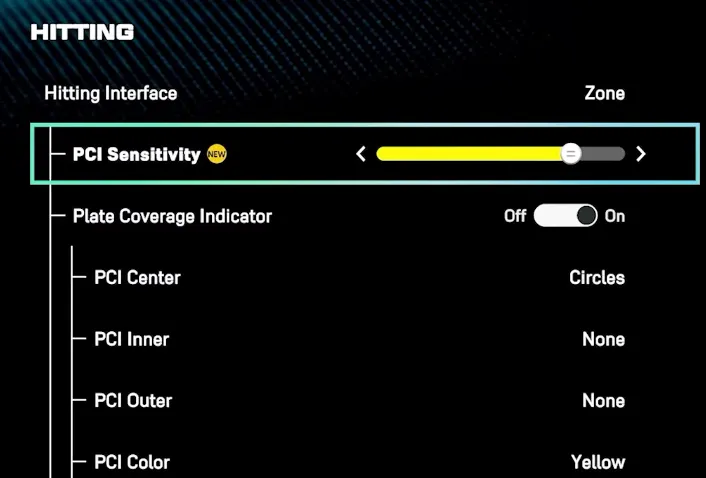
PCI Center: Use the Bat style. It's clean, simple, and keeps your focus on the ball.
PCI Inner: Use the Wedge setting. This allows for more precise tracking without unnecessary visual distractions.
PCI Outer: Set this to None. You want the cleanest view possible without additional clutter.
PCI Color: Yellow works best for most players, but you can choose a color that stands out to you.
PCI Opacity: Set it between 50% to 70% for a balanced view of the pitch and the PCI. It's bright enough to see but transparent enough to avoid distracting you.
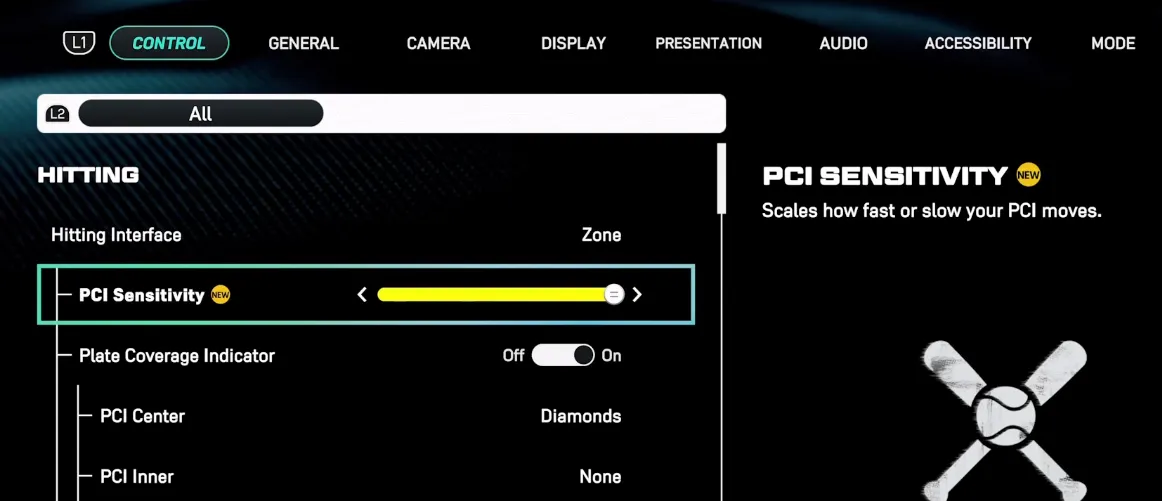
PCI Sensitivity: Start with 60-75%. This setting controls how fast your PCI moves. High sensitivity helps with quick reactions but can be tricky for beginners, so feel free to adjust.
4. Swing Input: Buttons
Buttons provide more consistent timing compared to analog sticks. They're more precise, which is crucial in competitive play.
5. In-Play View: Dynamic
This view is helpful after contact is made, allowing you to track the ball's flight path with ease.
6. Hitting Depth of Field: Off
The new Depth of Field feature blurs the background, but it can cause lag or distractions, so it's best to turn it off for smoother gameplay.
Mastering your hitting settings is key to becoming a top player in MLB The Show 26. By optimizing your PCI, camera views, and swing inputs, you’ll gain better pitch recognition and make more solid contact at the plate. Whether you’re competing in ranked games or just enjoying the experience, getting these settings dialed in can give you a serious advantage. If you're looking to progress even faster and get your hands on some of the best players, consider purchasing MLB 26 Stubs from U4N. It’s a trusted platform where you can easily purchase MLB 26 Stubs to skip the grind and focus on building your dream team!
Optimal Control Settings
To master hitting, your controls need to be dialed in for maximum responsiveness.
Hitting Interface: Stick with Zone for full control.
PCI Sensitivity: Set it between 60-75%, depending on your preference. Higher sensitivity gives faster reactions but requires precision.
PCI Style: Use Bat or Diamonds. These offer a clean and direct focus on the ball.
PCI Inner/Outer: Turn both Off. This eliminates visual clutter and helps you focus on pitch tracking.
PCI Color: Yellow is a safe bet for visibility. Feel free to experiment with other colors, but yellow is often the easiest to see against most backgrounds.
PCI Opacity: Keep it between 50%-70% for the perfect balance of visibility and pitch tracking.
Swing Input: Buttons. Button input provides the most consistent and reliable timing, which is key in high-level play.
Camera & Visuals
The right camera setup is crucial for pitch recognition and reaction time.
Hitting Camera: Use Strike Zone or Strike Zone High for the best possible view of the ball as it leaves the pitcher's hand.
Hitting Depth of Field: Turn this off. While it's designed to blur the background and help with focus, it can sometimes cause visual lag or distractions.
In-Play View: Set it to Dynamic so you can track the ball after contact.
Competitive Tips
Focus on the Hand: Train yourself to focus on the pitcher's release point. This gives you valuable extra milliseconds to react and adjust.
Use a Monitor: If possible, play on a gaming monitor with a low response time (1ms) to reduce input lag, which can make a huge difference in timing.
Practice on High Difficulty: Use Custom Practice on Legend difficulty to speed up your reaction time and improve pitch recognition.
Key Tips for Better Hitting
Tip
Explanation
Strike Zone Camera
This gives the clearest view for reading pitches.
Don't Slam the PCI
Keep the PCI centered for a smoother swing.
Use PCI Anchor
Lock the PCI in a specific zone for consistent placement.
Focus on Normal Swings
Use Normal Swings (X/A) for balanced contact and power.
Practice Recognition
Use Custom Practice on higher difficulty to sharpen reaction time.
Q1: How do I get better at hitting?
Answer: Hitting can be tough, especially in MLB The Show 26, but there are several strategies that can help you improve. Here are some tips based on feedback from experienced players:
Choose the Right Interface & Camera Most players recommend using the Zone Hitting Interface because it offers full control over where you aim the PCI (Plate Coverage Indicator). For camera angles, Strike Zone 2 is often favored as it gives a clear view of the pitch. However, it's also useful to experiment with different camera angles like Strike Zone High if you're facing high-throwing pitchers.
Work on Your Timing Timing is more important than perfect PCI placement. One player suggests keeping your thumb on the bottom rim of your controller, which helps you focus on getting the pitch in the “green” timing window. Focus on visualizing this window and adjust your swing to make solid contact.
Focus on Pitch Recognition Before you even swing, it's important to read the pitch. Start by tracking the ball out of the pitcher's hand, especially with less than two strikes. Some players recommend a “fastball first” mentality, where you expect a fastball before considering any off-speed pitches.
Use a Relaxed Grip Tension in your hands can lead to slower reactions. Keep your fingers relaxed until the moment you "pull the trigger." This is crucial when timing off-speed pitches correctly.
Practice with Less Pressure One user shared that they started by practicing without swinging. Instead, focus on just tracking the pitch and identifying whether it's a ball or strike. Once you're comfortable with pitch recognition, you can start practicing actual swings.
Adjust Your PCI Placement If you're struggling with PCI placement, try adjusting the sensitivity in your settings. Some players have found that lowering the PCI sensitivity makes it easier to hit. Others recommend using a simpler PCI design, like a diamond shape with no inner or outer rings, to focus solely on timing.
Patience Is Key Always remember that MLB The Show punishes impatience. Wait for the right pitch and only swing at strikes you're comfortable with. Many top players admit that they're patient, and they rarely swing at anything outside the strike zone.
Use Opposite-Handed Hitters Mix up your lineup by using at least 5 opposite-handed hitters. It's also a good idea to pinch-hit during the later innings to get favorable matchups, especially against pitchers whose energy is running low.
Analyze Your Hitting Stats After each game, check your hitting analysis. Many players suggest focusing on pitches around the middle of the plate, as they are often the easiest to hit. If you're chasing too many outside pitches, cut back on those and focus on the center of the plate.
Stay Relaxed and Confident Remember, you're going to face tough pitchers, and it's okay to struggle sometimes. Don't let bad at-bats ruin your confidence. Staying relaxed and moving on quickly is a huge part of long-term improvement.
Q2: How do I stop swinging at bad pitches?
Answer: To avoid swinging at bad pitches, you need to work on pitch recognition and patience:
Develop a "Pitch Zone" Select one or two squares of the strike zone you're comfortable hitting. Focus on only swinging when the ball is in those areas. It might lead to more strikeouts, but it will improve your ability to handle good pitches. Expand your zone as you get better.
Understand Pitcher Fatigue As the pitcher's energy decreases, they become easier to hit. Watch their pitch count and look for signs of fatigue. Patience can pay off as pitchers lose their control and give up easier pitches.
Q3: What should I focus on when using the Zone Hitting interface?
Answer: When using Zone Hitting, remember that the PCI is your primary tool for making solid contact. Here are some key points:
Use Short and Quick Movements Avoid gross stick movements. Precision is more important than trying to chase after every pitch. Keep your stick movements short and quick to cover the strike zone without overreaching.
Adjust the PCI Before the Pitch Set the PCI where you expect the pitch to come. Some players recommend aiming for the “fat” part of the plate when there are fewer than two strikes, and then protecting the whole plate with two strikes.
Q4: How do I make my hitting more consistent?
Answer: Consistency comes with practice, patience, and understanding your strengths:
Track the Ball Early The earlier you pick up the ball from the pitcher, the better. This gives you more time to react and adjust to the pitch.
Practice PCI Movement Practice moving your PCI before actually swinging. Focus on getting the right PCI placement as the ball approaches, but don't force yourself to always aim perfectly. Sometimes, a little imperfection leads to a more natural swing.
Take It Slow It's easy to rush in MLB The Show, but slower, more deliberate movements often result in better swings. Practice with a calm mind, and you'll see improvement.
Q5: What camera angle should I use for hitting?
Answer: Camera choice is subjective, but here are some commonly recommended angles:
Strike Zone: A popular default that provides a clear view of the pitch and is easy to adjust.
Strike Zone 2: Often favored for its balance between pitch visibility and plate coverage.
Strike Zone High: Best for high-throwing pitchers or for players who struggle with high fastballs.
Experiment with these angles to see which one helps you track pitches the best. Remember, your comfort is key.
The U4N Editorial Team is made up of dedicated gamers and technical experts. We're not just a trusted marketplace for game assets—we're all about empowering players with top-tier, expert-driven content. Our team produces in-depth guides, strategies, and technical fixes for some of the biggest games out there, like MLB The Show 26, Aion 2, Forza Horizon 6, Arc Raiders, and Path of Exile.
Whether it's mastering market flipping in Diamond Dynasty or optimizing your endgame builds, all of our strategies are tested and proven by in-house experts. At U4N, we don't just follow the meta—we help you stay ahead of it.