If you want to hit like a pro in MLB The Show 26, the right camera view is key. The camera angle plays a huge role in how well you can track pitches and make solid contact. While everyone has their personal preferences, there are a few camera views that stand out as the best for competitive gameplay. Let's break down the top hitting camera views and why they're recommended.
Top Hitting Camera Views
| Camera Option | What It's Best For | Why It's Recommended |
|---|---|---|
| Strike Zone | Default go‑to hitting view | Gives the clearest visual of the incoming pitch and helps with recognizing the ball's location and break more accurately. |
| Strike Zone High | High release point pitchers | Slightly elevated view that makes high fastballs easier to pick up — great against tall pitchers or ones with high arm slots. |
| Strike Zone 2 / 3 | Player preference/shifted views | Variants that adjust camera positioning slightly; many players like these for better clarity on breaking balls or low pitches. |
| Zoom or Offset | Alternate options | Some players use these if they prefer a different field perspective — but generally, Strike Zone cameras are preferred for competitive hitting. |
Best Competitive Hitting View
After playing with different options, most players agree that the Strike Zone camera is the best hitting view in MLB The Show 26. It's the default view for many players and provides the clearest, most consistent visual of the ball's path. This makes pitch recognition a lot easier, especially when you're facing pitchers with tricky stuff.
For a more refined option, Strike Zone High is an excellent pick when facing tall pitchers or ones with high release points. This view gives you a slight elevation, making it easier to track high fastballs and breaking balls that come in from above. It's a great alternative if you find the regular Strike Zone view a little too low or hard to pick up certain pitches.
If you're looking to elevate your game in MLB The Show 26, mastering the right hitting view is just the beginning. Alongside fine-tuning your camera settings, it's also essential to focus on optimizing your roster and maximizing your in-game currency. The MLB The Show 26 Stubs marketplace is the best place to buy and sell players, and it can help you acquire those key cards that take your team to the next level. If you're ready to avoid the grind and focus on gameplay, check out U4N — the trusted platform for cheap MLB The Show 26 Stubs. U4N lets you easily buy the stubs you need, so you can build the ultimate squad without the hassle.
Strike Zone 2 / Strike Zone 3 for Specific Needs
Some players prefer Strike Zone 2 or Strike Zone 3 for a slightly altered view. These variants adjust the camera positioning, so if the standard Strike Zone feels too close or too high, you can find a more comfortable setup. Strike Zone 2, in particular, is popular because it gives a more balanced perspective while still offering great clarity on breaking balls and low pitches.
Extra Settings to Enhance Hitting
There's another setting that can improve your hitting experience: Hitting Depth of Field. Turning this ON blurs the background, so your focus stays on the pitcher and the ball. This can help reduce distractions, especially in stadiums with large crowds or busy backgrounds.
Additionally, make sure to set In-Play View to Dynamic. This ensures that the camera follows batted balls smoothly after contact, helping you track the ball as it's hit. You can also adjust the hitting camera mid-at-bat, depending on the pitcher's release point, for a more optimal view of the ball's trajectory.
Recommended Hitting Settings:
- Hitting View: Strike Zone or Strike Zone High
- Hitting Depth of Field: ON
- In-Play View: Dynamic
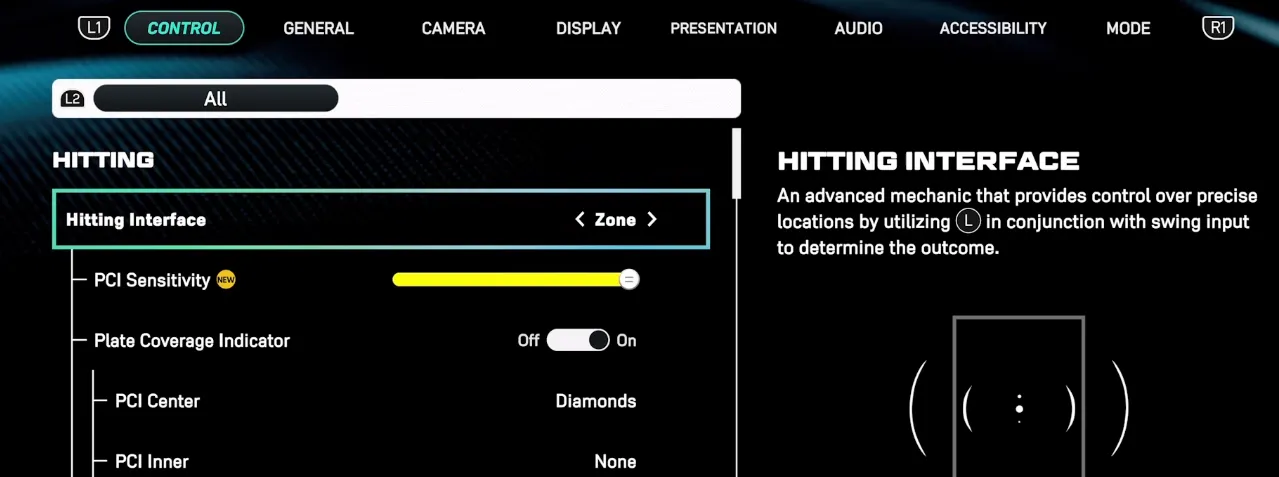
- Hitting Interface: Zone
Q: What's the best camera view for hitting in MLB The Show 26?
A: The best camera view for hitting largely depends on your play style and what you're comfortable with. Here are some popular options:
Q: Why is Strike Zone the most commonly used view?
A: Strike Zone is the default camera view in MLB The Show 26. It provides a clear, focused look at the strike zone, making it easier to judge pitches. It's balanced, giving you a good view of both inside and outside pitches. This is great for most players, especially beginners.
- Best for: All-around hitting, beginners, and general use.
Q: What makes Strike Zone High a great choice for hitting?
A: Strike Zone High is perfect for pitchers with high release points or for players who struggle with high fastballs. This camera view is slightly elevated, giving you a better angle to pick up those high-pitched fastballs and breaking balls.
- Best for: Facing high fastball pitchers, or if you struggle with high pitch locations.
Q: I want something in between. Should I use Strike Zone 2?
A: If you like Strike Zone but need a little more clarity, Strike Zone 2 is a solid option. This view shifts the camera just slightly for a better view of breaking balls and inside pitches. It gives you a more comfortable perspective on pitch movement.
- Best for: Players who want a balance between seeing the strike zone clearly and tracking breaking pitches.
Q: What if I struggle with pitches in the dirt or low in the zone?
A: If you find yourself swinging at pitches in the dirt, try using the Zoom camera. This view zooms in on the batter and pitcher, improving your depth perception. It makes it easier to judge pitches and helps you avoid chasing bad ones.
- Best for: Players who need better depth perception and pitch recognition, especially for low pitches.
Q: Why would I use the Catcher's View?
A: The Catcher's View is a more immersive camera angle that simulates a real batter's perspective. It's a great option if you prefer to see the whole field and anticipate the pitch's movement. This view can help with timing and reaction speed.
- Best for: Players who want an immersive, real-life batting experience.
Q: Are there other camera views that I should consider?
A: Yes! Wide and Offset views offer a broader field of vision. These options help you track pitches and field placement more easily, which could be especially useful for players focusing on overall game awareness.
- Best for: Players looking for more of a field view or better pitch movement tracking.
Q: Why do so many players use Strike Zone 2?
A: Strike Zone 2 is often favored for its ability to better track pitches, especially low ones. Many players find that this view helps them pick up the ball faster and see the bottom of the strike zone more clearly. It's especially helpful for those who struggle with low pitches, as it provides a better look at when a ball is low in the zone or out of it.
- Why it's recommended: Great for tracking low pitches and improving pitch recognition, especially on higher difficulties like Hall of Fame or Legend.
Q: What's the advantage of using Strike Zone High?
A: Strike Zone High is preferred by some players because it gives a clearer view of high pitches, such as fastballs or high-breaking balls. It helps you judge whether a pitch is in the strike zone or too high to swing at, providing a strategic advantage.
- Why it's recommended: Ideal for players who struggle with high-pitched fastballs or breaking balls.
Q: Is Zoom a good option for hitting?
A: Zoom gives you a closer look at the batter and pitcher, which can help with pitch recognition and timing. Some players, particularly those who need better depth perception, prefer this camera because it brings the action closer without compromising overall visibility.
- Why it's recommended: Excellent for players who need better pitch clarity and depth perception.
Q: I've seen people use Catcher Near—is this a good option?
A: Catcher Near is a great choice for players who prefer to be closer to the action and need a view that mimics real-life gameplay. It's ideal for players who want to see the batter's stance and get a good sense of the pitcher's delivery.
- Why it's recommended: Provides a more realistic experience and helps with pitch timing.
Q: I've heard about Offset—what's that all about?
A: Offset is a more unconventional choice, but it's favored by players who are up against sidearm or submarine pitchers. It gives a slightly shifted view of the field, making it easier to pick up pitches from these unique pitching styles.
- Why it's recommended: Ideal for handling sidearm or submarine pitchers, and can improve pitch tracking against unusual deliveries.
Q: Why is Strike Zone 3 sometimes preferred?
A: Strike Zone 3 is a variant of the standard strike zone camera, but with a more zoomed-out perspective. This view helps some players maintain better awareness of the entire field while still keeping a solid look at the pitch.
- Why it's recommended: Great for players who like to see the bigger picture while keeping the strike zone in view.
Q: Any tips for improving hitting with these views?
A: The key is to experiment with different views until you find one that feels most natural for you. In addition to camera settings, remember to adjust your PCI (Plate Coverage Indicator) settings. Some players prefer inner-circle PCI for precision, while others go for more basic setups. Custom practice with your favorite hitters can also help you sharpen your timing and pitch recognition.