購物車空
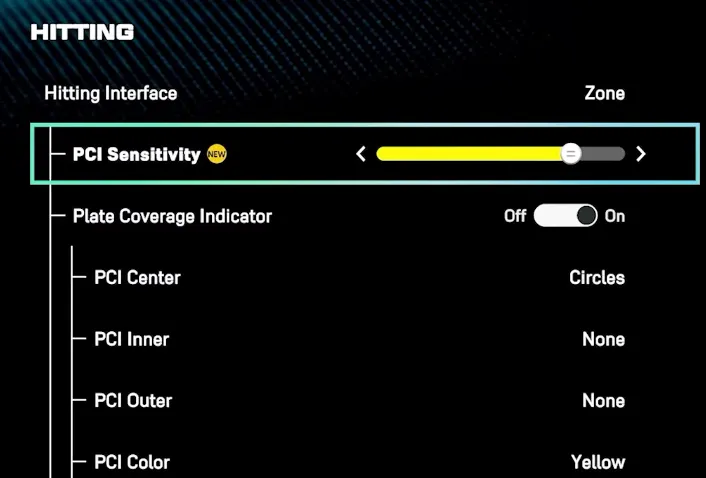
繼續購物In MLB The Show 26, the newly introduced PCI Sensitivity slider allows you to scale how fast or slow your Plate Coverage Indicator (PCI) moves when using the "Zone" hitting interface.
The slider adjusts the relationship between your analog stick movement and the PCI's speed on screen:
While the "best" setting is a matter of personal preference, current community and expert recommendations include:
In MLB The Show 26, finding the right balance with the PCI Sensitivity slider is key to refining your hitting performance. Whether you prefer a more responsive PCI for fastballs or a slower, more controlled feel for breaking pitches, adjusting this setting can give you the precision you need to excel. If you're looking to enhance your experience and get ahead in the game, you might want to buy cheap MLB 26 stubs PS5 from trusted platforms like U4N. With their competitive prices and reliable delivery, U4N offers an easy way to boost your gameplay without breaking the bank.
You can find this slider by navigating through the following menus:
Note: You must have your Hitting Interface set to Zone for this setting to be active.
U4N編輯團隊由一群熱愛遊戲的分析師和技術專家組成。我們不僅是一個可靠的遊戲資產市場——我們的核心目標是通過專業內容幫助玩家。我們的團隊為一些大熱門遊戲製作詳細的攻略、經濟策略和技術問題解決方案,包括《MLB The Show 26》、《Aion 2》、《Forza Horizon 6》、《Arc Raiders》和《Path of Exile》等。
無論是掌握遊戲市場的買賣技巧,還是幫助你打造最強的遊戲角色或策略,我們發布的每一份內容都經過我們團隊的實際測試。在 U4N,我們不僅跟隨遊戲的趨勢,我們還幫助你領先一步