購物車空
繼續購物Since its release in March 2026, MLB The Show 26 has seen a number of performance complaints from early players. Most of these issues are not game-breaking, but they can affect how smooth and responsive the game feels.
The reports are fairly consistent across platforms. They point to a mix of UI slowdown, occasional frame drops during gameplay, and unstable online performance. Below is a clear breakdown of what is happening and what you can realistically do about it.
One of the most widely reported problems is slow menu performance.
Players describe the interface as:
This is not traditional “lag” in the network sense. It is more about how quickly the game processes inputs and loads elements. It tends to be most noticeable when moving quickly between menus.
During actual gameplay, performance is generally stable, but not always consistent.
The most common pattern:
This suggests that certain animations or camera transitions are putting extra load on the system. While the issue is usually short, it can still affect timing, especially for hitting.
Online modes have also shown some instability, especially shortly after launch.
Players have reported:
These issues are often tied to server load in the early weeks of release. They can improve over time, but they are still frustrating when they happen.
If you are trying to stay competitive while dealing with these performance issues, it can help to focus on efficient roster building rather than relying only on grinding. Some players look into where to buy MLB The Show 26 stubs to save time, and platforms like U4N are often mentioned in community discussions. The key is to approach this carefully, use trusted sources, and treat it as a small convenience rather than a shortcut that replaces normal gameplay.
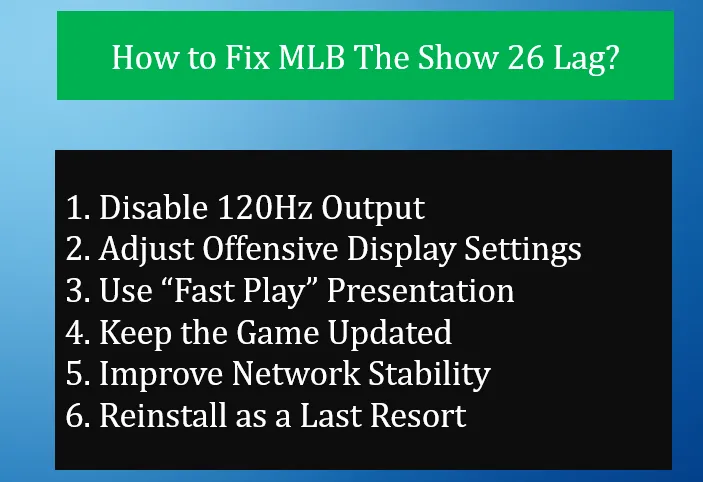
These steps are based on what has worked for many players so far. They are simple and low risk.
If you are playing on a console that supports 120Hz, try turning it off.
This has helped reduce “choppy” or uneven frame pacing for some players, especially after recent updates.
Some players notice lag specifically while batting.
A common workaround:
This reduces visual overlays and can make the game feel more responsive during swings.
Presentation settings can affect performance more than expected.
Switching to Fast Play:
This is a simple change that can make gameplay feel smoother overall.
San Diego Studio regularly releases patches after launch.
Make sure:
Early updates often target:
Running an outdated version increases the chance of lag.
For online modes, your connection matters as much as the servers.
Try the following:
These steps can reduce ping spikes and input delay.
If performance issues continue and nothing else helps, a full reinstall may be worth trying.
This can:
It is not a guaranteed solution, but some players have reported improvement.
U4N編輯團隊由一群熱愛遊戲的分析師和技術專家組成。我們不僅是一個可靠的遊戲資產市場——我們的核心目標是通過專業內容幫助玩家。我們的團隊為一些大熱門遊戲製作詳細的攻略、經濟策略和技術問題解決方案,包括《MLB The Show 26》、《Aion 2》、《Forza Horizon 6》、《Arc Raiders》和《Path of Exile》等。
無論是掌握遊戲市場的買賣技巧,還是幫助你打造最強的遊戲角色或策略,我們發布的每一份內容都經過我們團隊的實際測試。在 U4N,我們不僅跟隨遊戲的趨勢,我們還幫助你領先一步