Whether you're grinding through Diamond Dynasty or climbing the competitive ladder in MLB The Show 26, setting up your game correctly is key to boosting your performance. As an experienced gamer, I've put together the best settings for Xbox that help you master both hitting and pitching, plus how to fine-tune visuals and game speed for smoother, faster play.
Core Gameplay Settings
Setting
Recommended Option
Description
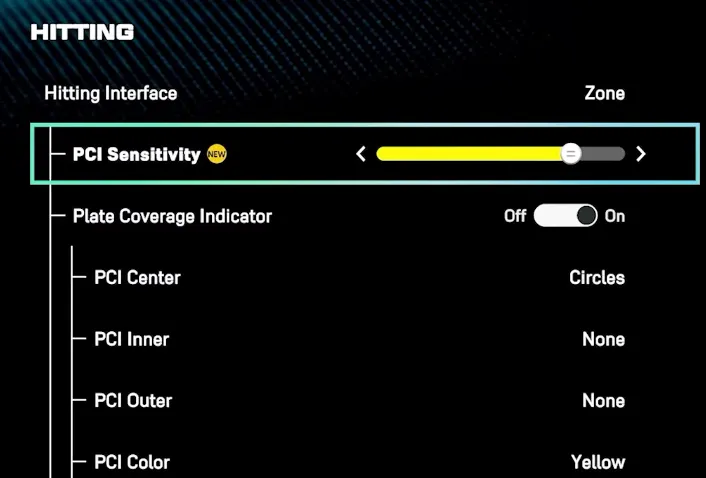
Hitting Interface
Zone
Full control over Plate Coverage Indicator (PCI) for precise hitting.
PCI Sensitivity
Max (or 75% for control)
High sensitivity allows fast reaction to high-velocity pitches. Adjust for stability if needed.
Pitching Interface
Pinpoint
Steep learning curve, but provides maximum accuracy for pitch placement.
Throwing Interface
Button Accuracy
Reliable throws with perfect timing rewarded via a meter.
Best Camera Views for Xbox
Camera View
Recommended Option
Description
Hitting Camera
Strike Zone / Strike Zone High
Best for pitch recognition, with a clear view of the pitch's path.
Fielding Camera
High
Wide overhead view for tracking fly balls and base runners.
In-Play View
Dynamic
Automatically adjusts to give the best angle during live gameplay.
Visual & PCI Customization
Setting
Recommended Option
Description
PCI Style
Bat or Diamonds (Center)
Clean look for focused plate coverage, without distractions.
PCI Color
Yellow or Cyan (Opacity 60-70%)
Easily visible without overwhelming the screen.
PCI Anchor
Off
Disables the cursor anchor for full freedom of movement.
Hitting Depth of Field
On
Softens background to reduce distractions from crowd animations.
To get the most out of your MLB The Show 26 experience, fine-tuning your settings is essential. Whether you’re grinding through Diamond Dynasty or working your way up the competitive ranks, the right settings can significantly enhance your gameplay. With these settings dialed in, you'll be able to react faster, pitch with precision, and stay focused on the action without any distractions.
If you’re looking to level up your team or unlock top-tier players faster, be sure to check out U4N for MLB 26 Stubs sale. U4N offers great deals on stubs, helping you save time and money while getting the players you need to dominate in Diamond Dynasty. Whether you need to buy MLB 26 Stubs for roster upgrades or to grab those key players for your competitive push, U4N is a trusted platform for all your stubs needs.
Pitching & Defense Settings
Setting
Recommended Option
Description
Pitching Interface
Pinpoint
High-level control, great for competitive players (classic option available for new players).
Throw Canceling
On
Prevents bad throws from accidental button presses.
Auto Defensive Shift
Off
Gives you control over defensive positioning.
Gameplay & Quality of Life Settings
Setting
Recommended Option
Description
Quick CPU Pitching
On
Forces the CPU to pitch faster, saving time for grind-heavy modes.
Presentation Mode
Fast Play
Skips replays and broadcasts for quicker gameplay.
Injuries
Off
Optional, turn off for more consistent gameplay (especially in offline modes).
Balks & Ejections
Off
Prevents interruptions during gameplay, keeping things smooth.
Perfect Close Play Calls
On
Reduces bad close calls for a smoother experience.
Audio & Presentation Settings
Setting
Recommended Option
Description
Commentary
Off
Eliminates distractions, allowing full focus on gameplay.
Menu Sound Effects
Mid
Balanced menu sound effects for easy navigation.
Sound FX
High
Keeps pitch and swing feedback loud and clear.
PitchCom
Off
If you don't like the CP-style cues, disable it for a more traditional feel.
Xbox Performance Settings
Setting
Recommended Option
Description
Refresh Rate
120 Hz + VRR/FreeSync (if supported)
Improves smoothness and reduces lag for competitive play.
HDR
Off
Helps reduce color bandwidth/input lag on some TVs.
Game Mode on TV
On
Reduces input lag for a faster response during gameplay.
U4N編輯團隊由一群熱愛遊戲的分析師和技術專家組成。我們不僅是一個可靠的遊戲資產市場——我們的核心目標是通過專業內容幫助玩家。我們的團隊為一些大熱門遊戲製作詳細的攻略、經濟策略和技術問題解決方案,包括《MLB The Show 26》、《Aion 2》、《Forza Horizon 6》、《Arc Raiders》和《Path of Exile》等。