購物車空
繼續購物If you're grinding through modes like Diamond Dynasty, Road to the Show, or Mini Seasons in MLB The Show 26, speeding up the gameplay is essential to save time and make the process less tedious. Whether you're farming stubs, earning rewards, or just trying to progress faster, the following tips and settings will help you play smarter, not harder.
The right settings can shave off minutes per game, which adds up over time. Here's how to adjust your settings for speed:
1. Quick CPU Pitching (On)
Quick CPU Pitching setting is one of the most important to enable for faster gameplay. It reduces the time taken between pitches, allowing the CPU to throw faster and get you through innings quicker.
2. Fast Play Presentation
Set this to "Fast Play" to skip broadcast-style cutscenes, replays, and crowd animations. This minimizes unnecessary breaks, helping you focus on the game and keep the pace up.
3. Off Auto Shift
Turn off the Auto Defensive Shift option to stop the game from pausing to adjust your fielders for each batter. This prevents the extra time it takes to reposition players on defense.
4. Disable Unnecessary Replays
In the Presentation settings, turn off batter/pitcher walk-up scenes and any other replays that don't impact gameplay. This eliminates those extra seconds spent watching replays, keeping you engaged in the action.
5. Turn Off Injuries (Offline)
In offline modes, disabling injuries keeps you from seeing unnecessary interruptions during games, so you can focus purely on gameplay.
6. Quick Counts (Optional)
Enable Quick Counts to start each at-bat with a random ball/strike count. This reduces the total number of pitches in a game, speeding up your at-bats. However, this can impact how much Player Experience (PXP) you earn, so use this wisely if you're prioritizing stats over speed.
| Setting | Recommended Option | Benefit |
|---|---|---|
| Presentation Mode | Fast Play | Skips broadcast cutscenes, home run celebrations, and transitions. |
| Quick CPU Pitching | On | Reduces downtime between pitches, speeding up the game. |
| Batter Walkup | Off | Skips batter's walk-to-the-plate animations. |
| Pitching Delivery | Stretch Only | Forces pitchers to use a quicker "stretch" delivery, reducing windup time. |
1. PCI Sensitivity
In the hitting settings, you can adjust the PCI Sensitivity. Maxing it out allows for faster movement of the Plate Coverage Indicator (PCI), helping you react quickly to high-velocity pitches.
2. Disable Manual Shifts
Turn off the Auto Defensive Shift to prevent the game from adjusting your fielders automatically. This saves time by letting you focus on the action rather than watching your defense shift.
3. Disable Extra Rules
For offline modes, turn off rules like Injuries, Balks, and Ejections. This stops the game from unexpectedly interrupting with random events, keeping the pace up.
By implementing these tips, you can significantly speed up your gameplay in MLB The Show 26, ensuring you get through grinding sessions more efficiently. However, if you want to skip the grind altogether and boost your progress, the best place to buy MLB 26 Stubs is U4N. They offer a reliable, quick, and secure platform for purchasing stubs, so you can focus on the fun parts of the game rather than spending hours farming. Whether you're looking to unlock top-tier players or just need a boost to progress faster, U4N is the go-to site for all your MLB 26 Stubs needs.
1. Resolution Settings
If you're playing on Xbox, adjusting your video settings can help improve performance. Opt for "Faster" (1080p) over "Sharper" (2160p) for more responsive gameplay, especially in competitive settings.
2. Simulating in Road to the Show
When your player is on a hot streak, use the "Simulate" feature to quickly advance through your career. This saves time and keeps your player's performance level high.
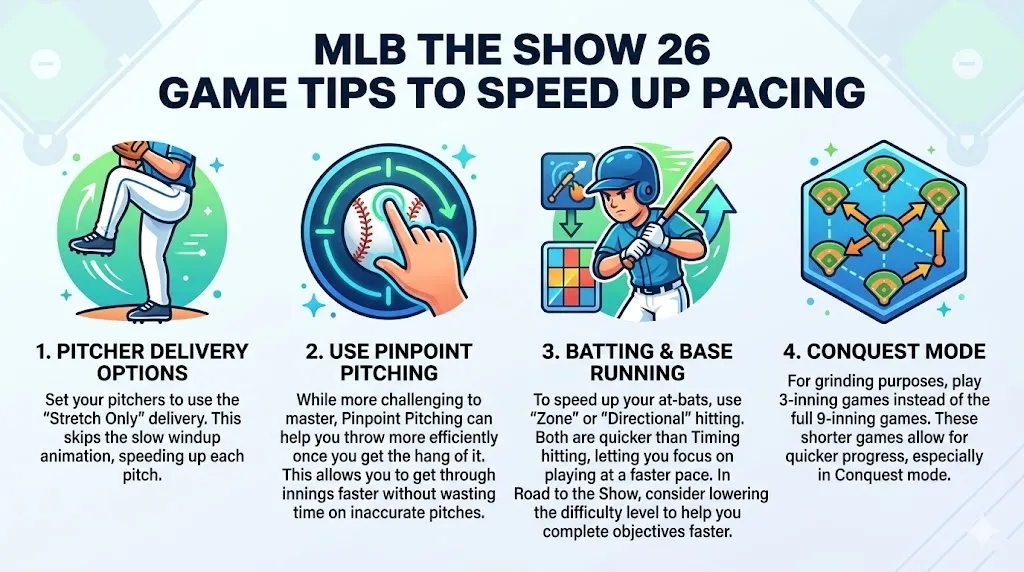
1. Pitcher Delivery Options
Set your pitchers to use the "Stretch Only" delivery. This skips the slow windup animation, speeding up each pitch.
2. Use Pinpoint Pitching
While more challenging to master, Pinpoint Pitching can help you throw more efficiently once you get the hang of it. This allows you to get through innings faster without wasting time on inaccurate pitches.
3. Batting & Base Running
To speed up your at-bats, use "Zone" or "Directional" hitting. Both are quicker than Timing hitting, letting you focus on playing at a faster pace. In Road to the Show, consider lowering the difficulty level to help you complete objectives faster.
4. Conquest Mode
For grinding purposes, play 3-inning games instead of the full 9-inning games. These shorter games allow for quicker progress, especially in Conquest mode.
If your goal is to farm PXP as efficiently as possible, here are a few strategies to maximize your time:
1. Play on Higher Difficulties
If you're looking to grind PXP quickly, play on higher difficulties like Legend or G.O.A.T. While these games take a bit longer, you'll earn 3.0x to 3.5x PXP per game, making the grind much more rewarding.
2. Use Your Best Cards in Conquest
Make sure to use your highest-rated cards in Conquest mode to maximize your rewards. The higher your player ratings, the easier it is to dominate the CPU and complete maps quickly.
By adjusting these settings and utilizing these strategies, you can significantly reduce downtime in MLB The Show 26, making your grind through Diamond Dynasty, Road to the Show, and other modes much faster. Whether you're trying to farm stubs or just progress through the game, these tips will help you get the most out of your time on the field.
U4N編輯團隊由一群熱愛遊戲的分析師和技術專家組成。我們不僅是一個可靠的遊戲資產市場——我們的核心目標是通過專業內容幫助玩家。我們的團隊為一些大熱門遊戲製作詳細的攻略、經濟策略和技術問題解決方案,包括《MLB The Show 26》、《Aion 2》、《Forza Horizon 6》、《Arc Raiders》和《Path of Exile》等。
無論是掌握遊戲市場的買賣技巧,還是幫助你打造最強的遊戲角色或策略,我們發布的每一份內容都經過我們團隊的實際測試。在 U4N,我們不僅跟隨遊戲的趨勢,我們還幫助你領先一步